
WHIM
A modular, local-first control framework that unifies AI, voice, geofencing, weather radar, HAM radio, and IoT across desktop, mobile, and vehicle — with zero cloud dependency.
Three platforms. One ecosystem. Entirely sovereign.
THE WHIM ECOSYSTEM
How the platforms, models, and infrastructure connect
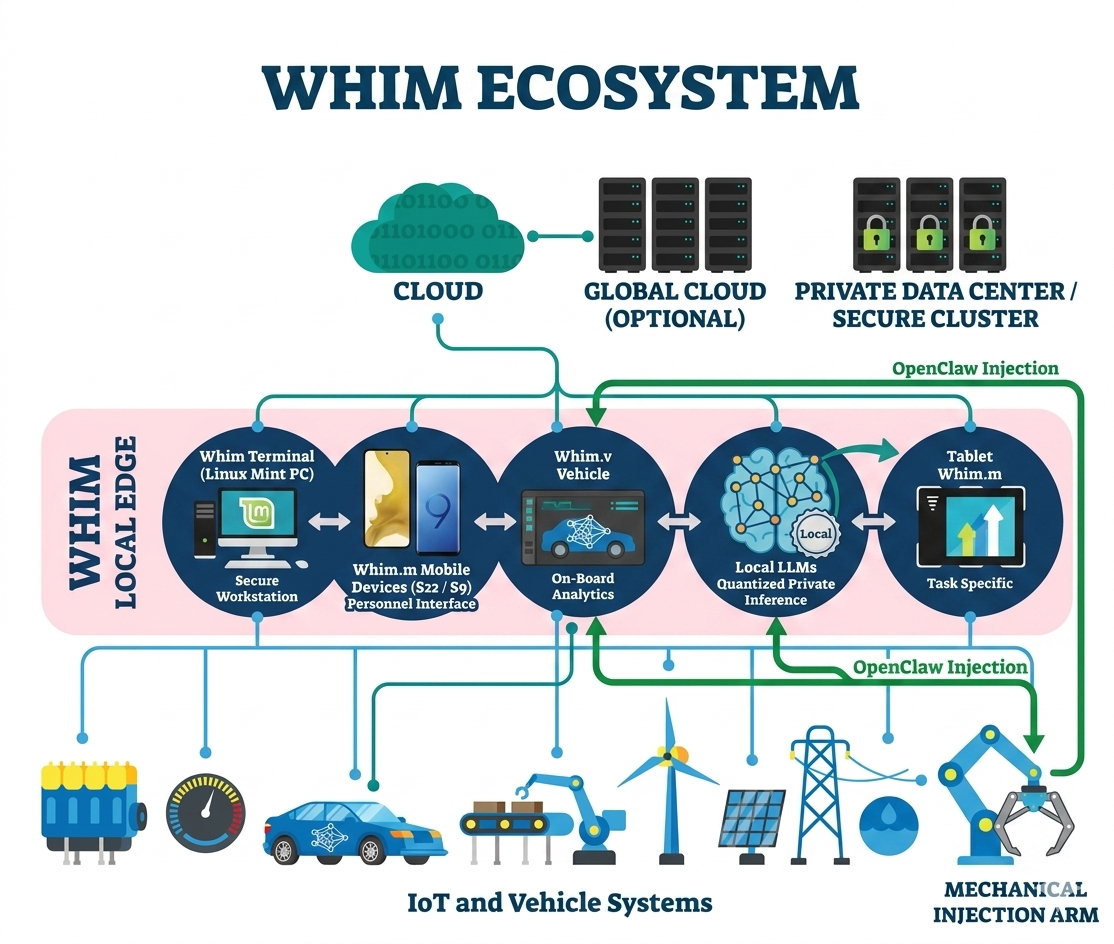
A typical flow: Mobile device sends a voice command → OpenClaw routes it through the local LLM → Whim Terminal executes the action → result syncs back to all connected devices.
01
Application Overview
Whim is a three-tier local-first ecosystem — desktop terminal, mobile companion, and vehicle dashboard — built in Python that unifies AI chat, voice cloning, geofence tracking, weather radar, HAM/APRS monitoring, IoT automation, messaging, screen sharing, and document editing into a single dark-themed platform. It runs on Linux (CARRARA Mint), Windows 11, and macOS, connecting to Android devices and vehicle displays via reverse SSH tunnel, Tailscale mesh VPN, LAN, or USB/ADB. No cloud APIs. No telemetry. ~2 MB of code.
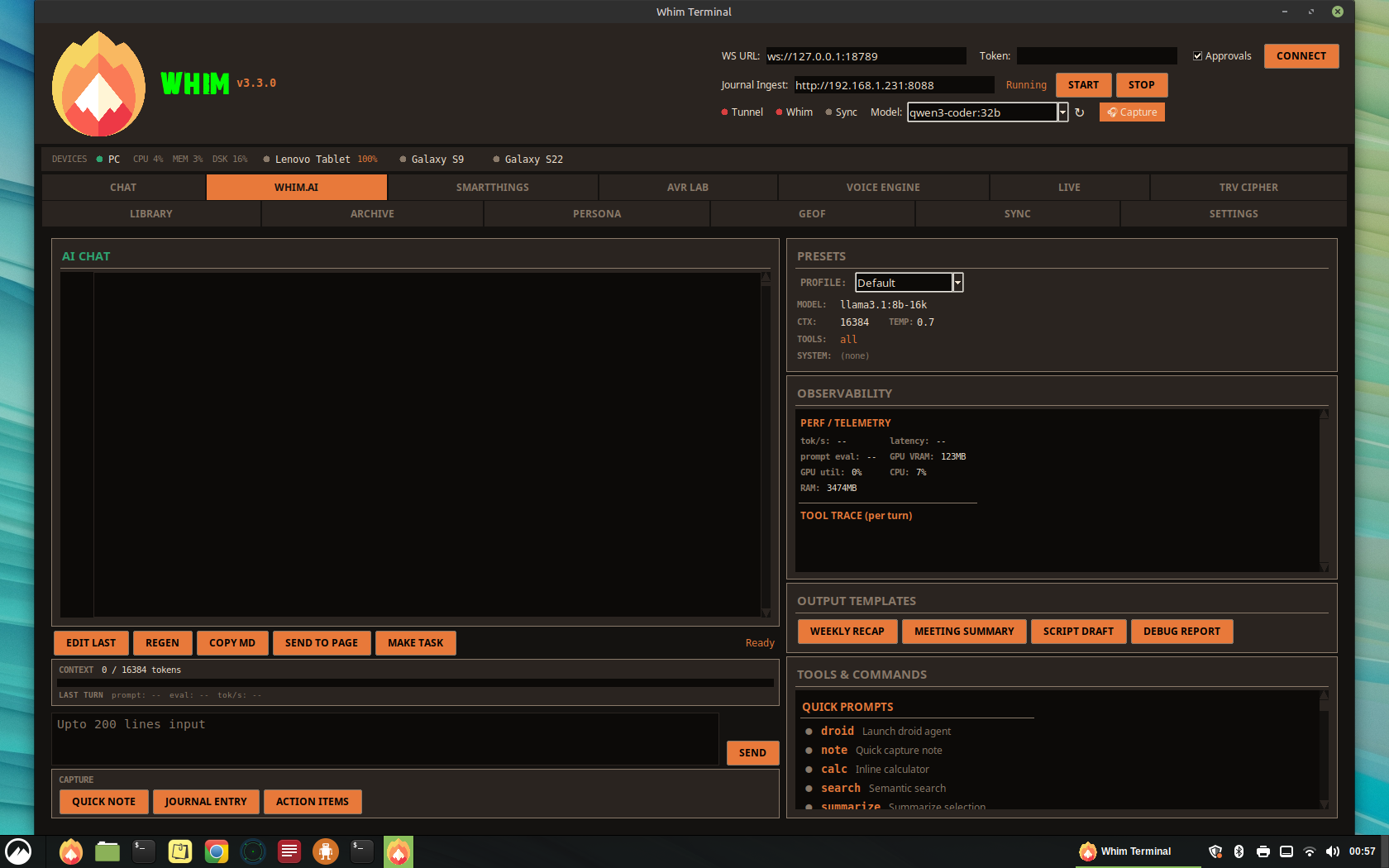
The Whim Ecosystem
| Platform | App | Description |
|---|---|---|
| Desktop | Whim Terminal v3.5.0 | Full-featured Tkinter application with 20 tabs: AI chat with Unified Model Router (local-first Ollama with cloud API fallback via OpenAI, Anthropic, DeepSeek), Sovereign Mode toggle, GBrain persistent AI memory with knowledge graph and entity tracking, voice cloning (XTTS v2), wake word engine, GeoF geofence tracker with LoRa collar integration and named location management, Doppler weather radar with NWS NEXRAD overlay and 7 regional radar stations, HAM/APRS station monitor with Direwolf, SmartThings IoT, Signal/Discord messaging, Email via Himalaya, NodeFlow visual editor, screen share, archive editor, and more. Shared location database with address-to-GPS geocoding across GeoF, Doppler, and HAM tabs. Runs on Linux, Windows 11, and macOS. |
| Mobile | Whim.m v3.4 | Android companion app (APK + PWA) with five tabs: REC (voice recording), LIBRARY (file browser), CHAT (Ollama AI proxy), WAKE (voice commands), DEVICES (mesh messaging). Runs on Samsung Galaxy S22, Galaxy S9, and Lenovo TB311FU tablet. |
| Vehicle | Whim.V v1.1 | Touch-optimized vehicle dashboard for 13.6″ Tesla-style displays (Ubuntu) or Android tablets. Five panels: GeoF geofence map with Leaflet satellite tiles and named locations, NWS Doppler radar with 7 station selector, LibreOffice document viewer, AI chat, system logs. Named location manager with Nominatim geocoding, Service Worker for offline caching. Flask server + WebView APK. |
| Web Portal | Whimgo.io | Public-facing project site and operator dashboard hosted on GitHub Pages. Features product overview, Edge Match GPU selector, development journal, and WISP remote terminal (ttyd :7681 over Tailscale mesh with TLS). Operator-gated pages use client-side SHA-256 passphrase authentication. Enables remote APK sideloading and system administration from any browser on the mesh. |
Key Highlights
02
Connectivity & Networking
Whim uses a multi-layered connectivity architecture to bridge the desktop application with mobile devices, messaging platforms, and IoT infrastructure.
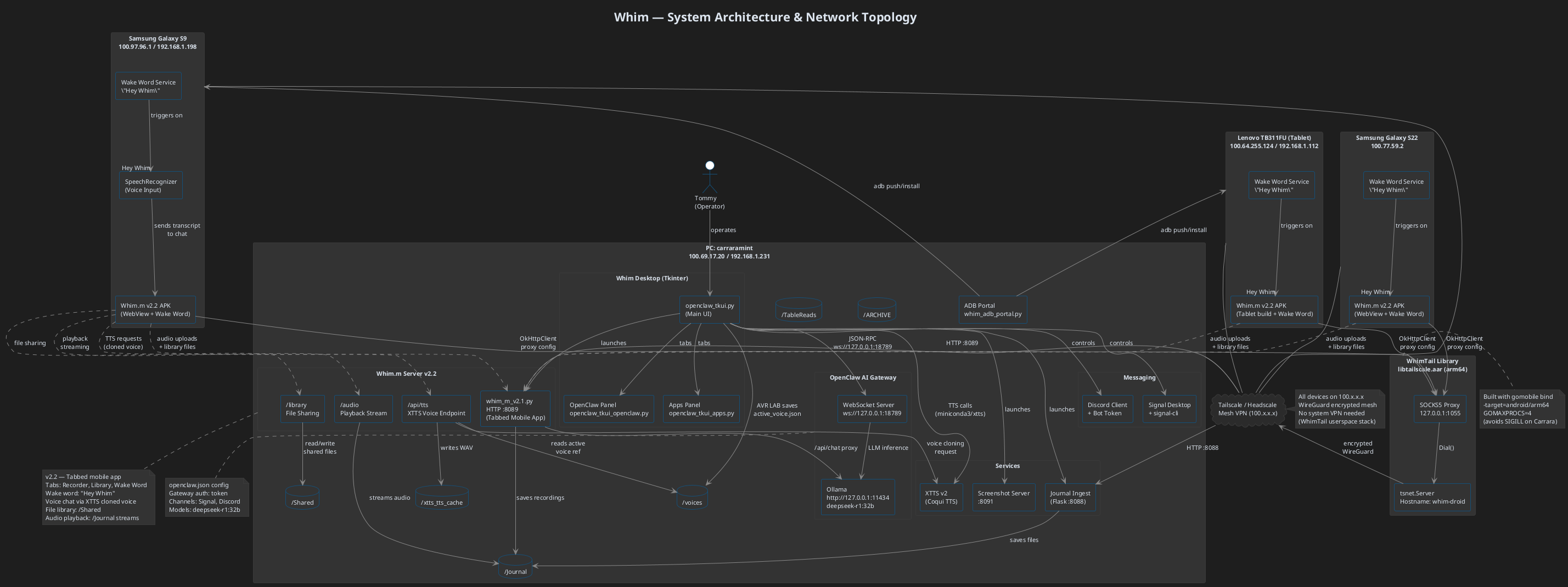
System Architecture & Network Topology (UML) — Includes Whimgo.io web portal, WISP remote terminal (ttyd :7681), Tailscale mesh, VPS tunnel, and all device endpoints
Connection Channels
| Channel | Protocol | Default Port | Purpose |
|---|---|---|---|
| OpenClaw Gateway | WebSocket | 18789 | Core command bus for chat, approvals, sessions, presence |
| Journal Ingest / Whim.m | HTTP (multipart) | 8088 | Voice recording upload, Whim.m PWA, AI chat proxy |
| Screen Share | HTTP (MJPEG stream) | 8091 | Desktop-to-phone screen share + phone camera feed |
| SSH Tunnel (autossh) | Reverse SSH via VPS | 8089 | Primary: secure cross-network connectivity via VPS at 104.207.140.242 |
| Tailscale (fallback) | WireGuard mesh VPN | 8089 | Fallback: direct connection via Tailscale IP 100.69.17.20, handles WiFi↔cellular handoffs |
| Ollama | HTTP REST | 11434 | Local LLM inference (streaming chat completions) |
| Signal CLI | HTTP | 8080 | Signal messenger send/receive via signal-cli |
| ADB | USB / TCP | 5555 | Android device management, APK install, screenshots |
| Whim.V Dashboard | HTTP (Flask) | 8099 | Vehicle/tablet dashboard: GeoF map, Doppler radar, document viewer, AI chat, system logs |
| LoRa Bridge (GeoF) | Serial / TCP | — | ESP32 collar gateway for geofence tracking (lora_bridge.py subprocess) |
| Direwolf (HAM) | KISS / AGWPE | 8001 | APRS packet decode from RTL-SDR or soundcard for station monitoring |
| Singleton Lock | TCP | 48891 | Prevents duplicate Whim instances, sends SHOW signal |
| Zipline CLI | HTTP (Tailscale) | 8089 | Local-first file transfer between mesh devices via Whim.m endpoints |
| WISP Terminal (ttyd) | HTTPS (WebSocket) | 7681 | Web-based terminal access to CARRAMint via ttyd over Tailscale mesh, embedded in Whimgo.io |
Header Bar Controls
The application header provides real-time connectivity controls:
- WS URL — WebSocket endpoint for the OpenClaw gateway (default:
ws://127.0.0.1:18789) - Token — Authentication token for gateway access (masked input)
- Approvals — Toggle operator approval scope for sensitive actions
- Journal Ingest — Shows the LAN IP and port for the upload server with Start/Stop controls
- Tunnel Status Dot — Green/red indicator showing reverse SSH tunnel health (auto-updates every 10s)
- Whim Status Dot — Green/red indicator showing Whim.m server reachability on localhost:8089
- LLM Model Dropdown — Selects the active Ollama model for Whim.AI (llama3.1:8b-16k, deepseek-r1:32b, etc.). Refresh button fetches available models from Ollama.
- Audio Capture button — Opens a floating always-on-top tool for capturing system audio (HDMI, speakers) as lightweight audio files. See section below.
Two-Row Tab Layout
All 20 module tabs are split across two rows for better visibility and click targets. Row 1 contains the primary workflow tabs (Chat through TRV Cipher). Row 2 contains utility and configuration tabs (Library through Brain and Settings). The active tab is highlighted in green with a border accent. Tabs are button-based with hover effects. Global mouse-wheel scrolling works on every scrollable widget in the application.
03
Desktop Tabs & Features
Whim organizes its functionality into 16 dedicated tabs, each serving a specific domain within the ecosystem.
| Tab | Internal Key | Description |
|---|---|---|
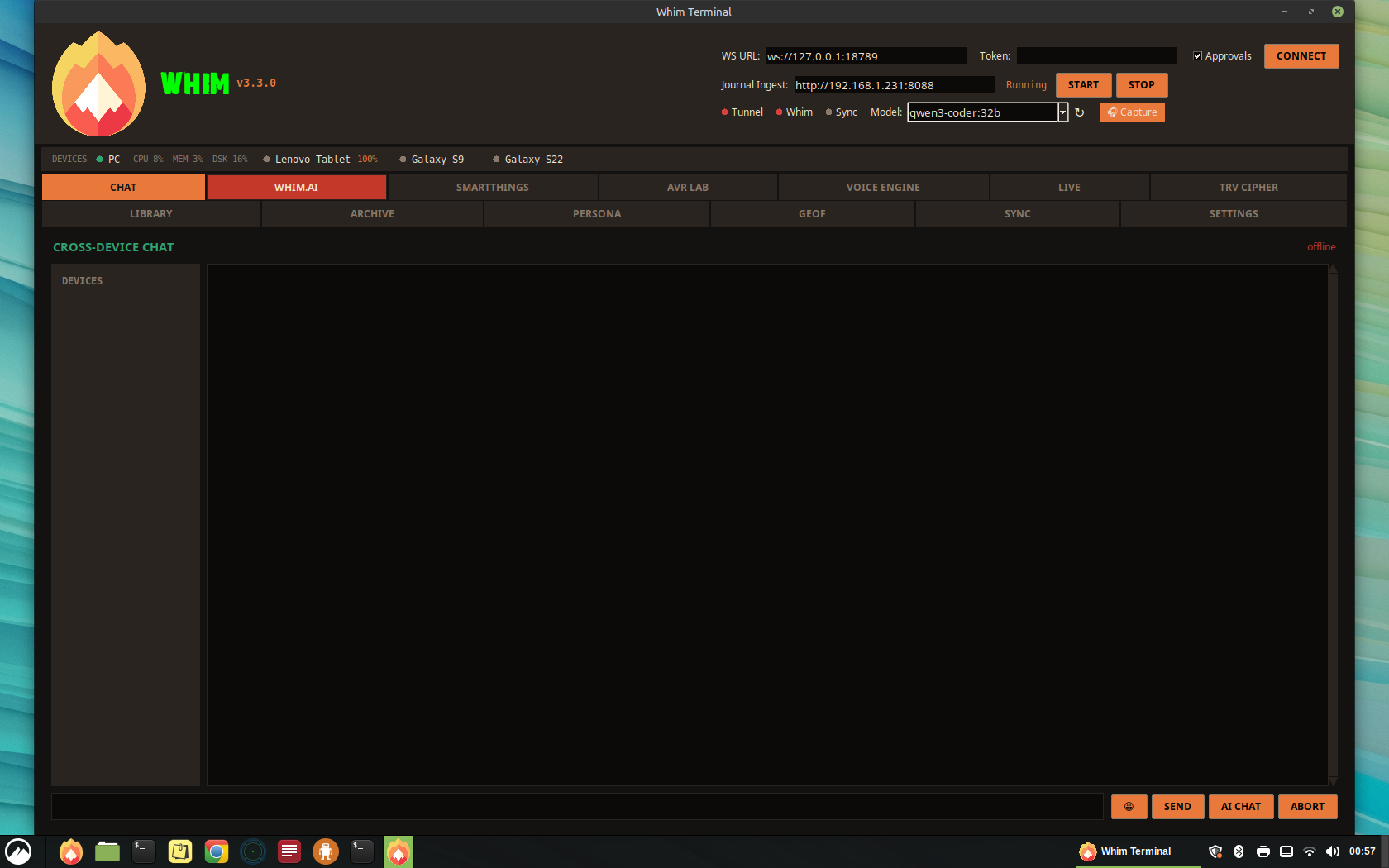
| CHAT | chat | Direct command-line chat with the OpenClaw gateway. Send messages, abort tasks, view real-time WebSocket traffic. |
| WHIM.AI | whimai | Full AI console with local Ollama LLM, presets, observability, context metering, tool trace, output templates, and capture tools. |
| SMARTTHINGS | smartthings | Samsung SmartThings device browser with scan, filter, favorites, device detail, and recently-controlled history. |
| AVR LAB | xtts | XTTS v2 voice synthesis lab with speaker references, spectrogram visualization, and Table Reads output. |
| VOICE ENGINE | voice_engine | Wake word tuning: live spectrogram (Whim-Scope), gain/HPF/AGC/parametric EQ, sensitivity, VAD, spectral subtraction, confidence ghost bar, intelligibility band. |
| PERSONA | persona | Voice personality manager: coined response playlists per voice clone, confidence-gated, context-aware, XTTS pre-render pipeline, behavioral categories. |
| TRV CIPHER | hearmeout | Audio transcription workstation with spectrogram, playback transport, Whisper transcription, ODT export, and scrub tools. |
| DOPPLER | doppler | Weather radar with embedded OSM tile map, NWS NEXRAD precipitation overlay, Open-Meteo conditions & 7-day forecast, anemometer, NWR audio (web stream + RTL-SDR), and severe weather alerts pushed to S22. |
| GEOF | geof | Geofence tracker with canvas map, collar status table, LoRa bridge integration, 20-minute heartbeat monitor, and fence pin management for livestock tracking. |
| HAM | ham | APRS station monitor with embedded tile map, Direwolf integration (KISS/AGWPE/simulate), station list with distance filtering, base station config, and raw packet log. |
| NODEFLOW | nodeflow | Visual node-based flow editor showing active droids, LLM reasoning, OpenClaw telemetry, and data flow connections with drag-and-drop canvas, auto-poll, and node inspector. |
| ARCHIVE | archive | Rich text editor with formatting toolbar, font selection, alignment, bullet lists, find/replace, word count, and file browser. |
| SS | ss | Screen share server with QR code, phone camera feed, desktop preview, FPS/quality settings, and MJPEG streaming. |
| SETTINGS | settings | API keys & endpoints (Ollama, OpenAI, Anthropic, DeepSeek, SmartThings, Notion), model management (pull/delete from Ollama), Sovereign Mode toggle, Unified Model Router (local-first with cloud fallback), app preferences, theme, paths. |
Desktop Tab Screenshots
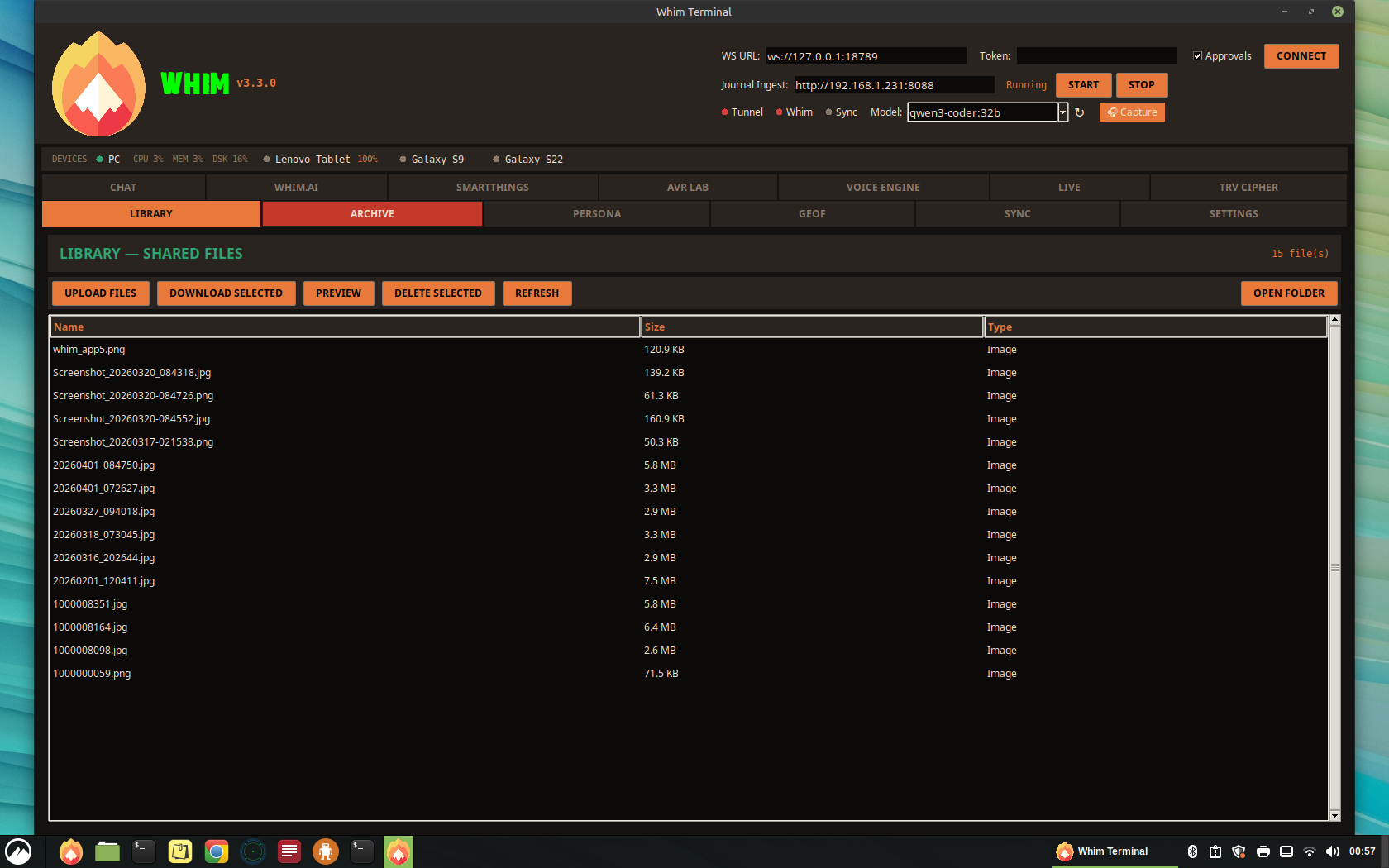
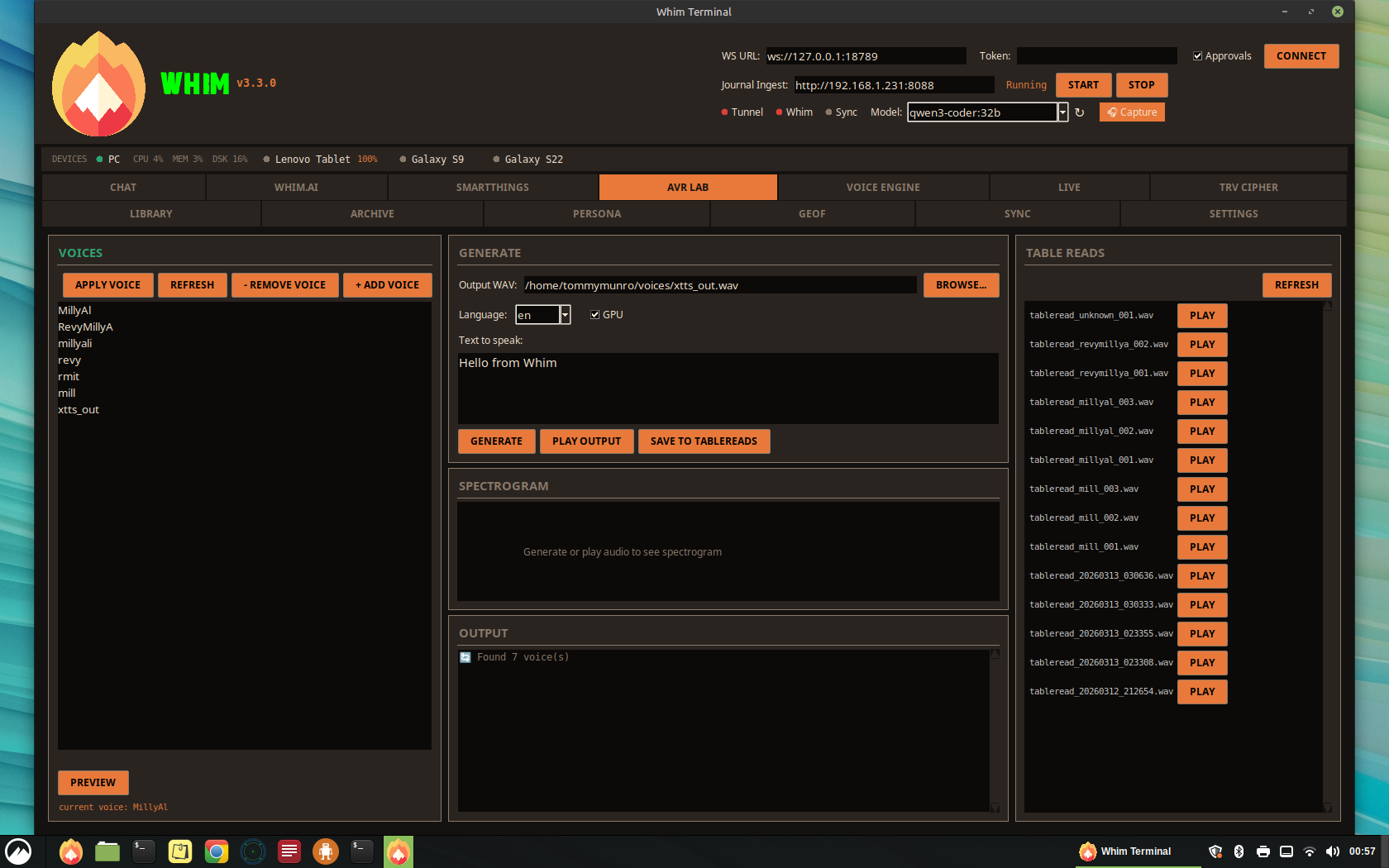
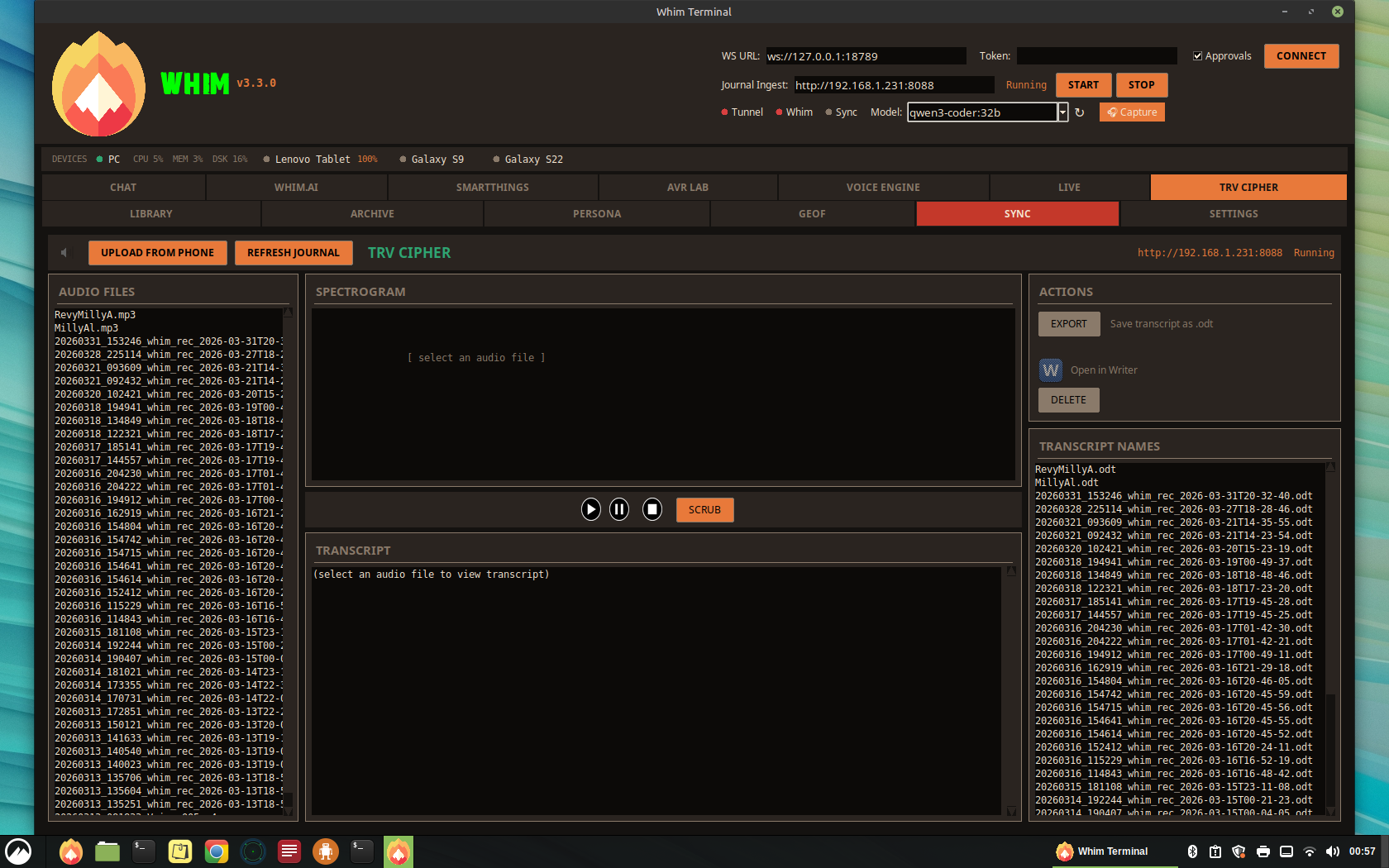
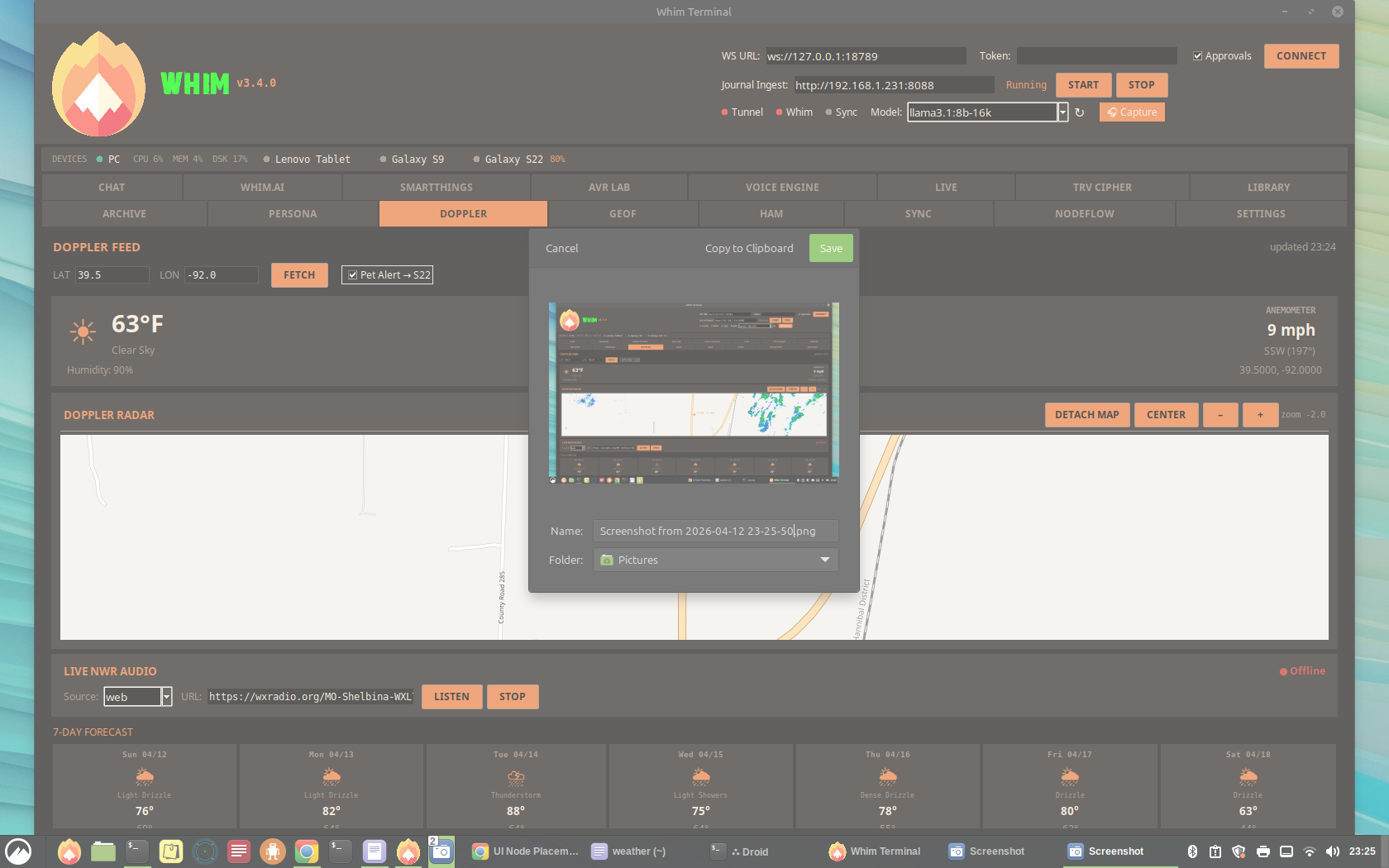
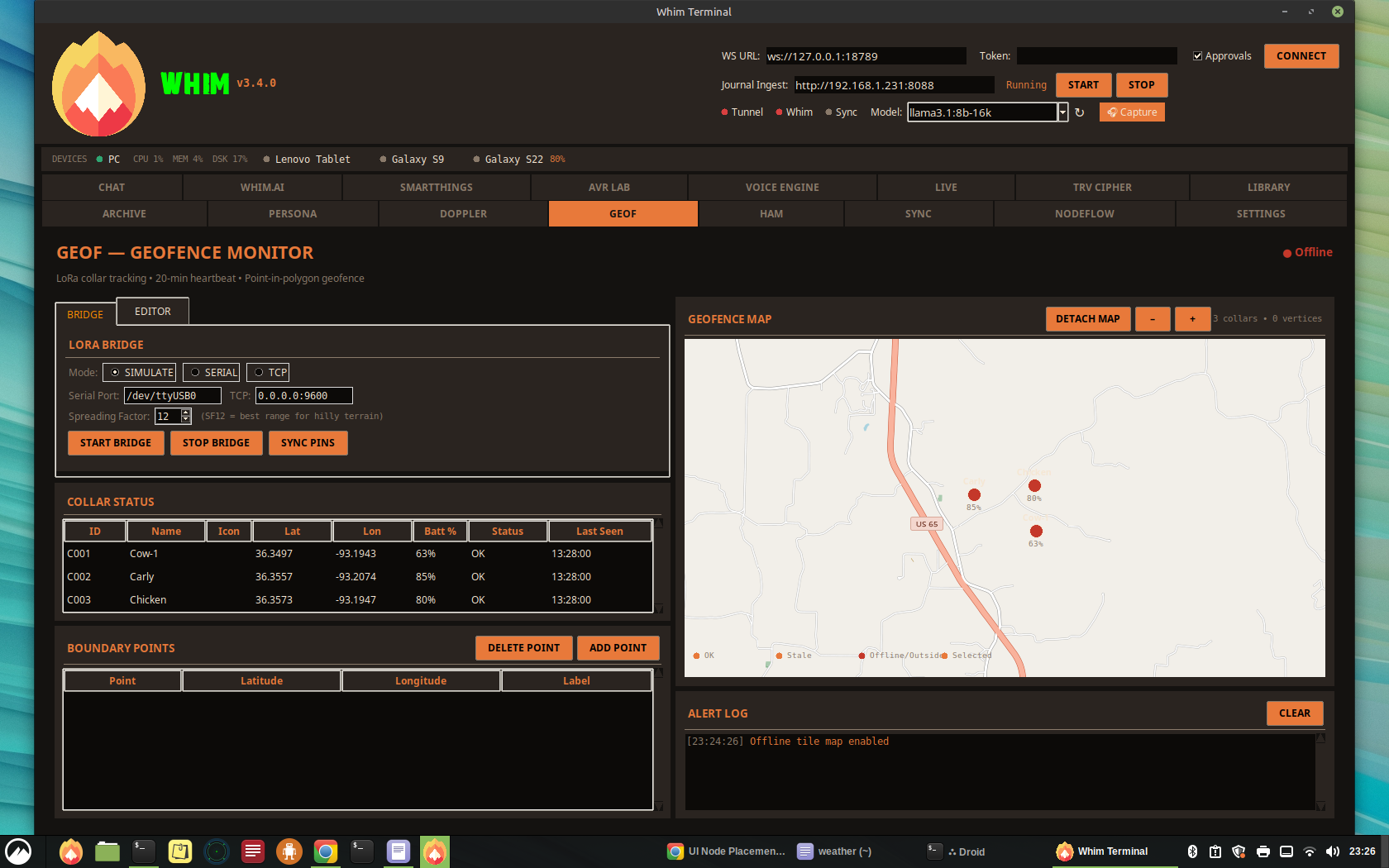
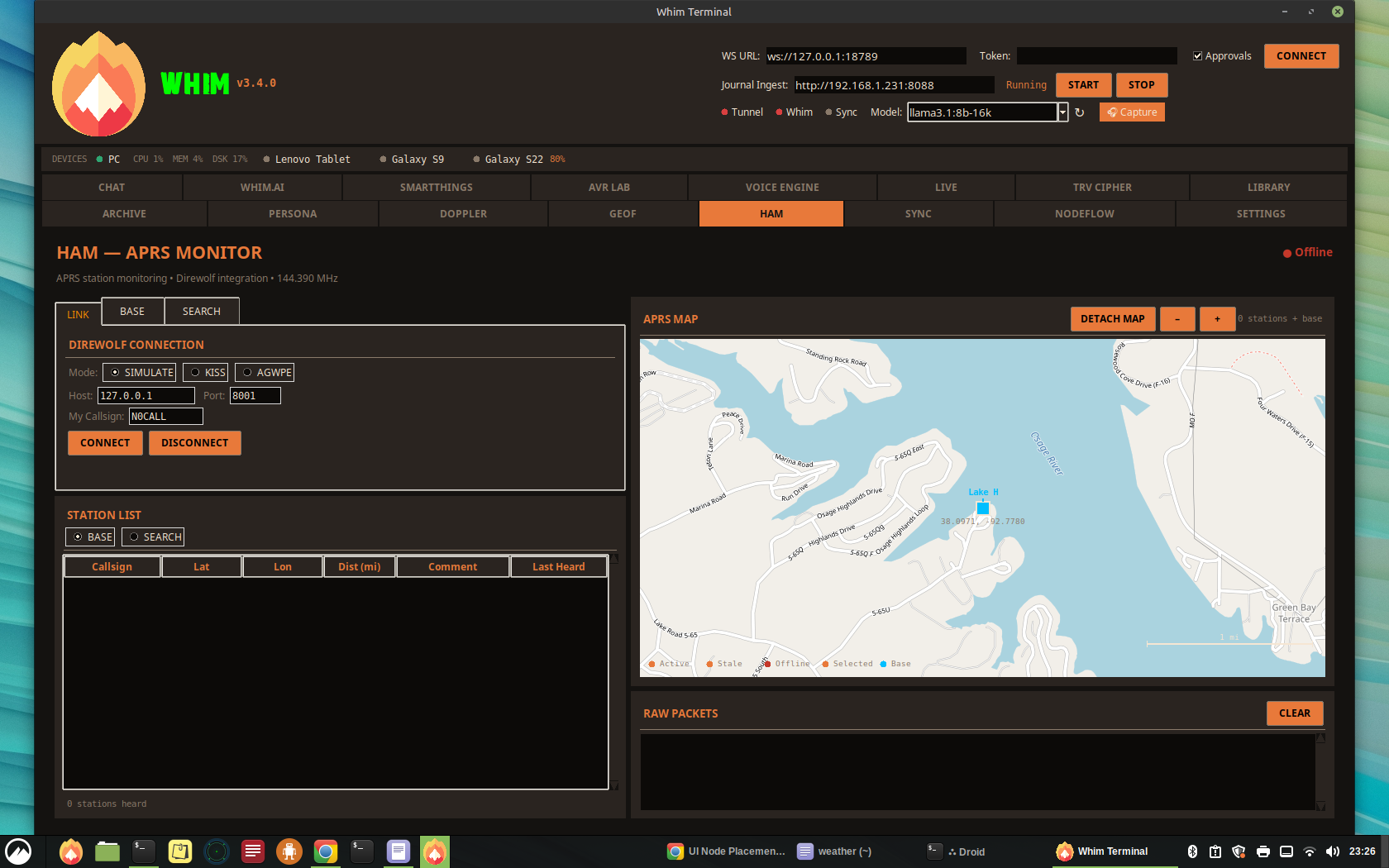 04
04
Whim.AI — Local LLM Console
Whim.AI is the central intelligence hub. It connects to a local Ollama instance for streaming chat completions with full observability.
Layout
- Left Column (40%) — AI chat log with line-number gutter, multi-line input (up to 200 lines), capture buttons, and drag-and-drop file import zone
- Right Column (60%) — Presets panel, observability dashboard, output templates, and scrollable Tools & Commands reference
Presets
| Preset | Model | Context | Temperature | Tools | System Prompt |
|---|---|---|---|---|---|
| Default | llama3.1:8b-16k | 16384 | 0.7 | all | (none) |
| Creative | llama3.1:8b-16k | 16384 | 1.2 | all | Creative writing assistant |
| Code | llama3.1:8b-16k | 16384 | 0.2 | code | Concise code assistant |
| Analyst | llama3.1:8b-16k | 8192 | 0.3 | search,calc | Data analyst |
| Minimal | llama3.1:8b-16k | 4096 | 0.5 | none | As few words as possible |
Observability Dashboard
Real-time performance telemetry including:
- Token/s — Live tokens per second throughput
- Latency — End-to-end response time
- Prompt Eval — Prompt evaluation latency
- GPU VRAM / Utilization — nvidia-smi integration for GPU monitoring
- CPU / RAM — System resource monitoring
- Context Meter — Visual bar showing used vs. available context window
- Tool Trace — Per-turn trace of tool calls, token counts, and timing
Capture Tools
- Quick Note — Save AI response as a note to ~/Journal
- Journal Entry — Export entire conversation to ~/Journal
- Action Items — Extract task lists and save as Markdown
- Export ODT — Full conversation export as ODT (LibreOffice) or fallback TXT to ~/TRANSCRIPT
- Save to TableReads — Save selected audio to ~/TableReads
Output Templates
One-click templates for structured content: Weekly Recap, Meeting Summary, Script Draft, Debug Report.
Tools & Commands Reference
The right panel lists all available commands organized into categories:
05
Whim.m — Mobile App
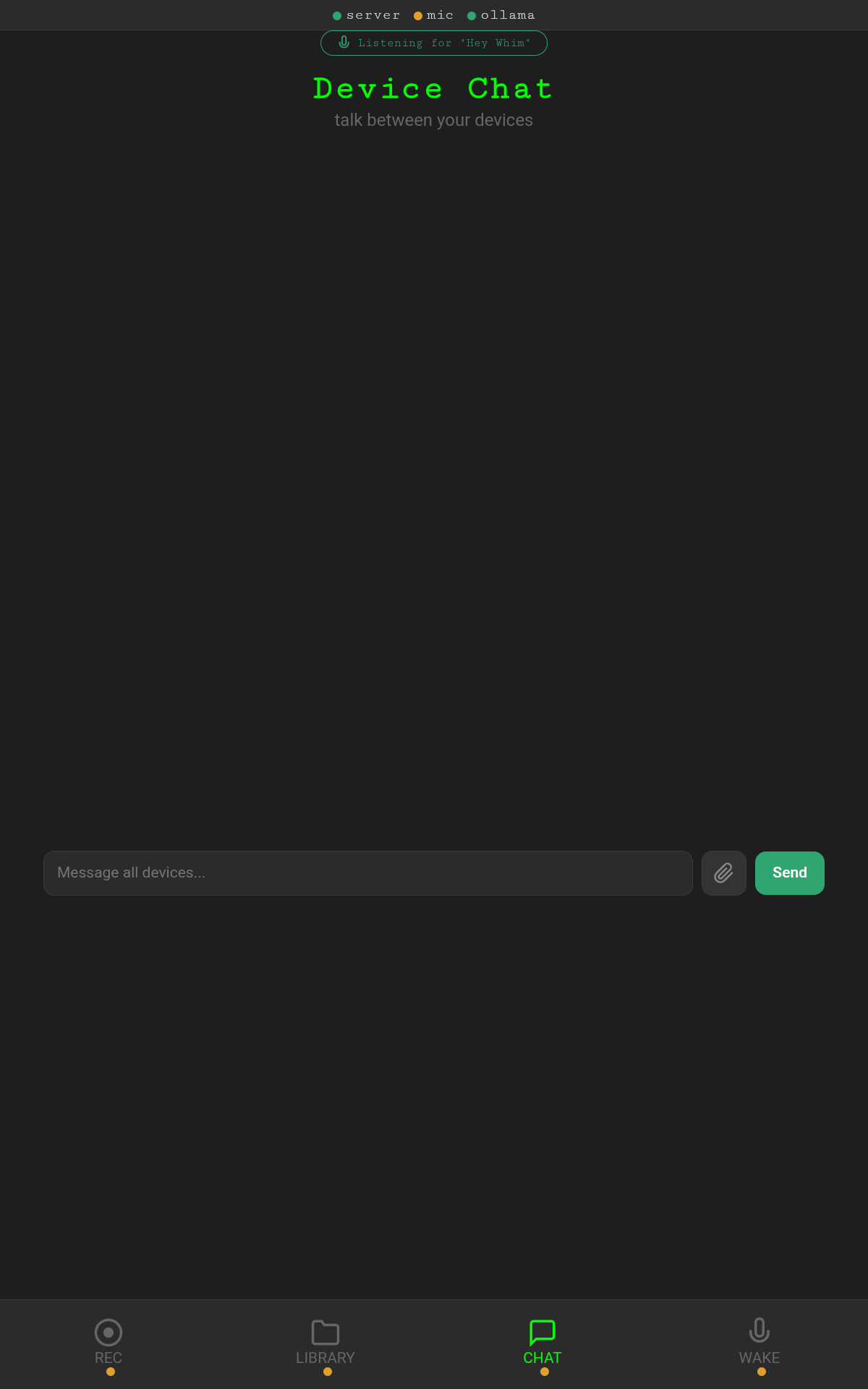
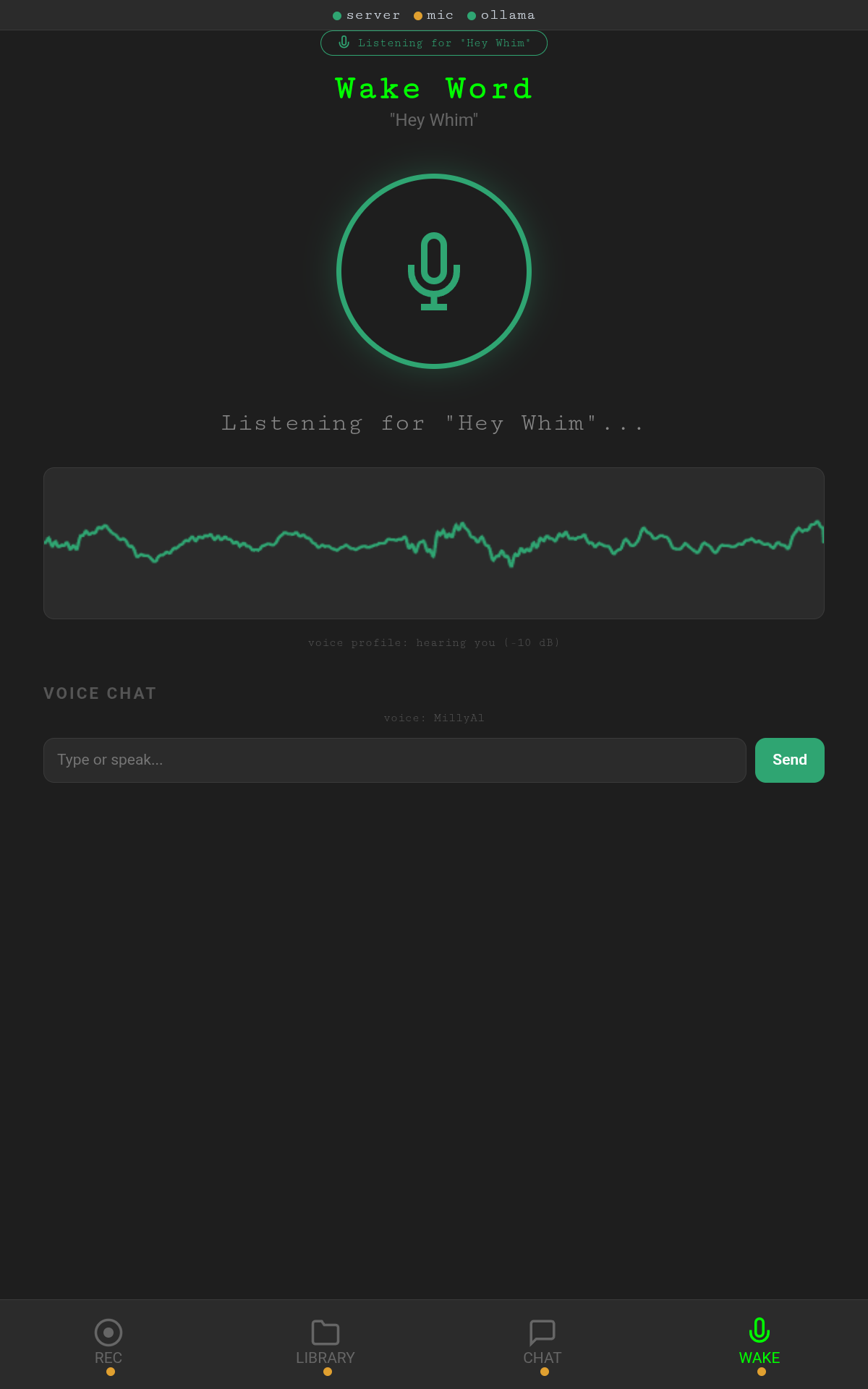
Whim.m v3.4 is a full-featured mobile companion app served as a native APK or Progressive Web App (PWA) from either the desktop Whim app or a standalone Python server. It provides voice recording, AI chat (via Ollama proxy), wake word voice commands, a cross-device file library, and inter-device messaging — all organized into five dedicated bottom navigation tabs: REC, LIBRARY, CHAT, WAKE, and DEVICES. A persistent "Listening for Hey Whim" banner runs across the top of every tab, giving always-on wake word access regardless of which tab is active. The app uses a hybrid connection strategy: VPS tunnel by default with Tailscale as an opt-in fallback, switchable from a dropdown in the mobile UI or from the desktop Control Panel.
v3.4.4 — Five-Tab Navigation
- White screen fix — Leaflet JS/CSS tags made non-blocking (
asyncscript,media="print" onloadstylesheet) to prevent render-blocking on slow or offline internet connections. Previously caused a blank white screen on the Lenovo tablet when the CDN was unreachable. - GeoF map retry —
geofInitMap()now retries up to 10 times (5 seconds) while Leaflet loads asynchronously, instead of silently failing. - Service Worker cache bump — Cache version updated to
whim-v3.4.4-fireto force stale page flush on all connected devices.
Lenovo Tablet (TB311FU)
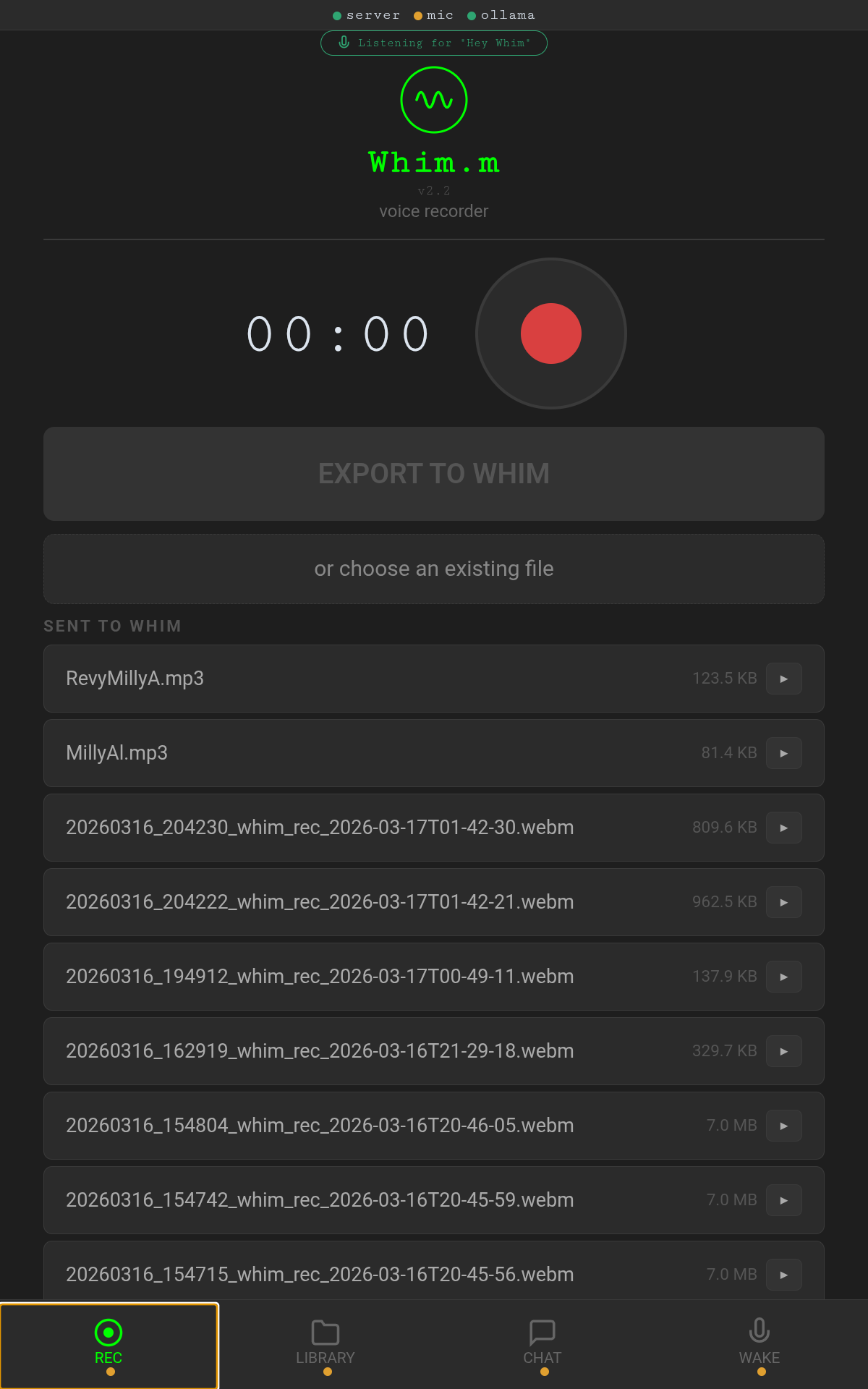
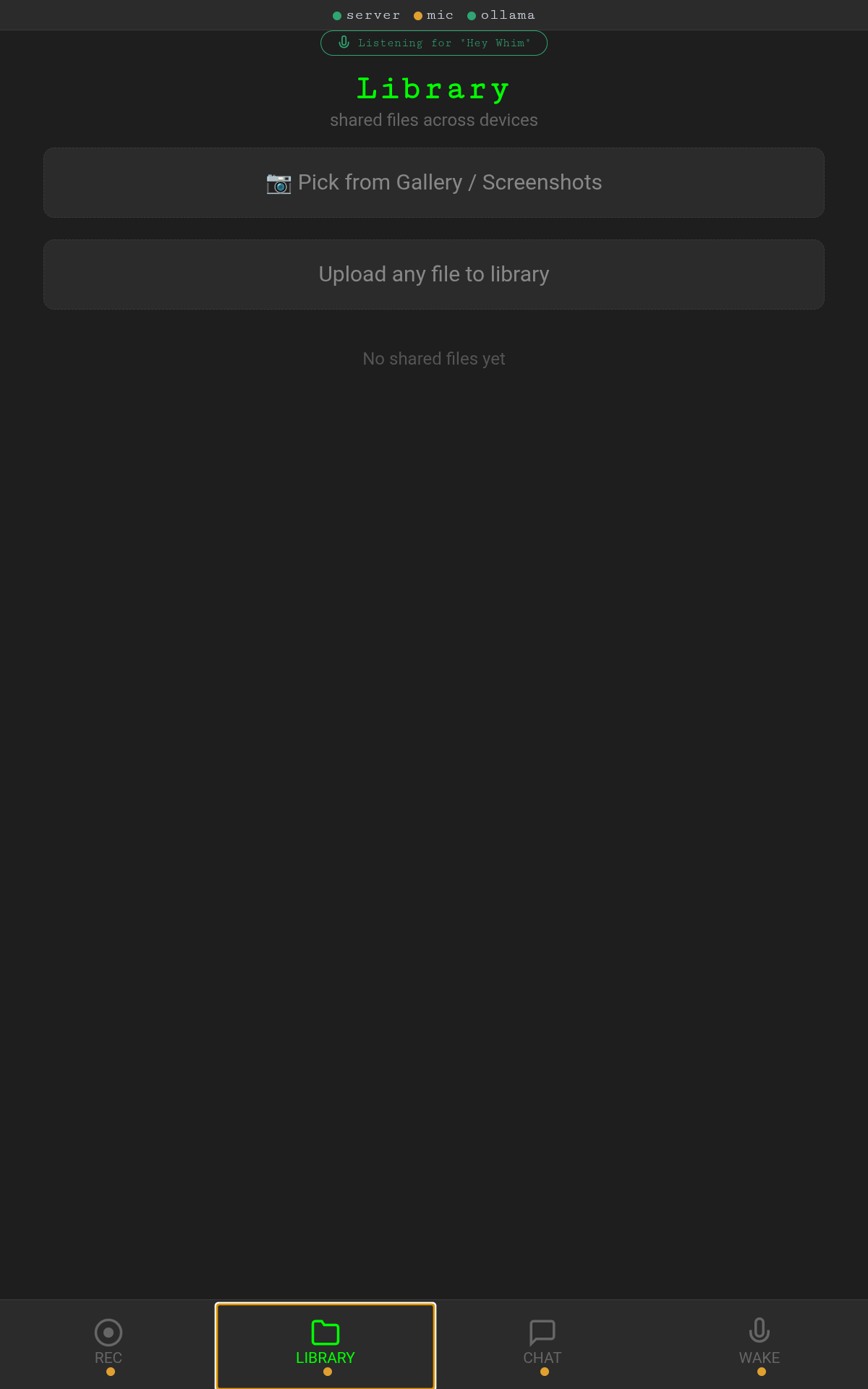
Samsung Galaxy S22
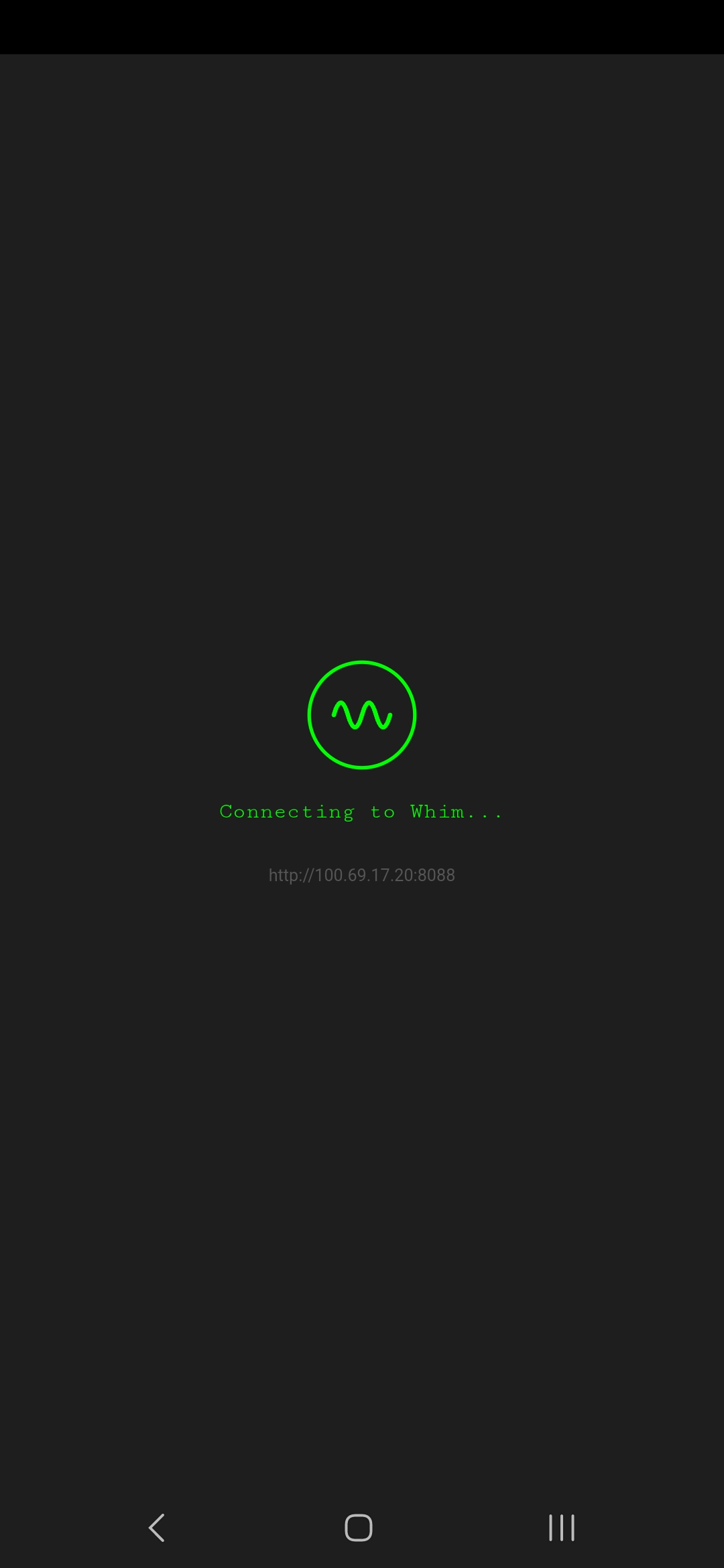
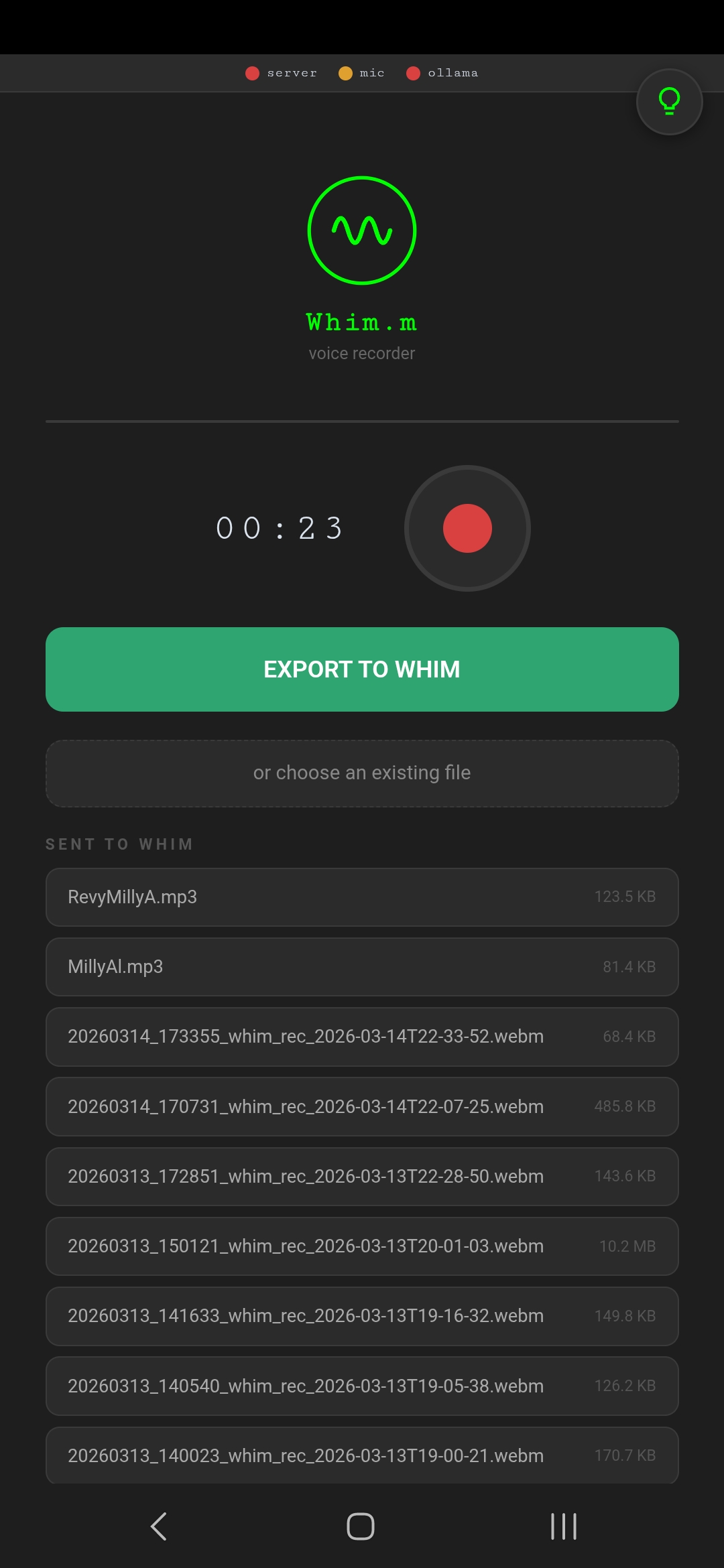
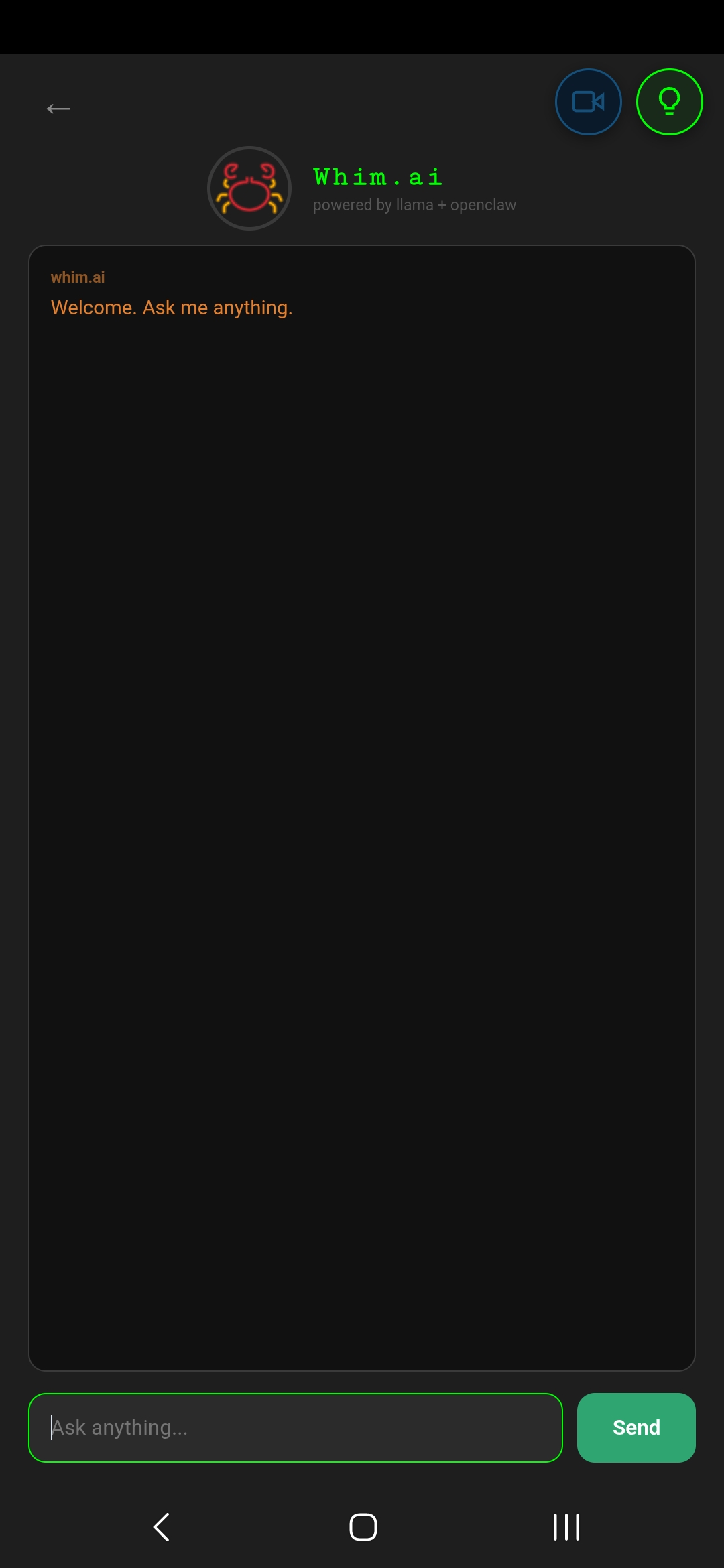
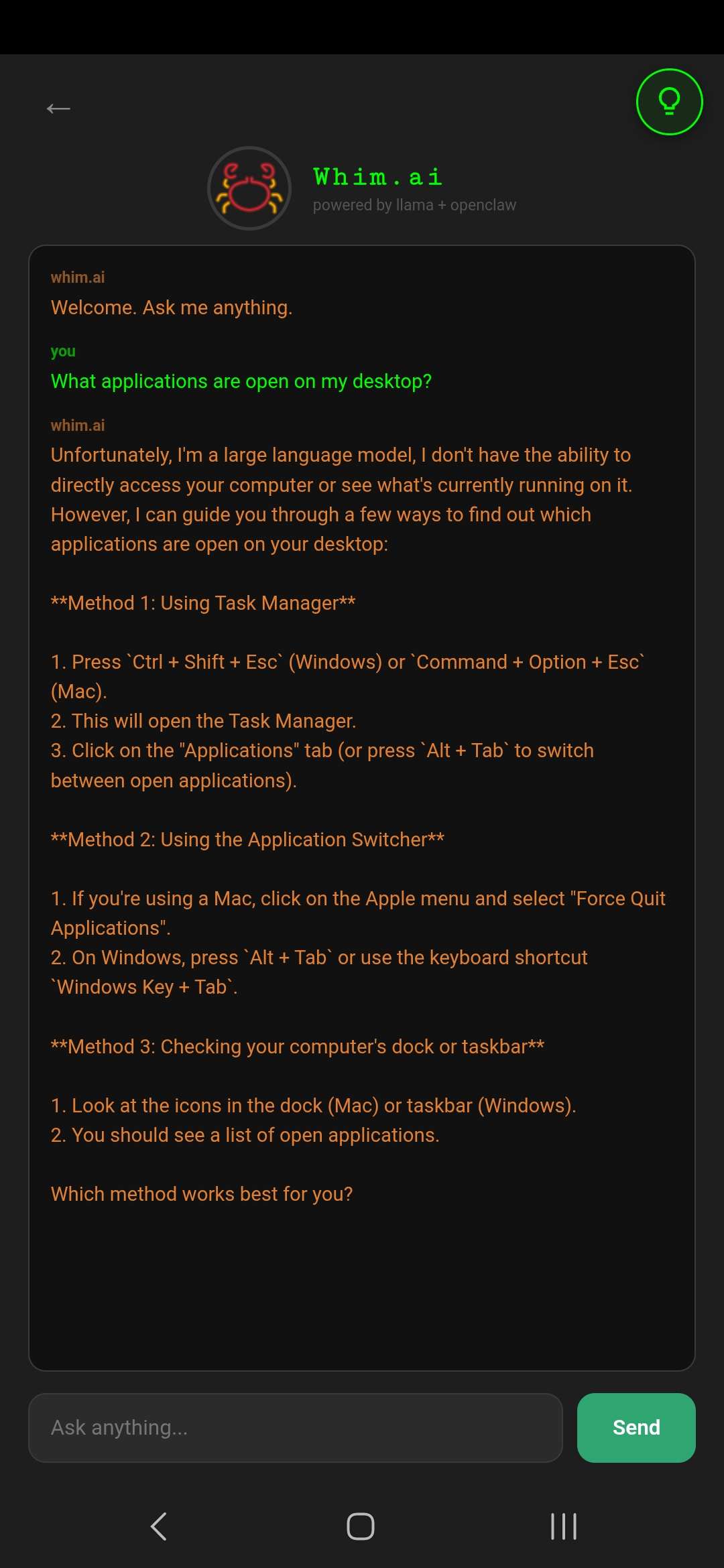
Features
- Five-Tab Navigation — Bottom navigation bar with REC, LIBRARY, CHAT, WAKE, and DEVICES tabs for organized access to all features
- Persistent Wake Word Banner — "Listening for Hey Whim" banner visible across all tabs, providing always-on voice activation without switching to the WAKE tab
- Voice Recorder (REC) — Tap-to-record with real-time timer display, WebM/Opus encoding, and per-file playback buttons
- Export to Whim — One-tap upload of recordings to the desktop ~/Journal directory with progress bar
- File Picker — Choose existing audio files (.m4a, .aac, .ogg, .opus, .flac, .wav, .mp3, .3gp, .amr) for upload
- Sent File List — SENT TO WHIM section showing all uploaded files with size and inline playback
- Health Status Bar — Top bar with dot indicators for tunnel, server, mic, ollama, and TS (Tailscale) connectivity status
- Hybrid Connection — Connection mode dropdown (top-right) switches between VPS Tunnel (default), Tailscale (fallback), or Auto-detect. Persists across sessions via server config.
- Auto-Reconnect — When connection drops, retries with exponential backoff (3s base, 30s max) with visible "Connection lost — reconnecting..." banner. All HTTP requests use retry wrappers.
- File Library (LIBRARY) — Share files between devices; pick from gallery/screenshots or upload any file to the shared library
- Device Chat (CHAT) — Real-time messaging between phones and tablets with "Message all devices..." input and file attachment support
- Wake Word (WAKE) — "Hey Whim" wake word activates voice input; listens continuously and responds with MillyAl cloned voice via XTTS
- Voice Commands — Wake word supports app control via whim-cmd JSON protocol:
open_maps— Open Organic Maps for navigationopen_app— Launch any app directly on the device via Android intentplay_music— Open YouTube Music with optional search query
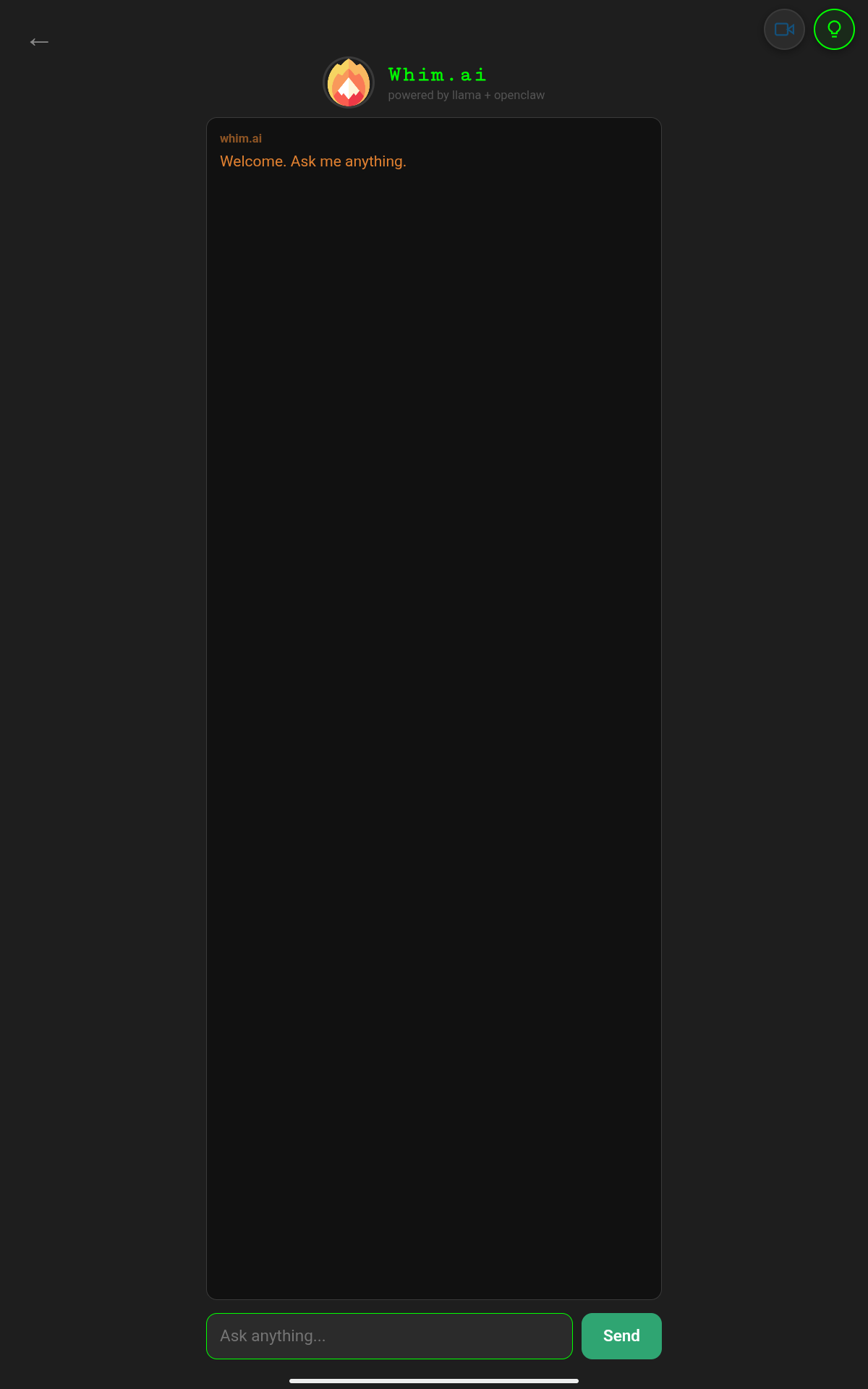
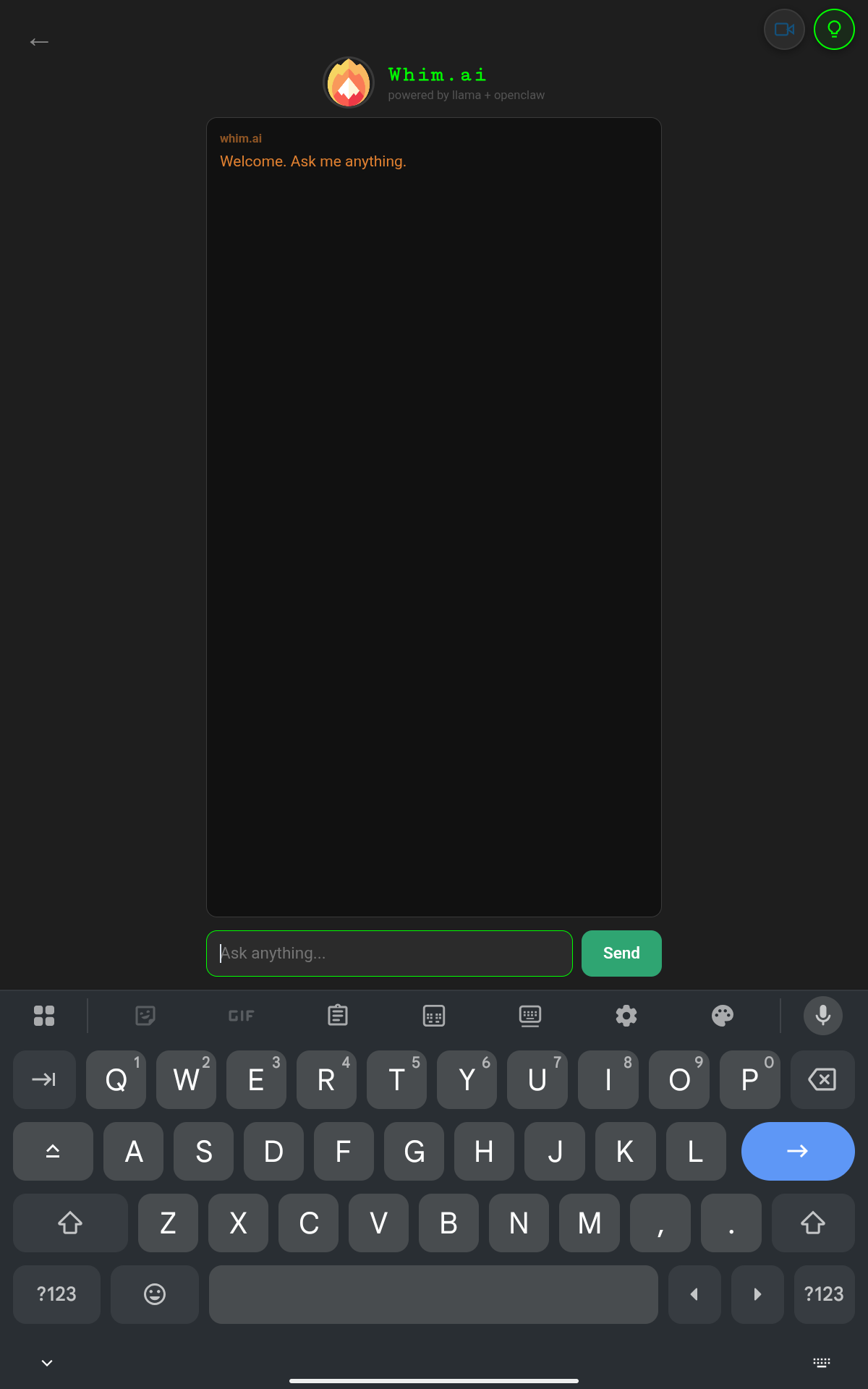
- Whim.ai Chat — Standalone AI chat screen powered by Llama + OpenClaw with "Ask anything..." prompt
- MillyAl Voice — AI responses are spoken aloud using the MillyAl cloned voice (XTTS), with "Generating voice..." indicator during synthesis
- Organic Maps — Voice-activated navigation: "open maps and set destination to..."
- Screen Share FAB — Floating action button to open the Screen Share server (port 8091)
- PWA Support — Full Progressive Web App manifest with installable home screen icon, service worker, and standalone display mode
- Dark Theme — Matches the desktop Whim aesthetic with #1e1e1e background
Wake Word Command Protocol
When a voice command is recognized, Whim.m embeds a whim-cmd JSON block in the AI response to trigger device actions:
Running Whim.m Standalone
Output will show LAN IP and VPS tunnel URL for connecting from your phone.
APK Variants
| File | Size | Description |
|---|---|---|
| whim_m_v3.4_phone.apk | ~61 KB | WebView wrapper for phones (Samsung Galaxy S22, Galaxy S9) |
| whim_m_v3.4_tablet.apk | ~61 KB | WebView wrapper for tablet (Lenovo TB311FU) |
06
QR Code System
Whim generates QR codes in two locations to enable instant phone-to-desktop connectivity without typing URLs:
1. TRV Cipher — Upload from Phone Dialog
Clicking "Upload from Phone" in the TRV Cipher tab opens a modal dialog with:
- A dynamically generated QR code encoding the Journal Ingest server URL (e.g.,
http://192.168.1.100:8088) - The URL displayed as a clickable, copyable label
- A "Copy URL" button for clipboard access
- Real-time server status and upload counter
The QR code is generated using the qrcode Python library with error correction level M, rendered as a pixel-perfect canvas grid.
2. Screen Share (SS) Tab — QR Panel
The SS tab has a dedicated QR CODE card in the left column that displays a QR code for the screen share server URL. When the server starts, the QR is generated via qrcode.make() and displayed on a Tkinter canvas, scaled to fit the available space.
How to Use
- Start the relevant server (Journal Ingest or Screen Share)
- Ensure your phone is on the same WiFi network or connected via the VPS tunnel
- Scan the QR code with your phone camera or QR scanner
- The browser opens the Whim.m PWA or Screen Share page
Use a COLON before the port number, not a period.
Correct: http://192.168.1.100:8088
Wrong: http://192.168.1.100.8088
07
Hybrid Tunnel Networking
Whim uses a hybrid two-mode connection strategy: a reverse SSH tunnel through a public VPS as the always-on primary, with Tailscale retained as an opt-in fallback for situations where rock-solid stability is needed (e.g., WiFi↔cellular handoffs). The mode is switchable from the mobile app or the desktop Control Panel.
Connection Modes
| Mode | Default | How It Works |
|---|---|---|
| VPS Tunnel | YES | Phone → VPS:8089 → SSH tunnel → PC:8089. Works everywhere, no VPN client needed on phone. |
| Tailscale | OPT-IN | Phone → 100.69.17.20:8089 direct via WireGuard mesh. Handles network transitions natively. Requires Tailscale on phone. |
| Auto-detect | OPT-IN | On connection, checks if Tailscale IP is reachable; uses it if available, otherwise falls back to VPS tunnel. |
Switching Modes
- Mobile app — Connection mode dropdown in the top-right corner of the health bar (VPS Tunnel / Tailscale / Auto-detect)
- Desktop Control Panel — Whim tab → radio buttons push mode changes via
/connection_modeAPI - Config persistence — Mode saved to
config/connection_mode.json
Auto-Reconnect with Exponential Backoff
When any connection drops, the mobile client automatically retries:
- Base delay: 3 seconds (+ 0–2s random jitter)
- Backoff: Doubles each attempt: 3s → 6s → 12s → 24s → 30s (capped)
- Max delay: 30 seconds
- Visual indicator: Pulsing red "Connection lost — reconnecting..." banner
- All fetch calls wrapped with
fetchWithRetry(up to 3 attempts per request)
Tailscale Device IPs
| Device | Tailscale IP | LAN IP |
|---|---|---|
| PC (carraramint) | 100.69.17.20 | 192.168.1.231 |
| Samsung Galaxy S9 | 100.97.96.1 | 192.168.1.198 |
| Samsung Galaxy S22 | 100.77.59.2 | — |
| Lenovo TB311FU (Tablet) | 100.64.255.124 | 192.168.1.112 |
How It Works
VPS Tunnel (default): The CARRARA desktop opens an outbound SSH connection to a public VPS. The VPS accepts inbound connections from mobile devices and forwards them through the tunnel back to the desktop. No ports need to be opened on the home router.
Tailscale (fallback): When enabled, phones connect directly to the PC's Tailscale IP (100.69.17.20) via WireGuard mesh. This is more stable during WiFi↔cellular transitions because Tailscale handles NAT traversal and connection migration natively.
Infrastructure
| Item | Value |
|---|---|
| VPS | 104.207.140.242 (Vultr) |
| Tunnel port | 8089 |
| Service | whim-tunnel.service (systemd, starts on boot) |
| Tool | autossh (auto-reconnects on failure) |
| Auth | SSH key only (~/.ssh/id_ed25519), passwords disabled |
| Firewall | ufw: ports 22 (SSH) + 8089 (tunnel) |
| sshd config | GatewayPorts yes |
Tunnel Service
The tunnel runs as a persistent systemd service on CARRARA:
Desktop Status Indicators
The Whim Terminal header bar displays two auto-updating status dots that poll every 10 seconds:
| Indicator | Green | Red/Grey |
|---|---|---|
| Tunnel | whim-tunnel.service active AND VPS:8089 reachable | Service down or VPS unreachable |
| Whim | Whim.m server responding on localhost:8089 | Server not running |
| Tailscale | Tailscale daemon running (BackendState: Running) | Tailscale stopped or not installed |
| Ollama | Ollama responding on localhost:11434 | Ollama not running |
System Tray Status
Whim also displays a system tray icon with three states:
| State | Icon Color | Tray Tooltip |
|---|---|---|
| Tunnel down | Grey | Tunnel: Down | Whim: Offline |
| Tunnel up, Whim unreachable | Yellow | Tunnel: Connected | Whim: Offline |
| Both connected | Green | Tunnel: Connected | Whim: Online |
Mobile Health Bar
The Whim.m mobile app health bar shows five indicators: tunnel, server, mic, ollama, and TS (Tailscale). The tunnel dot turns green when the phone can reach the Whim server through the VPS, confirming end-to-end tunnel connectivity. The TS dot turns green when Tailscale is running on the PC.
A connection mode dropdown in the top-right corner allows switching between VPS Tunnel, Tailscale, and Auto-detect modes. When disconnected, a pulsing red banner appears: "Connection lost — reconnecting..." with automatic exponential backoff retries.
Mobile Access via Tunnel
When the tunnel is active, the Whim.m standalone server prints the VPS URL alongside the LAN IP:
Troubleshooting
- Tunnel not connecting:
ssh -v -R 8089:localhost:8089 root@104.207.140.242 -N - Port in use on VPS:
sudo lsof -i :8089 - Service status:
sudo systemctl status whim-tunnel.service - Restart tunnel:
sudo systemctl restart whim-tunnel.service
08
LLMs & AI Stack
Whim uses a fully local AI inference stack powered by Ollama. All models run on the CARRARA machine's GPU with no external API calls.
Models in Use
| Model | Role | Context | Notes |
|---|---|---|---|
| DeepSeek R1:32B | Primary agent model | Varies | Default model for OpenClaw gateway agents. Reasoning-optimized with chain-of-thought. |
| Llama 3.1:8B-16K | Fallback / Whim.AI default | 16384 | Used for the Whim.AI console and mobile Whim.m chat. Fast inference, 16K context window. |
Ollama Configuration
AI Endpoints
- Desktop Whim.AI — Directly calls
http://localhost:11434/api/chatwith streaming enabled - Mobile Whim.m — Proxies
/api/chatPOST requests through the Ingest server to Ollama, enabling AI on the phone without direct Ollama access - OpenClaw System Prompt — A comprehensive system prompt that defines OpenClaw as the AI persona with full tool access across all Whim subsystems
Health Monitoring
Both desktop and mobile clients poll /health to check Ollama availability. The health endpoint returns {"status": "ok", "ollama": true/false} by probing http://localhost:11434/api/tags.
09
Voice & Audio Pipeline
AVR Lab (XTTS Voice Synthesis)
The AVR Lab tab provides text-to-speech synthesis using Coqui XTTS v2 running in a dedicated conda environment (xtts).
- Model:
tts_models/multilingual/multi-dataset/xtts_v2 - Voices Directory:
~/voices(speaker reference WAV files) - Output:
~/xtts_out.wav(default) or~/TableReads/ - Python:
~/miniconda3/envs/xtts/bin/python
TRV Cipher (Hear Me Out)
The TRV Cipher tab is a complete audio transcription workstation:
- Audio Files Browser — Lists all audio files from ~/Journal and ~/AUDIO_JR
- Spectrogram — Real-time FFT spectrogram visualization using NumPy (512-point Hanning window)
- Transport Controls — Play, Pause, Stop buttons with custom icons
- Scrub — Audio cleaning/processing tool
- Transcription — OpenAI Whisper integration via a transcription script
- Export — Save transcripts as ODT files, open in LibreOffice Writer
- Upload from Phone — QR code dialog for phone-to-desktop audio upload
Audio Flow
10
Voice Engine — Wake Word Tuning
The VOICE ENGINE tab is a dedicated audio diagnostics and wake word calibration environment built for use in noisy environments such as vehicles, outdoor settings, or anywhere ambient noise interferes with "Hey Whim" detection. It provides a real-time spectrogram, signal processing controls, and wake word sensitivity tuning — all in a three-column layout.
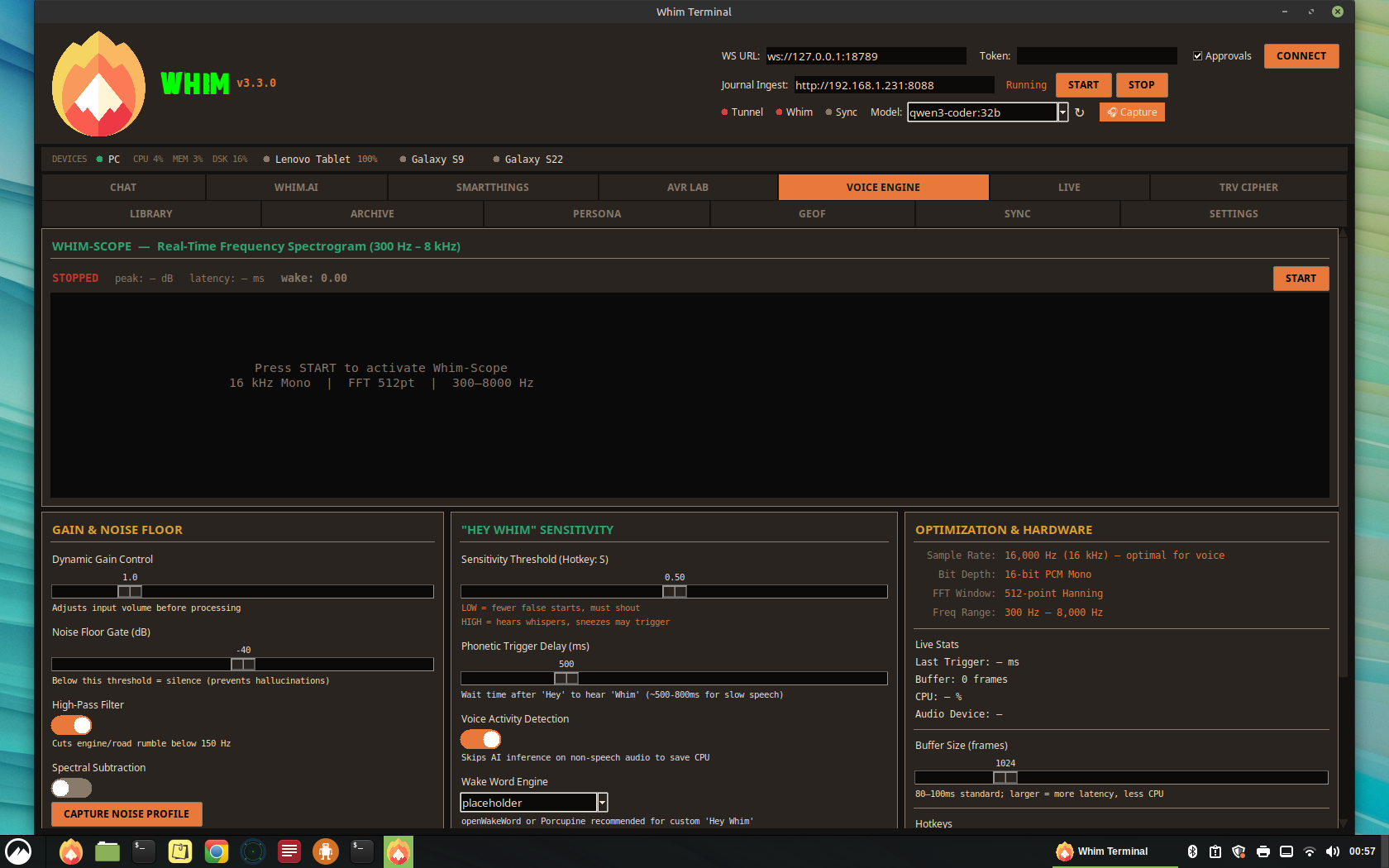
Whim-Scope (Live Spectrogram)
The top half of the tab displays a real-time frequency heatmap covering the 300 Hz – 8 kHz range, driven by a 512-point Hanning FFT at 16 kHz mono. Key visual features:
- Frequency Heatmap — Color-coded intensity from dark (silence) to bright orange/green (loud signal), updating at ~20 FPS
- Confidence Ghost Bar — A vertical bar on the right edge of the scope showing wake word match confidence in real-time. Grey below 50%, Blue at 50%+ match, Green at 90%+ trigger threshold
- 1–3 kHz Intelligibility Band — When enabled, the critical voice frequency band renders in a distinct cyan/blue tint with dashed boundary lines and a "1-3k" label. This is the frequency range where human voice carries the most intelligibility; if the "M" in "Whim" isn't being caught, low-end noise is masking the nasal resonance in this band.
- Wake Word Overlay — When the engine detects "Whim," a green ">>> WAKE WORD DETECTED <<<" banner flashes across the top of the scope
- Frequency Axis Labels — 300, 1000, 2000, 4000, 6000, 8000 Hz markers along the left edge
Column A: Gain & Noise Floor (Pre-Amp)
| Control | Range | Description |
|---|---|---|
| Dynamic Gain | 0.1x – 5.0x | Adjusts input volume before processing. Drop if mic is near a vent to avoid clipping. |
| Noise Floor Gate | -80 to 0 dB | Silence threshold. Anything below is ignored, preventing wake word hallucinations from static. |
| High-Pass Filter | Toggle (150 Hz cutoff) | Cuts engine vibration and road hum. Critical for vehicles. Hotkey: H |
| Spectral Subtraction | Toggle + Capture | "Capture Noise Profile" learns ambient/keyboard sound and subtracts that frequency profile from mic input. |
| Automatic Gain Control | Toggle | Auto-levels gain based on ambient noise. Raises gain at highway speed, lowers at idle. Smooth tracking with -20 dB target. |
| Parametric EQ (400 Hz) | Toggle + depth (-24 to 0 dB) | Narrow notch dip at ~400 Hz to reduce cabin reverb "boxiness" that masks the "W" sound in "Whim". |
Column B: "Hey Whim" Sensitivity
| Control | Range | Description |
|---|---|---|
| Sensitivity Threshold | 0.0 – 1.0 | Lower = fewer false starts but must shout. Higher = hears whispers but sneezes may trigger. Hotkey: S |
| Phonetic Trigger Delay | 200 – 1500 ms | How long the engine waits after "Hey" to hear "Whim." Bump up to ~800 ms for slow speech. |
| Voice Activity Detection | Toggle | Only runs the expensive AI wake-word check when human-like speech patterns are detected. Saves CPU. |
| Wake Word Engine | Selector | Choose: placeholder (energy-based), openWakeWord, or Porcupine. The latter two support custom "Hey Whim" phrase. |
| Intelligibility Band | Toggle | Highlights 1–3 kHz on the Whim-Scope to visualize the critical voice frequency range. |
Column C: Optimization & Hardware
| Stat | Value |
|---|---|
| Sample Rate | 16,000 Hz (16 kHz) — optimal for voice; higher wastes CPU, lower loses "s" and "sh" sounds |
| Bit Depth | 16-bit PCM Mono |
| FFT Window | 512-point Hanning |
| Freq Range | 300 Hz – 8,000 Hz |
| Buffer Size | Adjustable 256 – 4096 frames (80–100 ms standard) |
Live readouts include inference latency (ms), buffer frame count, CPU usage, and active audio device name. All settings persist across sessions to ~/.openclaw/voice_engine.json.
Hotkeys
| Key | Action |
|---|---|
G | Cycle Gain (0.5 → 1.0 → 2.0 → 5.0) |
S | Cycle Sensitivity (0.3 → 0.5 → 0.7 → 0.9) |
H | Toggle High-Pass Filter on/off |
Audio Backend
Uses sounddevice (PortAudio) at 16 kHz mono with float32 samples. The audio callback pipeline processes in order: gain → HPF → parametric EQ → AGC → spectral subtraction → FFT → spectrogram → wake word detection. The wake word function is a placeholder (_ve_detect_wake_word) returning energy-based confidence, ready to swap in openWakeWord or Porcupine for actual custom "Hey Whim" inference.
If mechanical keyboard clacks trigger the wake word, use "Capture Noise Profile" to learn the keyboard's frequency signature, then enable Spectral Subtraction to remove it from the mic input.
11
Persona — Voice Personalities
The PERSONA tab is a voice personality manager that treats coined responses like playlists. Each voice clone (MillyAI, Revy, future voices) gets its own persona profile with a curated set of responses organized by behavioral situation. When Whim needs to respond to a trigger — wake word, command acknowledgment, error, idle chatter — it pulls from that persona's playlist instead of generating a generic response.
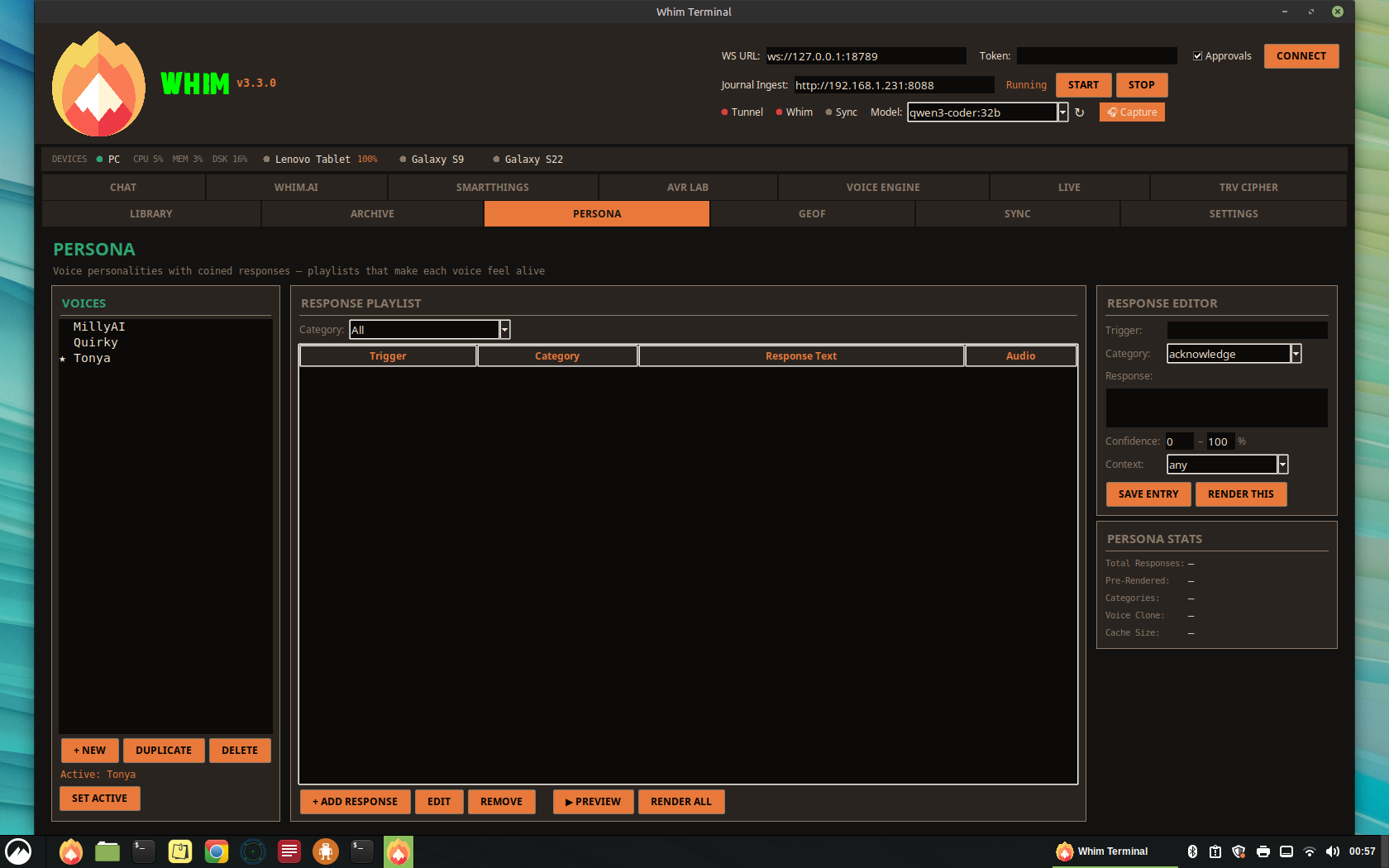
Three-Column Layout
- Column 1: VOICES — Persona selector linked to voice clones from
~/voices/. Create, duplicate, delete personas. The active persona (starred) is what Whim uses for all responses. - Column 2: RESPONSE PLAYLIST — Filterable list of coined responses with trigger name, category, response text, and cached audio status. Category filter narrows the view. Add, edit, remove, preview, and batch-render all entries.
- Column 3: RESPONSE EDITOR + STATS — Edit individual entries: trigger, category, response text, confidence range, context. Render single entries via XTTS. Stats show total/cached counts, voice clone, cache size.
Behavioral Categories
| Category | Color | When It Fires |
|---|---|---|
| Wake Word | Green | Immediately after "Hey Whim" is detected (e.g., "Yeah?") |
| Acknowledgment | Cyan | After a command is successfully parsed (e.g., "On it.") |
| Misheard | Orange | When confidence is below threshold (e.g., "The road's loud. One more time?") |
| Error | Red | When a command fails (e.g., "Can't reach the PC. Tunnel might be down.") |
| Narrative | Purple | During table read sessions in AVR Lab (e.g., "Rolling.") |
| Ambient | Grey | System events: boot, reconnect, idle timeout (e.g., "Tunnel's back up.") |
| Custom | Blue | User-defined triggers for future expansion |
Confidence-Gated Selection
Each response has a confidence range (e.g., 40–60%). The Voice Engine's wake word confidence score determines which response fires. At 90%+ confidence, wake responses fire. At 40–60%, partial-match misheard responses fire. Below 20%, the strongest "speak up" responses fire. This maps directly to the Confidence Ghost Bar in the Voice Engine tab.
Context-Aware Selection
The context field enables situational awareness. A response tagged "driving" only fires when connected via VPS tunnel (implying mobile/vehicle use). "Morning" fires between 5–10am. "table_read" only fires when AVR Lab is active. Multiple responses matching the same trigger + context are selected randomly to prevent repetition.
Pre-Render Pipeline
Responses are pre-rendered as cached WAV files via the XTTS conda environment (same GPU-accelerated pipeline as AVR Lab). Render All batch-processes every unrendered entry, skipping existing cache. Cached clips play in <100ms instead of waiting 2–5 seconds for live XTTS generation. Cache is stored at ~/voices/personas/[name]/cache/.
Default Persona: MillyAI
Ships with 42 coined responses across all 7 categories: 6 wake word, 8 acknowledgment, 8 misheard, 7 error, 6 narrative, 7 ambient. Ready to render with the MillyAI voice clone.
Coined responses are deterministic — they fire the same way every time. LLMs drift, get verbose, add qualifiers. The LLM handles open conversation; the persona handles mechanical reflexes. "Hey Whim" → "Yeah?" is not a conversation, it's a reflex. Reflexes should be fast, consistent, and characteristic.
12
Signal & Discord Integration
Signal Messenger
Whim integrates with Signal via signal-cli running as a local HTTP service:
- Account: Linked phone number for sending/receiving
- HTTP Endpoint:
http://127.0.0.1:8080 - Features: Send messages (sig.send), receive messages (sig.recv), list contacts (sig.contacts)
- Desktop App: Signal Desktop can be launched from
/opt/Signal/signal-desktop - DM Policy: Pairing mode for direct messages
- Group Policy: Open for group messages
Discord (OpenClaw Bot)
The Discord tab manages the OpenClaw bot (Enoch persona) with full action control:
- Desktop Launch: Start/stop Discord desktop client from
/usr/share/discord/Discord - Bot Config: View and edit OpenClaw bot configuration from
openclaw.json - Action Toggles: Individual switches for reactions, stickers, emoji uploads, sticker uploads, messages, search, channel info, voice status, moderation, and presence
- Voice TTS: Text-to-speech model overrides for Discord voice channels
- Heartbeat: Show OK heartbeat status
- Group Policy: Open access for all guilds
13
SmartThings IoT Control
The SmartThings tab provides a complete dashboard for Samsung SmartThings device management via the OpenClaw gateway.
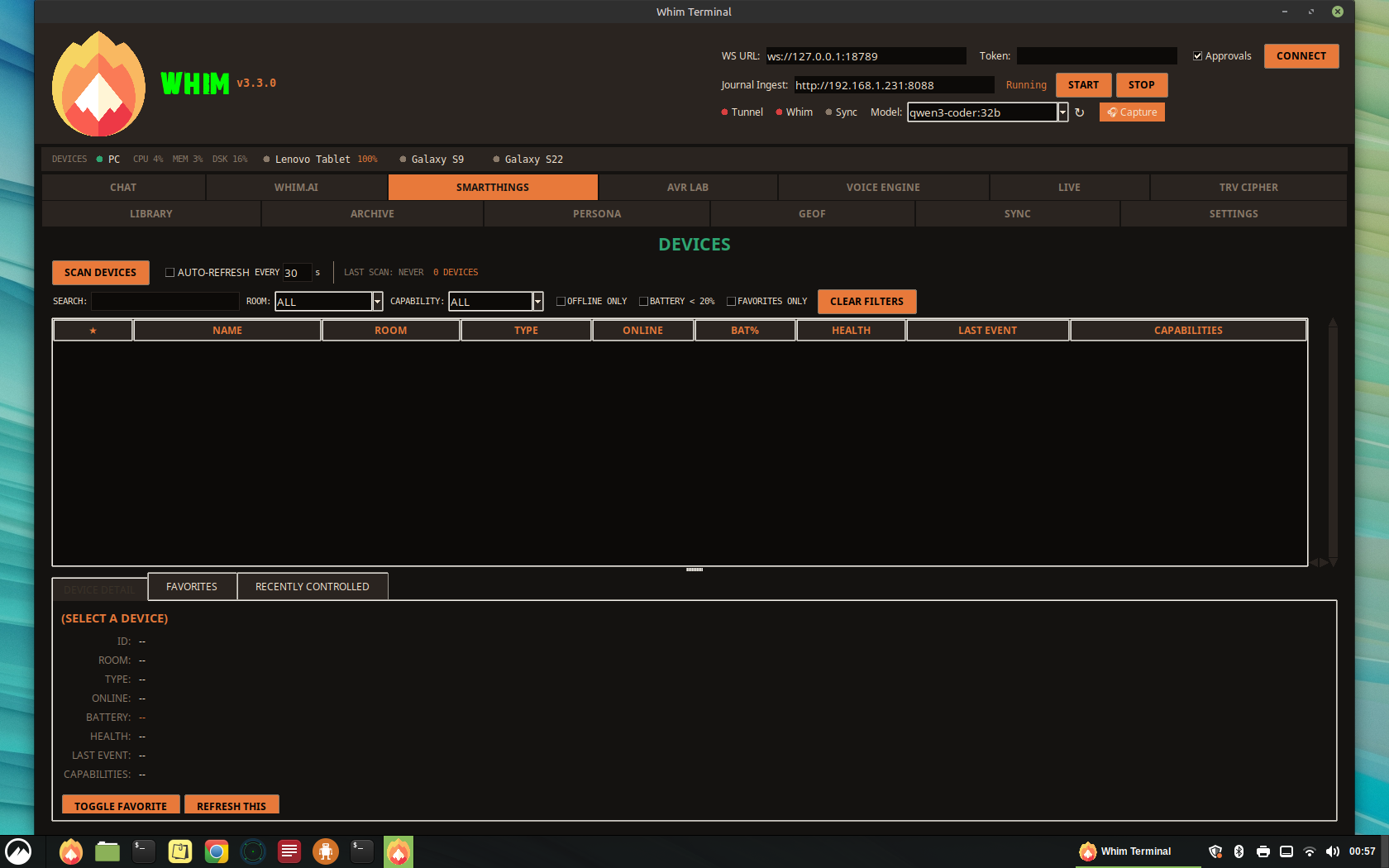
Features
- Device Scanning — Scan all connected SmartThings devices with auto-refresh (configurable interval, default 30s)
- Advanced Filtering — Search by name, filter by room, capability (switch, lock, thermostat, motion, contact, battery, light, valve, alarm, presence, sensor), offline-only, low battery (<20%), and favorites-only
- Device Table — Sortable treeview showing Favorite, Name, Room, Type, Online, Battery, Health, Last Event, and Capabilities columns
- Device Detail — Drill-down view with full device information
- Favorites — Double-click to star devices; favorites persist across sessions
- Recently Controlled — History log of device control actions with timestamps
- Rate Limiting — Visual indicator for API rate limit status
14.1
GeoF — Geofence Tracker
The GEOF tab is a geofencing and livestock tracking system designed for hilly terrain (Ozarks). It combines a canvas-based map with real-time collar monitoring via LoRa radio, GPS point-in-polygon fence checking, and ESP32-S3 collar firmware with deep sleep power management. A shared Named Location Manager lets you save multiple sites (with address-to-GPS geocoding via Nominatim), define per-site geofence boundaries (rectangle or square, configurable acreage), and jump between them instantly. Named locations are drawn as orange dashed fences on the map and are shared across GeoF, Doppler, and HAM tabs, as well as with Whim.V.
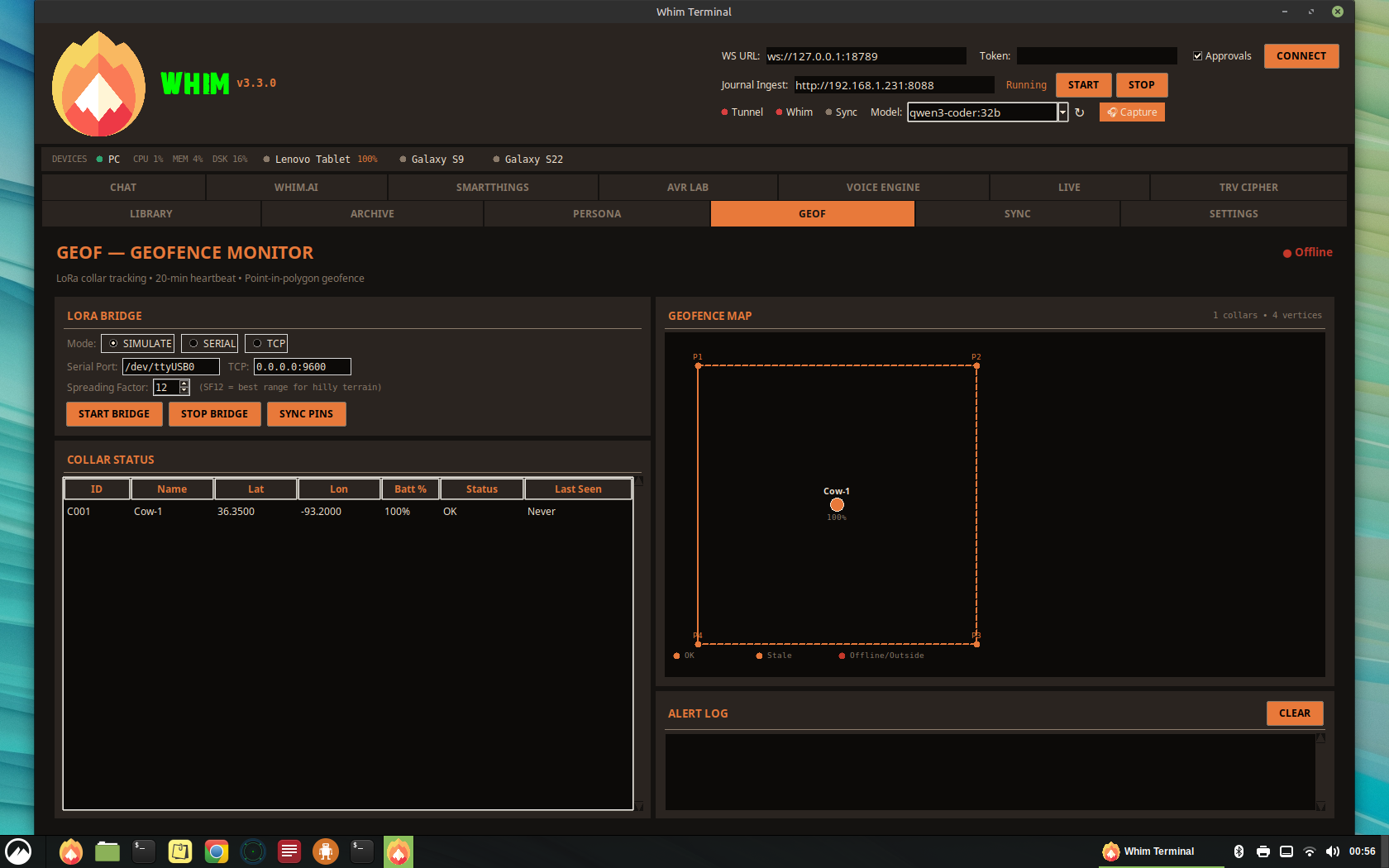
GeoF works just as well for the four-legged family members who think the backyard fence is more of a suggestion than a rule. If your dog has mastered the art of the great escape — or simply can't resist chasing squirrels into the neighbor's yard — a lightweight GPS collar with GeoF gives you peace of mind without the drama. You'll get a gentle heads-up the moment your adventurous pup wanders past the boundary, so you can call them back before they make it three blocks down the street. Same LoRa collar, same map, same alerts — just swap "Cow-1" for "Biscuit" and you're set.
Architecture
Layout
| Panel | Content |
|---|---|
| Toolbar | Sync Pins, Load/Save/Clear Fence, Start/Stop Bridge, Start/Stop Heartbeat |
| Left (60%) | Canvas map with pan, zoom, grid lines, fence polygon, pin markers, and collar positions (color-coded by status) |
| Right (40%) | Collar status treeview, detail panel, and LoRa log |
Collar Status Indicators
| Status | Color | Condition |
|---|---|---|
| OK | Green | Heartbeat received within 20 minutes and inside fence |
| STALE | Yellow | No heartbeat for 20–40 minutes |
| OFFLINE | Red | No heartbeat for >40 minutes |
| ALERT | Bright Red | Collar reported position outside the geofence boundary |
Pin Sync & Fence Management
- Sync Pins — Import GPS coordinates from a mobile JSON file (supports
[{lat, lon}]or{pins: [...]}format). Auto-builds fence polygon from 3+ pins. - Load / Save Fence — Persists fence vertices and collar registry to
~/.openclaw/fence_config.json - Clear Pins — Resets all pins and fence boundary
- Canvas Interaction — Click-drag to pan, scroll wheel to zoom (levels 1–20), coordinate display in status bar
LoRa Bridge Service
The LoRa bridge (services/lora_bridge.py) runs as a subprocess managed from the GeoF tab. It supports three modes:
| Mode | Flag | Description |
|---|---|---|
| Serial | --port /dev/ttyUSB0 | Reads from a hardware LoRa gateway via serial (default 115200 baud) |
| TCP | --tcp 0.0.0.0:9600 | Accepts collar packets over TCP sockets |
| Simulated | --simulate | Generates synthetic collar data for testing without hardware |
The bridge performs ray-casting point-in-polygon geofence checks on every packet. If a collar reports a position outside the fence boundary, the packet is tagged with OUTSIDE_FENCE alert.
LoRa Configuration
| Parameter | Default | Note |
|---|---|---|
| Frequency | 915 MHz | US ISM band |
| Spreading Factor | SF12 | Maximum range for hilly Ozarks terrain. Slower data rate but signals “bend” over ridges. |
| TX Power | 20 dBm | Maximum allowed for LoRa in US |
| CRC | Enabled | Error detection on all packets |
ESP32-S3 Collar Firmware
Each livestock collar runs on an ESP32-S3 with GPS, LoRa radio (SX1276), and IMU accelerometer. The firmware (Collar/firmware/main.cpp) uses a deep sleep cycle:
- 20-minute heartbeat — Wake from deep sleep, acquire GPS fix, check fence boundary, send LoRa status packet (collar ID, lat/lon, battery %), return to sleep
- 5-minute motion interval — When the IMU detects movement, sleep interval decreases to 5 minutes for higher-resolution tracking
- Emergency broadcast — If GPS position is outside the fence polygon, immediately transmit 3 rapid emergency packets before sleeping
- Battery monitoring — ADC reads voltage divider on LiPo cell (4.2V=100%, 3.0V=0%)
Packet Format
Collars transmit CSV over LoRa: COLLAR_ID,LAT,LON,BATTERY,NAME[,OUTSIDE_FENCE]
File Structure
| Path | Purpose |
|---|---|
services/lora_bridge.py | LoRa bridge service (serial/TCP/simulated) |
Collar/firmware/main.cpp | ESP32-S3 Arduino firmware |
Collar/config/fence.json | Default fence config (flash to ESP32 SPIFFS) |
~/.openclaw/fence_config.json | Active fence config (desktop) |
~/.openclaw/geof_pins.json | Cached pin data from mobile sync |
Heartbeat Monitor
The heartbeat monitor runs as a background timer in the Whim Terminal. Every 20 minutes it scans all registered collars and flags any that have gone silent as STALE or OFFLINE. Alerts appear in the LoRa Log panel and collar table rows change color accordingly.
SF12 (Spreading Factor 12) is critical for hilly terrain. It trades data rate for range, significantly increasing the chance of a signal clearing ridgelines between the collar and your antenna mast. Expect 2–5 km line-of-sight range, or 500m–1.5 km over hills with SF12 + 20 dBm.
14
Doppler — Weather Radar & NWR Audio
The DOPPLER tab is a full weather radar and situational awareness station, designed for monitoring storm activity, wind conditions, and precipitation relative to your assigned GPS coordinates. It combines text-based weather data from Open-Meteo with a visual NWS NEXRAD radar overlay on an embedded tile map, plus live NOAA Weather Radio (NWR) audio. A Location selector lets you jump to any saved named location (shared with GeoF and HAM tabs), and a NWS Radar station dropdown provides one-click access to 7 regional stations: KSGF (Springfield), KSRX (Ozarks), KEAX (Kansas City/Columbia), KLSX (St. Louis), KILX (Quincy/Lincoln), and KLZK (Little Rock). Named location fences are drawn on the radar map overlay.
Layout (Top to Bottom)
| Tier | Content |
|---|---|
| Header | DOPPLER FEED title, GPS coordinate input (LAT/LON), FETCH button, "Pet Alert → S22" checkbox, last-update timestamp. |
| Location Bar | Named location dropdown (jump to saved sites), MANAGE button (open Location Manager), NWS Radar station selector (KSGF, KSRX, KEAX, KLSX, KILX, KLZK). |
| Current Conditions | Compact horizontal strip: WMO weather icon, temperature (°F), description, anemometer (wind speed + bearing), humidity, assigned GPS. |
| Radar Map | Largest area — embedded OSM tile map (same engine as GeoF/HAM) with transparent NWS NEXRAD base reflectivity overlay, crosshair at assigned GPS, [+]/[–] zoom, scroll-wheel zoom, right-click pan, CENTER HOME, EMBED/DETACH MAP toggle. |
| NWR Audio | LIVE NWR AUDIO strip: source selector (Web Stream / RTL-SDR), configurable URL or frequency, LISTEN / STOP buttons, online/offline status indicator. |
| 7-Day Forecast | Compressed high-contrast tiles: date, WMO icon, description, high/low temps, precipitation probability. |
| Feed Log | Timestamped log of all fetches, radar updates, NWR events, and alert pushes. |
Data Sources
| Source | API | Data |
|---|---|---|
| Open-Meteo | api.open-meteo.com/v1/forecast | Temperature, wind, humidity, weather code, 7-day forecast. Refreshes every 15 minutes. |
| NWS NEXRAD (IEM) | mesonet.agron.iastate.edu WMS | Transparent radar reflectivity PNG overlay (green/yellow/red precipitation). Refreshes every 5 minutes. |
| OSM Tiles | tile.openstreetmap.org | Base map tiles, cached locally at ~/.openclaw/map_tiles/. |
NWR Audio Sources
| Mode | Tool | Default | Notes |
|---|---|---|---|
| Web Stream | ffplay | https://wxradio.org/MO-Shelbina-WXL70 | Internet-based NWR relay. ~30–60s behind real-time. |
| RTL-SDR | rtl_fm + ffplay | 162.400M | Direct radio reception from local NWR transmitter. Real-time, works offline. Requires RTL-SDR dongle (~$30). |
Severe Weather Alerts
When the WMO weather code indicates severe conditions (freezing rain, heavy snow, thunderstorms, hail), the tab displays a red alert banner and automatically pushes a notification to the Galaxy S22 via the Whim.m /device/chat endpoint. Alerts are cooldown-limited to one per weather code per 30 minutes.
Cross-Platform Notes
| Feature | Linux | Windows 11 | macOS |
|---|---|---|---|
| Tile Map | Full (TileMapRenderer) | Full (TileMapRenderer) | Full (TileMapRenderer) |
| Radar Overlay | Full (urllib + PIL) | Full (urllib + PIL) | Full (urllib + PIL) |
| NWR Web Stream | ffplay | ffplay (add to PATH) | ffplay (via Homebrew) |
| NWR RTL-SDR | rtl_fm (native) | rtl_fm (Zadig driver) | rtl_fm (via Homebrew) |
14.2
HAM — APRS Monitor
The HAM tab is a real-time APRS (Automatic Packet Reporting System) station monitor that integrates with Direwolf, a software-defined TNC. It displays received APRS packets on an embedded tile map, tracks station positions relative to a configurable base station, and logs raw packet data.
Layout
| Area | Content |
|---|---|
| Left Column | Sub-tabbed controls (LINK / BASE / SEARCH): Direwolf connection settings (Simulate/KISS/AGWPE), host/port, callsign, base station GPS, radius filter, search-by-callsign. |
| Station List | Treeview table: Callsign, Lat, Lon, Distance (mi), Comment, Last Heard. Color-coded by age (green/yellow/red). |
| APRS Map | Embedded OSM tile map with station markers, base station icon, [+]/[–] zoom, scroll-wheel, right-click pan, EMBED/DETACH MAP toggle. Same TileMapRenderer as GeoF and Doppler. |
| Raw Packets | Timestamped raw APRS packet log with color-coded tags (alert, ok, info, packet). |
Direwolf Connection Modes
| Mode | Description |
|---|---|
| Simulate | Generates synthetic APRS packets for testing without radio hardware. Good for verifying map rendering and UI layout. |
| KISS | Connects to Direwolf via KISS TCP protocol on the specified host/port. Standard TNC interface. |
| AGWPE | Connects via AGWPE protocol. Compatible with other TNC software that speaks AGWPE. |
Station Aging
| State | Threshold | Map Color |
|---|---|---|
| Active | < 10 minutes | Green |
| Stale | 10–30 minutes | Yellow |
| Offline | > 30 minutes | Red |
Cross-Platform Notes
| Feature | Linux | Windows 11 | macOS |
|---|---|---|---|
| Direwolf | Native package (apt install direwolf) | Windows build from GitHub | Homebrew or build from source |
| Tile Map | Full (TileMapRenderer) | Full (TileMapRenderer) | Full (TileMapRenderer) |
| KISS/AGWPE | TCP socket (cross-platform) | TCP socket (cross-platform) | TCP socket (cross-platform) |
15
NodeFlow — Visual Node Editor
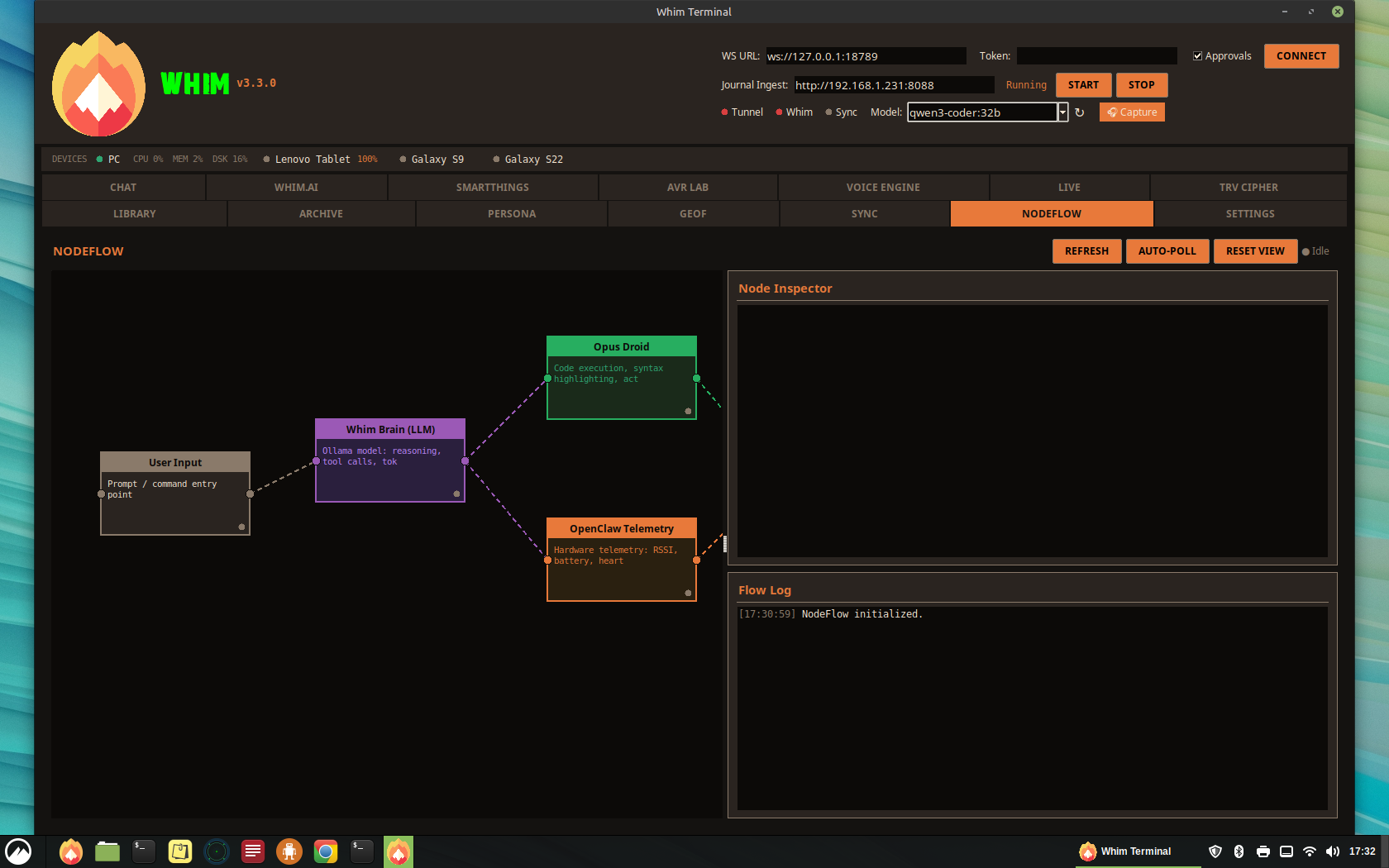
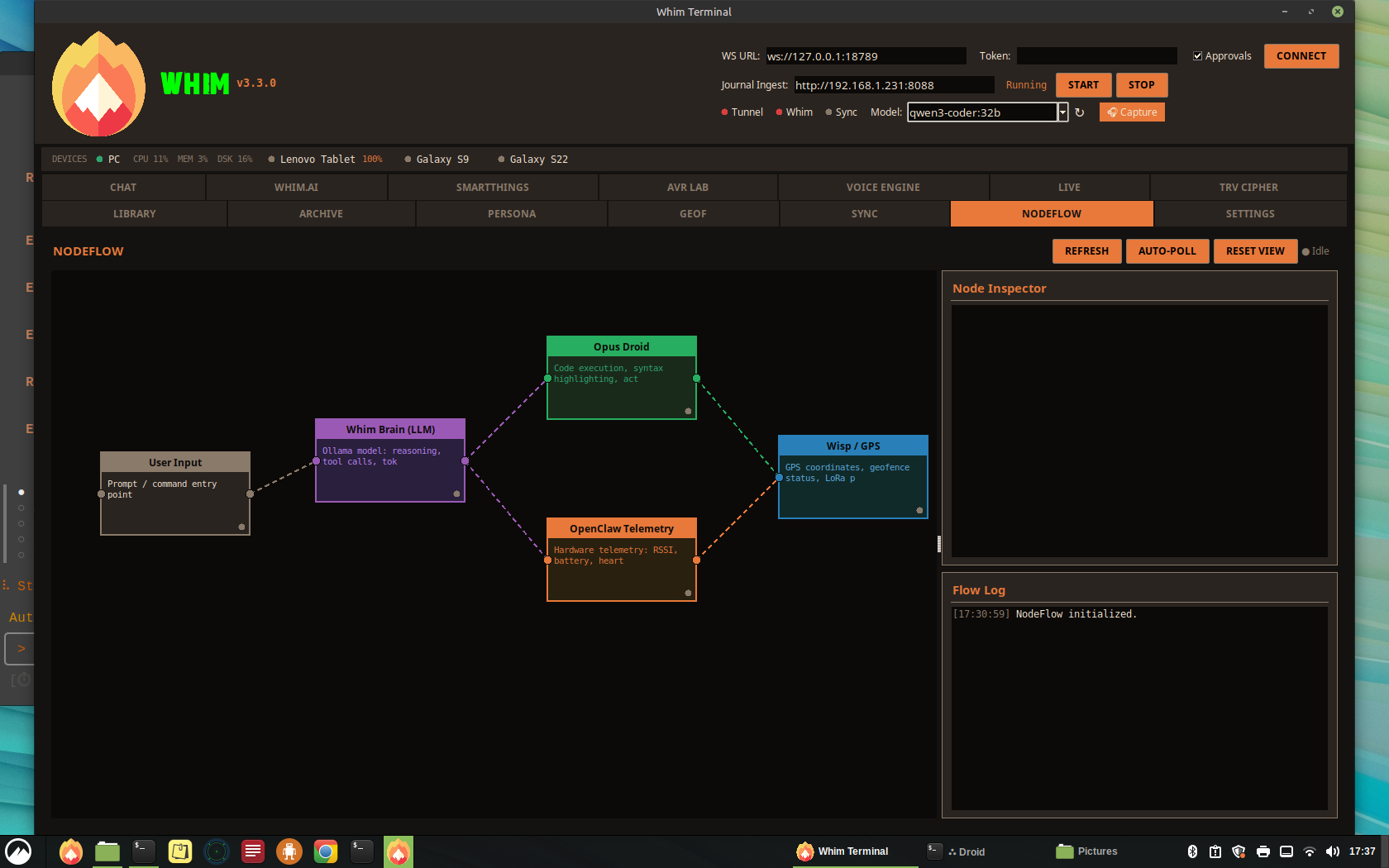
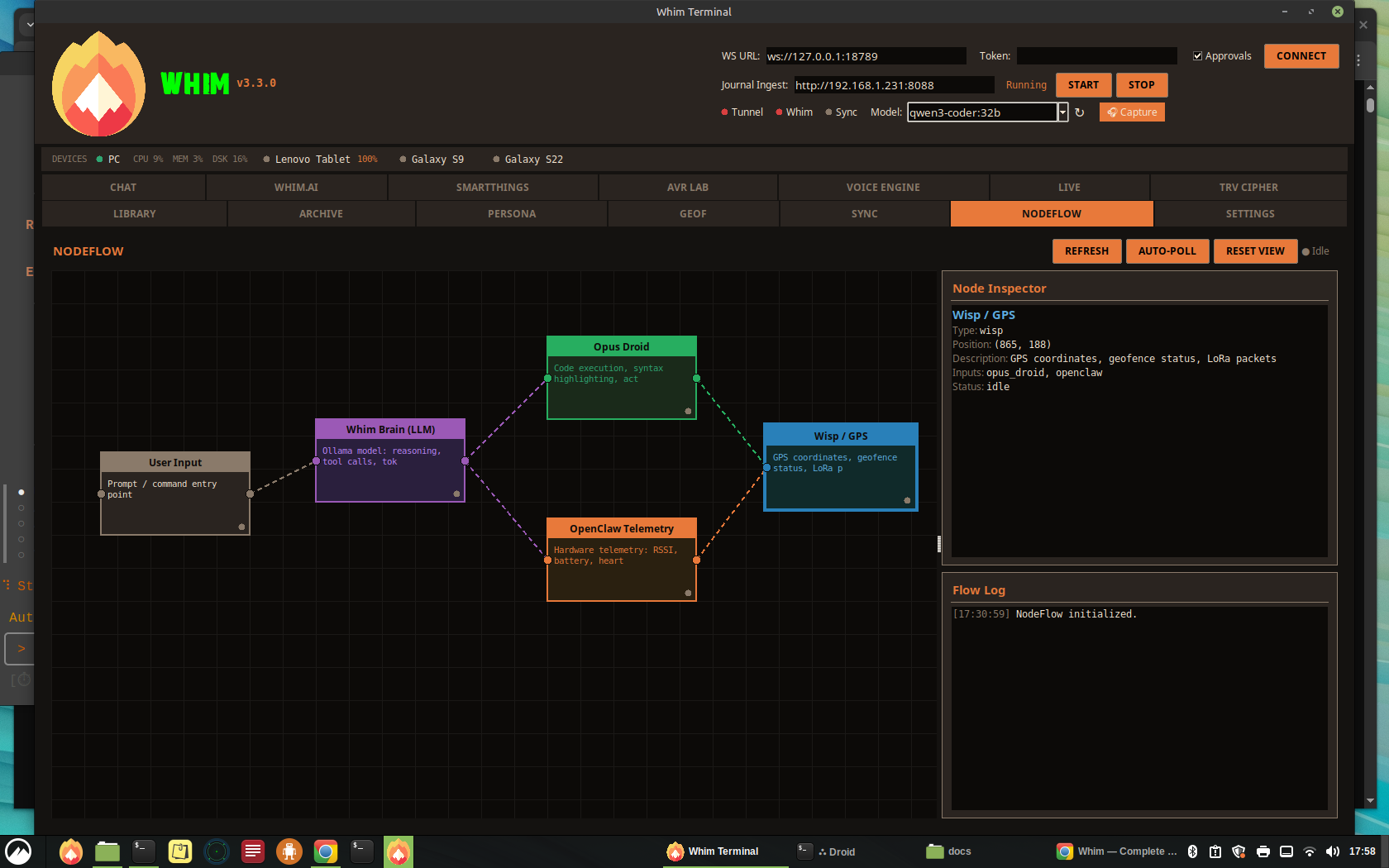
The NodeFlow tab is a visual node-based flow editor that maps the real-time data pipeline inside Whim. It renders each active component — User Input, Whim Brain (LLM), Opus Droid, OpenClaw Telemetry, and Wisp/GPS — as draggable nodes on an infinite canvas, with dashed edges showing how data flows between them.
Architecture
Default Nodes
| Node | Type | Description |
|---|---|---|
| User Input | input | Prompt and command entry point for the pipeline |
| Whim Brain (LLM) | brain | Local Ollama model handling reasoning, tool calls, and token streaming |
| Opus Droid | droid | Code execution, syntax analysis, and active path highlighting |
| OpenClaw Telemetry | openclaw | Hardware telemetry: RSSI, battery level, heartbeat status |
| Wisp / GPS | wisp | GPS coordinates, geofence status, and LoRa packet data |
Layout
| Panel | Content |
|---|---|
| Header | Title, Refresh / Auto-Poll / Reset View buttons, idle/active status indicator |
| Canvas (left, 75%) | Infinite dark canvas with grid lines, color-coded draggable nodes, dashed edge connections, zoom (scroll wheel), and pan (right-click drag) |
| Node Inspector (right top) | Detail card showing the selected node’s label, type, metadata, and connection list |
| Flow Log (right bottom) | Timestamped event log with color-coded severity (info, ok, warn, err) |
Interaction
- Drag Nodes — Click and drag any node to reposition it on the canvas; edges redraw automatically
- Select Node — Click a node to populate the Node Inspector with its details
- Zoom — Scroll wheel zooms in/out on the canvas
- Pan — Right-click (or middle-click) drag to pan the viewport
- Refresh — Re-query all node states from the running system
- Auto-Poll — Toggle continuous polling to keep node data live
- Reset View — Snap zoom and pan back to the default viewport
Node Color Scheme
| Type | Border Color | Purpose |
|---|---|---|
| brain | Purple | LLM reasoning engine |
| droid | Green | Code execution agents |
| openclaw | Orange | Hardware telemetry sources |
| wisp | Blue | GPS and geofence endpoints |
| input | Tan | User entry points |
16
Archive Tab Editor
The Archive tab is a full-featured document editor that saves files to ~/ARCHIVE. All documents created in Whim are stored in this directory.
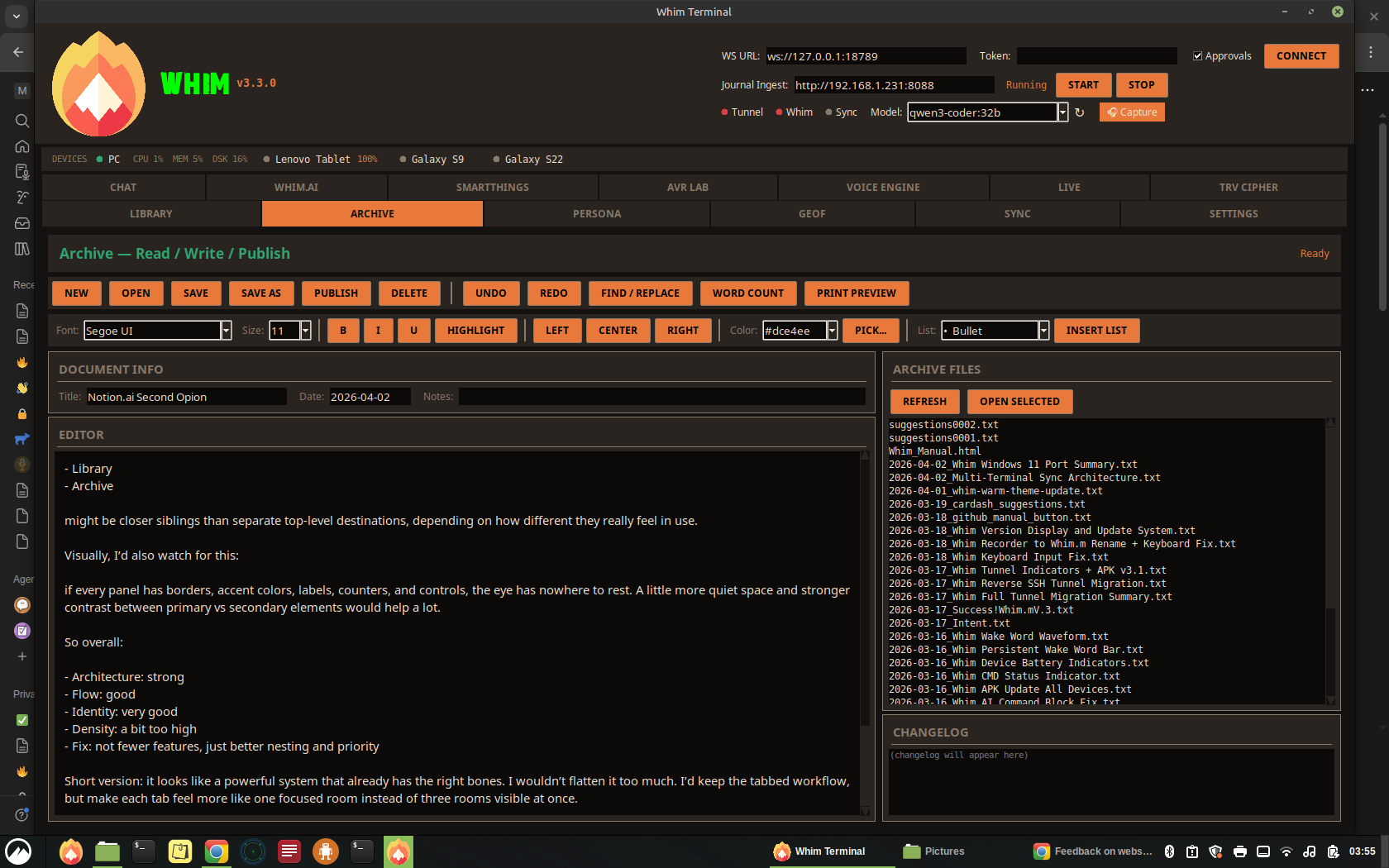
Document Actions
- New — Create a blank document with auto-dated metadata
- Open — Open .txt or .odt files from ~/ARCHIVE
- Save / Save As — Save with auto-generated filename (Date_Title.txt) and metadata header
- Publish — Mark a document as published with changelog entry
- Delete — Remove selected files from the archive
- Undo / Redo — Full undo/redo stack with unlimited history
- Find / Replace — Modal dialog for text search and bulk replacement
- Word Count — Live word, character, and line count
- Print Preview — (Planned feature)
Formatting Toolbar
- Font Family — Dropdown with system fonts + custom fonts from
~/.openclaw/WhimUI/fonts - Font Size — 8-24pt range
- Bold / Italic / Underline — Toggle formatting on selection
- Highlight — Yellow highlight on selected text
- Alignment — Left, Center, Right
- Font Color — 16 preset colors + custom color picker
- Bullet Lists — Bullet, Dash, Circle, Square, Triangle, Numbered
File Browser
The right column shows all files in ~/ARCHIVE with refresh, open, and double-click-to-load. A changelog panel at the bottom tracks all document actions with timestamps.
Document Header Format
17
Screen Share System
The SS (Screen Share) tab enables bidirectional visual communication between the desktop and mobile devices.
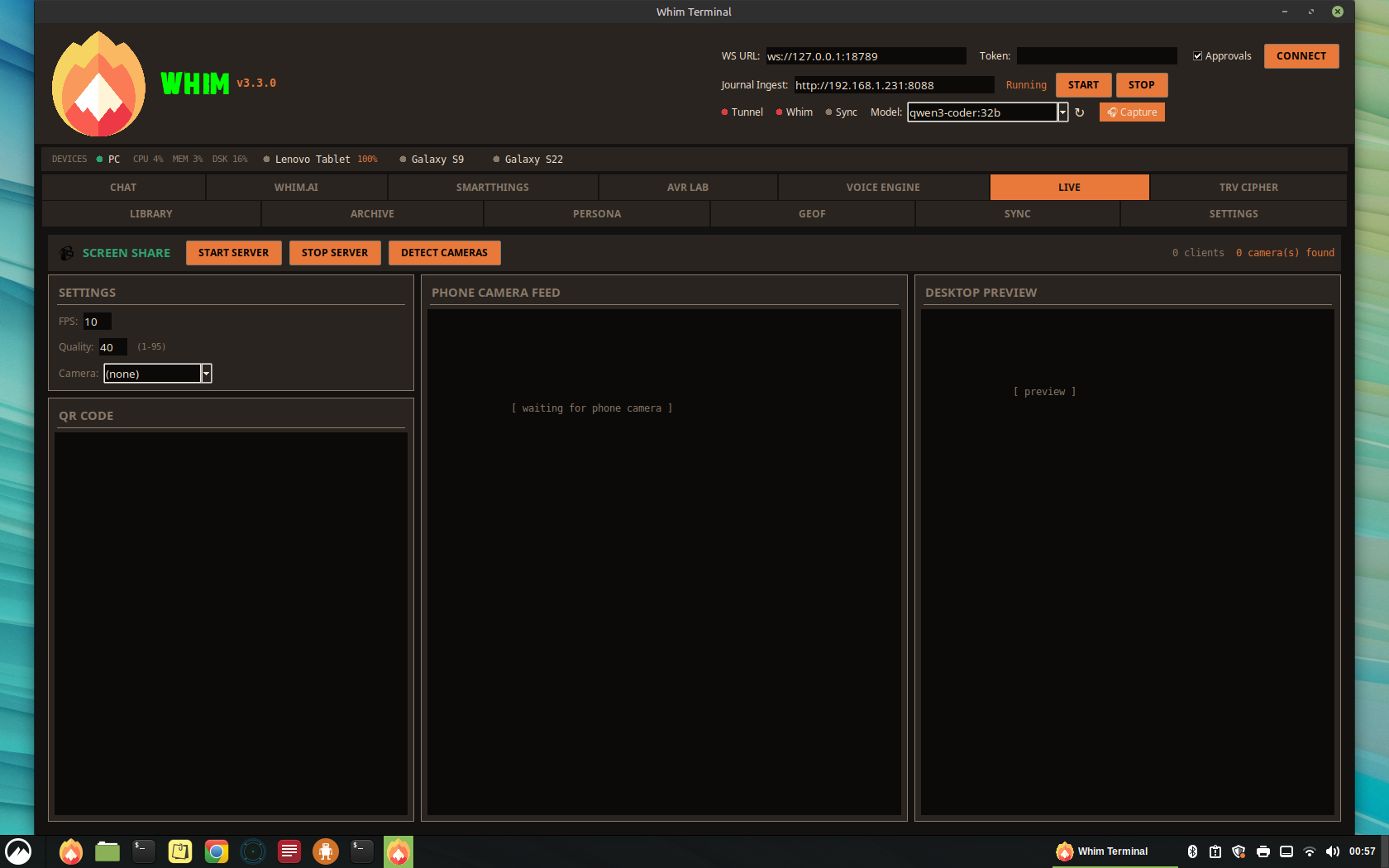
Architecture
- Desktop → Phone: Captures the desktop screen using
mss(Python screen capture), compresses as JPEG, and streams as MJPEG at/desktop_stream - Phone → Desktop: The phone camera posts JPEG frames to
/phone_framevia HTTP POST, displayed on the desktop canvas
Layout
| Column | Content |
|---|---|
| Left | Settings (FPS, Quality, Camera selection) + QR Code for phone connection |
| Center | Phone Camera Feed canvas (receives phone frames) |
| Right | Desktop Preview canvas (shows what the phone sees) |
Settings
- FPS: 1-30 frames per second (default: 10)
- Quality: JPEG compression 1-95 (default: 40)
- Camera: Auto-detected from
/sys/class/video4linux - Max resolution: Desktop stream downscaled to 1280px width
Endpoints
| Path | Method | Description |
|---|---|---|
| / | GET | Mobile HTML page with camera capture + desktop stream viewer |
| /desktop_stream | GET | MJPEG stream of desktop screen |
| /phone_stream | GET | MJPEG relay of phone camera frames |
| /phone_frame | POST | Accepts JPEG frame from phone camera |
| /ss_health | GET | JSON health check with capture status |
18
ADB Portal & Emulator
The Whim ADB Portal is a standalone GUI (whim_adb_portal.py) for managing APK installs and Android emulators, matching the Whim dark theme.
Device Management
- Auto-scan connected ADB devices with model detection
- Install APKs with automatic verification bypass
- Force reinstall with uninstall-before-install flow
- Batch install all Whim APKs at once
- Uninstall
com.whim.mpackage - Open ADB shell in a terminal emulator
- Take device screenshots (saved to ~/Pictures)
Emulator Profiles
| Profile | Resolution | DPI | RAM | API Level |
|---|---|---|---|---|
| Samsung Galaxy S9 | 1440 x 2960 | 570 | 4096 MB | 30 (Android 11) |
| Samsung Galaxy S22 | 1080 x 2340 | 425 | 8192 MB | 33 (Android 13) |
SDK Management
The portal can download and set up the full Android SDK command-line tools (~2 GB), accept licenses, install platform-tools, emulator, and system images, create AVDs with custom device profiles, and launch emulators with GPU acceleration.
19
OpenClaw Gateway
The OpenClaw Gateway is the central command bus that connects the Whim desktop client to the AI agent infrastructure via WebSocket.
Protocol
- Version: Protocol 3
- Auth: Token-based authentication (
auth.mode: "token") - Client ID:
tkui - Client Version: 0.2.0
- Platform: Linux
- Mode: Operator
- Scopes:
operator.read,operator.write,operator.approvals(optional)
Connection Flow
- Connect to WebSocket URL (default:
ws://127.0.0.1:18789) - Receive challenge with nonce and timestamp
- Send connect request with protocol version, client info, auth token, and device signature
- Enter bidirectional message loop (incoming events displayed in Events/Debug tab)
Sessions & Presence
The Sessions tab manages active OpenClaw sessions with auto-refresh, presets, crash recovery, and a Notion integration for session notes. The Presence tab shows real-time online status with heartbeat pings to each connected component.
Events/Debug Log
The Events/Debug tab provides a structured, filterable event log with:
- Module filter: ALL, WS, Gateway, AVR, TRV, Signal, Discord, Whim.ai, UI, Ingest, System
- Level filter: ALL, TRACE, DEBUG, INFO, WARN, ERROR
- Session ID and Request ID filtering
- Regex pattern search with history
- Saved queries for common filters
- JSON and text export
- Auto-scroll toggle and pause functionality
- Maximum 5000 entries with automatic cleanup
20
Settings Tab
The SETTINGS tab provides a three-column configuration panel for managing API keys, LLM models, and application preferences. All settings persist to ~/.openclaw/whim_settings.json.
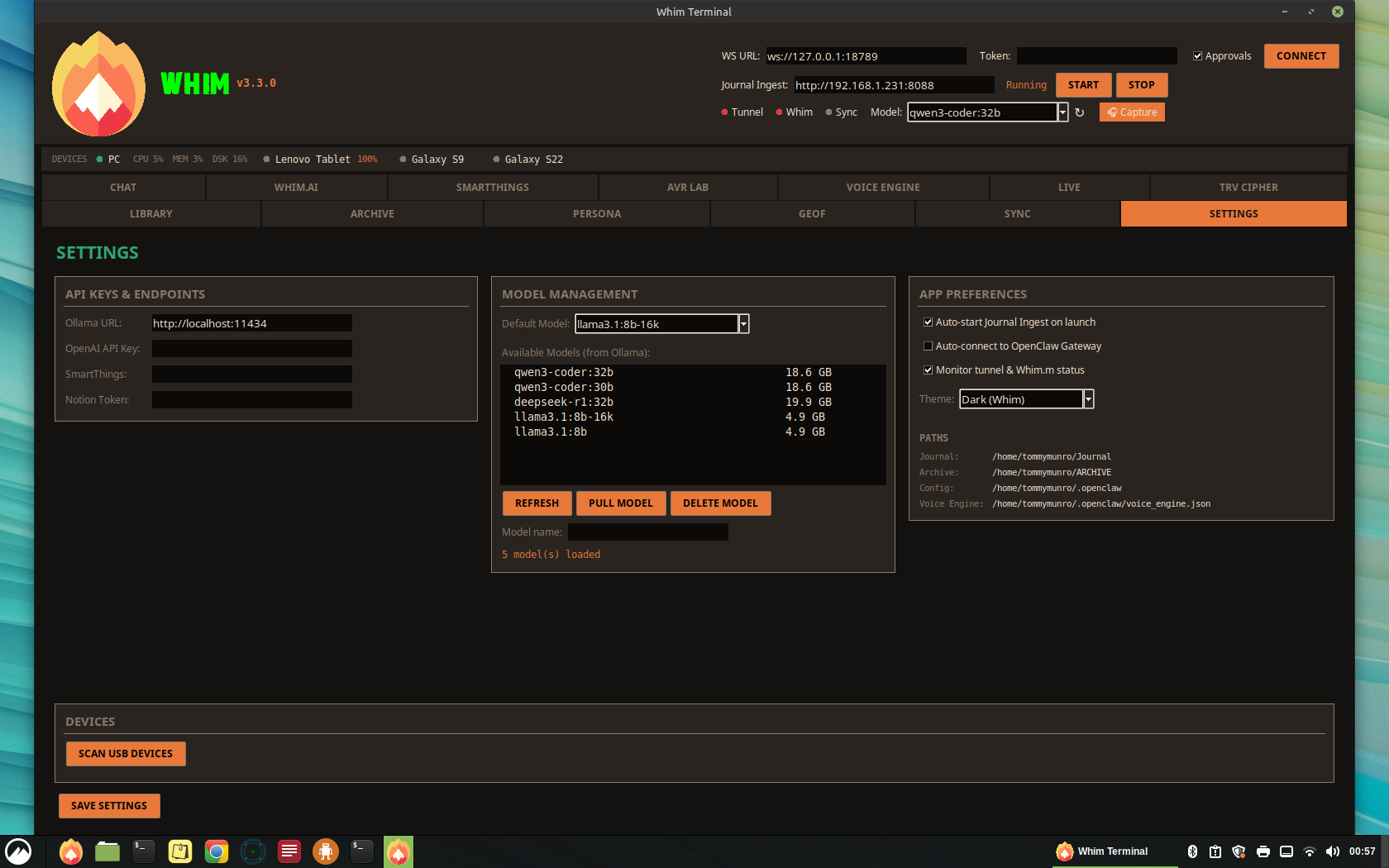
Column 1: API Keys & Endpoints
| Field | Description |
|---|---|
| Ollama URL | Base URL for the local Ollama LLM server (default: http://localhost:11434) |
| OpenAI API Key | API key for OpenAI cloud fallback (masked input, stored locally in whim_settings.json) |
| Anthropic Key | API key for Anthropic (Claude) cloud fallback (masked input, stored locally) |
| DeepSeek Key | API key for DeepSeek cloud fallback (masked input, stored locally) |
| SmartThings | Personal access token for Samsung SmartThings API |
| Notion Token | Integration token for Notion session tracking |
Column 2: Model Management
Manages Ollama models directly from the Whim Terminal:
- Default Model — Dropdown to select which model Whim.AI uses (synced with header dropdown)
- Available Models — Lists all models loaded in Ollama with their sizes
- Pull Model — Download a new model by name (e.g.
mistral:7b) - Delete Model — Remove a model from Ollama to free disk space
- Refresh — Re-query Ollama for the current model list
Column 3: App Preferences
- Auto-start Journal Ingest — Launch the upload server on app start
- Auto-connect to Gateway — Connect to OpenClaw WebSocket on launch
- Monitor tunnel & Whim.m status — Background polling for SSH tunnel and Whim.m health
- Sovereign Mode — When ON, Whim Terminal only uses local Ollama models and will never fall back to cloud APIs. When OFF, the Unified Model Router automatically routes prompts to cloud providers (DeepSeek → OpenAI → Anthropic) if Ollama is unreachable.
- Theme — Visual theme selector (Dark, Midnight, Solarized Dark)
- Paths — Shows configured directories for Journal, Archive, Config, and Voice Engine
Unified Model Router (v3.5.0)
The Unified Model Router (whim_model_router.py) provides automatic failover from local Ollama to cloud LLM providers. When a user sends a prompt, the router:
- Checks if local Ollama is reachable at the configured URL
- If reachable, routes the prompt to Ollama with full tool-call support (unchanged behavior)
- If unreachable and Sovereign Mode is OFF, attempts cloud providers in priority order: DeepSeek → OpenAI → Anthropic
- If Sovereign Mode is ON, returns an error message instead of routing to cloud
Cloud keys are configured in Settings > API Keys & Endpoints. Only providers with a saved key are attempted. The status bar shows which backend served the response (e.g. “Routed via deepseek”). Cloud fallback uses streaming responses but does not support Whim tool calls — those require local Ollama.
A standalone Node Manager window (model_manager.py) is also available for dedicated model management with streaming pull progress bars, a three-provider cloud key vault, and a Sovereign Mode toggle.
LLM Model Dropdown (Header Bar)
A global model selector in the header bar lets you switch between local LLMs at any time without opening Settings. It shows all models available in Ollama (fetched on startup and via the refresh button). Selecting a model immediately updates Whim.AI's active model for the next prompt. Currently available:
llama3.1:8b-16k— 4.9 GB, 16K context (default, fast)llama3.1:8b— 4.9 GB, standard contextdeepseek-r1:32b— 19.9 GB, reasoning model (slower, smarter)
Theme System
Whim Terminal supports three visual themes selectable from App Preferences. Themes apply immediately on save — no restart required. All colors (backgrounds, cards, buttons, text, accents, toggles, borders) update in-place via a recursive widget recolor that maps each widget's current color to its semantic role and replaces it with the new palette.
| Theme | Background | Accent | Character |
|---|---|---|---|
| Dark (Whim) | #141210 warm charcoal | #e8793a amber | Default. Warm tones, high contrast orange accents |
| Midnight | #0b0e17 deep navy | #4a7aff electric blue | Cool-toned, blue accent, suited for night sessions |
| Solarized Dark | #002b36 teal-black | #b58900 gold | Classic Solarized palette with warm gold accents |
Tool Store Sub-Tab
The Tool Store organizes AI tool capabilities into bundles displayed as a card grid. Each bundle card shows a custom icon, risk badge, active tool count, and per-tool toggle switches. Toggle switches are anti-aliased (4× supersampled PIL rendering). Per-bundle [all] / [none] controls update only that card's toggles and status in-place without rebuilding the grid.
- 7 bundles: System Admin, Workspace, Web Intel, Creative, Farm-Tech, Development, Archive
- Risk levels: Safe (green), Moderate (orange), Elevated (red), CRITICAL (hot red) — critical tools require manual approval
- Apply to Preset / Apply to openclaw.json — push tool selections to the active preset or directly to the OpenClaw config
Email Sub-Tab
A front-end GUI for managing email accounts without terminal commands. Configures Himalaya (IMAP/SMTP CLI) directly from the Settings panel.
- Setup Guide — Step-by-step instructions for Gmail, Outlook, Yahoo, and custom IMAP providers, including app password generation
- Configured Accounts — Lists all accounts parsed from
~/.config/himalaya/config.tomlwith display name, server, and default status. Per-account Remove button - Add Account — Provider dropdown auto-fills IMAP/SMTP hosts and ports. Custom provider reveals editable server fields. App password field with show/hide toggle
- Test Connection — Live IMAP login test (background thread) with pass/fail feedback
- Storage — Passwords stored in
chmod 600files under~/.config/himalaya/, referenced by the TOML config'sbackend.auth.cmd
User Guide Sub-Tab
A scrollable reference for all Tool Store bundles with per-bundle commentary. Each bundle section shows its icon (PNG from ~/settings/), description, risk level, and all tools with contextual Unicode icons. Two authorship tiers for notes:
- User notes (turquoise) — editable integration commentary added by the user
- Droid notes (light orange, italic) — system integration context added by the AI assistant
A General Notes field sits at the top for cross-cutting observations. All comment fields auto-resize to show full content without internal scrolling. Ctrl+S quick-save; data persists to ~/.openclaw/user_guide_comments.json.
21
BRAIN — GBrain Knowledge Engine
The BRAIN tab provides a persistent AI memory system powered by GBrain (v0.28.9). GBrain stores knowledge in a local PGLite database with pgvector for hybrid search (keyword + vector + reciprocal rank fusion). The brain compounds automatically — every interaction can add knowledge, and the system gets smarter over time.
Header: Brain Health Indicator
A live health dot appears in the main header bar alongside Devices and Ecosystem. It polls GBrain every 30 seconds and shows:
- • Green — Brain online, shows page count (e.g. “42pg”)
- • Grey — Brain offline or not installed
Clicking the indicator jumps directly to the BRAIN tab.
Global Shortcut: Ctrl+Shift+G
Press Ctrl+Shift+G from any tab to open a quick brain query dialog. Enter a natural language question, hit OK, and results appear in the BRAIN tab’s Search & Query view.
Sub-Tab: Search & Query
A smart search bar supporting natural language queries (e.g. “show me everything about my S22 phone”). Result type filters narrow results:
- All — Hybrid query with synthesis (default)
- Pages — Keyword search across brain pages
- Entities — Filter to people and companies
- Timeline — Filter to timeline entries
- Repos — Search local GitHub repositories from the Whim Dictionary
Action buttons: Hybrid Query, Keyword Search, List Pages, Get Page (by slug), and Backlinks (show pages linking to a slug). The → Whim.ai button sends results to the AI chat and auto-triggers an analysis response.
Sub-Tab: Timeline
Chronological view of brain events with date range selectors. Quick-select buttons: Today, This Week, This Month. Ideal for reviewing what happened across Journal, Voice, and GeoF data.
Sub-Tab: Entity Explorer
Browse entities by type: People, Companies, Devices, Projects, Locations, Concepts. Left panel shows an entity list; right panel splits into two views:
- Detail pane — Full page content with backlinks listed below
- Backlink Graph — Visual radial graph showing the selected entity at center with connected pages arranged in a circle. Nodes are color-coded by type (orange = people, blue = companies, yellow = devices). Up to 12 backlinks displayed with overflow count.
Sub-Tab: Operations
Three-column layout for brain management:
- Brain Status — Live stats (pages, chunks, links, tags), Refresh/Doctor/Sync buttons
- Dream Cycle — GBrain’s 8-phase maintenance cycle (lint → backlinks → sync → synthesize → extract → patterns → embed → orphans). Dry Run for preview, Full Run with confirmation dialog
- Safety & Permissions — Droid write toggle (see below), auto-enrich, auto-summary, import toggles
- Export — Export entire brain as a Markdown vault or Obsidian-compatible folder (wikilinks converted)
Droid Write Permissions
“Allow Droids to Write to Brain” defaults to OFF. Enabling it triggers a confirmation dialog listing exactly what droids can do: create/update pages, add entity links and backlinks, write timeline entries, and run enrichment pipelines. When enabled, two automated features activate:
- Auto-enrich — Polls ~/Journal every 5 minutes for new files and auto-imports them
- Auto-summary — Generates a daily summary page (
summaries/daily-YYYY-MM-DD) with brain stats and recent activity
Send to Brain (from Whim.ai)
A Send to Brain button in the Whim.AI toolbar saves the last AI response (and its prompt) as a brain page. A dialog asks for the page slug (e.g. notes/my-topic). The page is created with frontmatter, tags, and a timestamp. The Brain Health indicator refreshes immediately after save.
Slash Commands
| Command | Description |
|---|---|
/gbrain query <question> | Hybrid search with synthesis |
/gbrain search <term> | Keyword search |
/gbrain status | Show brain stats and health |
Recent Activity Feed
A bottom panel in the BRAIN tab shows the latest brain page changes for situational awareness. Auto-refreshes after imports, syncs, and dream cycles.
Installation
GBrain is installed via git clone + bun install && bun link at ~/gbrain. Brain data lives at ~/.gbrain/brain.pglite (embedded Postgres 17.5, no server needed). A compiled reference page (systems/whim-terminal-ecosystem) documents the full Whim architecture and is searchable from day one.
22
Email — Himalaya Integration
The EMAIL tab integrates Himalaya, a CLI email client, directly into Whim Terminal and Whim.ai chat. IMAP/SMTP configuration is managed in the Settings > Email sub-tab.
Chat Commands
| Command | Description |
|---|---|
/email list [count] | List inbox message headers |
/email read <id> | Read a specific email by message ID |
/email search <query> | Search across the mailbox |
Email content is never fabricated. If the Himalaya tool is unavailable, Whim.ai tells the user to run the slash commands directly.
23
Whim Dictionary & Context System
The Whim Dictionary (whim_dictionary.py) is a 43-term glossary of the entire Whim ecosystem that gets injected into every Whim.ai system prompt. This gives the local LLM contextual awareness of all subsystems, terminology, and project structure.
What It Contains
- 43 ecosystem terms — Whim Terminal, OpenClaw, WISP, Whim.ai, Ollama, OpenFang, Collar, TRV, FreshTail, OpenTailor, GBrain, Himalaya, and more
- 6 GitHub repositories — Local paths and remote URLs for Whim, whimgo.io, 0411, mtkclient, Azure-ttk-theme, and gbrain
- GBrain config defaults — Install/brain directory paths, feature toggles
- Context builder —
build_whimai_context_block()generates the text block appended to every AI system prompt
How It Works
On every Whim.ai inference call, the dictionary context block is appended to the system prompt after the base prompt and playback/agent logic prompts. The AI sees a “Whim Ecosystem Context” section listing key terms, all local GitHub repos with paths, and GBrain integration commands. This means the AI can answer questions like “where is the Whim repo?” or “what is OpenFang?” without hallucinating.
24
Audio Capture Tool
A floating always-on-top tool window for capturing system audio output as lightweight audio files — no video, just audio. Designed for the use case of turning YouTube videos, podcasts, or any playing audio into portable files you can listen to in the car.
How It Works
Clicking the 🎧 Capture button in the header bar opens a compact floating window that stays on top of all other windows. It captures audio from PipeWire/PulseAudio monitor sources — virtual loopback devices that tap into whatever audio is playing through your speakers or HDMI output. No screen recording, no video — just the audio stream, encoded to a small file.
Controls
| Control | Description |
|---|---|
| Source | Dropdown listing all PipeWire monitor sources. Auto-selects HDMI if available. Options include USB speakers, headphones, S/PDIF, and HDMI. |
| Format | Output codec: MP3 (default, car-compatible), Opus, OGG Vorbis, M4A (AAC), WAV (lossless) |
| Bitrate | 64k – 320k. Default 128k gives ~1 MB/min for MP3 (good for podcasts/speech). |
| Record / Stop | Start/stop capture. Header button flashes red while recording. |
| VU Meter | Live level indicator (green/yellow/red). |
| Timer | Running elapsed time (HH:MM:SS) and live file size. |
| Name / Rename | Inline rename of the output file after stopping. |
Output
Files save to ~/Journal/audio_captures/ with timestamps (e.g. capture_20260317_143022.mp3). The folder link in the tool opens the directory in the file manager. At 128k MP3, a 1-hour podcast capture is roughly 60 MB.
Typical Workflow
- Start playing a YouTube video or podcast in the browser
- Click 🎧 Capture in the Whim header bar
- Select the HDMI or speaker monitor source
- Click Record — the tool captures audio while you watch/listen
- Click Stop when done — rename the file to something meaningful
- Transfer the MP3 to your phone (via Whim.m Library, ADB, or file share) for car listening
Uses ffmpeg -f pulse to read from PipeWire/PulseAudio monitor sources. The monitor sources are virtual loopback devices created automatically by PipeWire for every output sink. No additional driver or loopback configuration is needed.
25
Technical Stack & Configuration
Runtime Environment
| Component | Technology |
|---|---|
| OS | Linux Mint (CARRARA machine) |
| Python | 3.12+ (system) + conda env: xtts (3.10+) |
| GUI Framework | Tkinter with ttk (Azure dark theme) |
| AI Runtime | Ollama (local GPU inference) |
| Voice Synthesis | Coqui XTTS v2 (conda env: xtts) |
| Transcription | OpenAI Whisper |
| Networking | Reverse SSH tunnel via VPS (autossh + systemd) |
| Messaging | signal-cli (Signal) + discord.py/nextcord (Discord) |
| IoT | Samsung SmartThings via OpenClaw gateway |
| Android | ADB + Android SDK command-line tools |
| Screen Capture | mss (Python) |
| Image Processing | Pillow (PIL) |
| QR Codes | qrcode (Python library) |
| System Tray | pystray |
| Document Export | odf (OpenDocument Format) + LibreOffice Writer |
| Audio Processing | FFmpeg, NumPy, wave |
Key Directories
| Path | Purpose |
|---|---|
~/vaults/WHIM/ | Main Whim project vault |
~/vaults/WHIM/app/ | Desktop application source code |
~/vaults/WHIM/mobile/ | Mobile app, APKs, build artifacts |
~/vaults/WHIM/assets/ | Fonts, icons, logos |
~/.openclaw/ | OpenClaw config, Whim icon, sessions store |
~/.openclaw/WhimUI/ | Custom fonts and icon packs (Papirus, Mint-Y) |
~/Journal/ | Voice recordings and notes uploaded from phone |
~/ARCHIVE/ | Documents created in the Archive Tab Editor |
~/TRANSCRIPT/ | Exported ODT transcripts |
~/TableReads/ | XTTS voice synthesis output |
~/voices/ | Speaker reference files for XTTS |
~/Incoming/fire.png | Flame logo used in the header and taskbar |
Configuration File
The main configuration lives at ~/.openclaw/openclaw.json and controls:
- Model providers and fallback chains
- Gateway mode, auth tokens, and control UI settings
- Signal channel config (account, HTTP URL, auto-start, DM/group policies)
- Discord channel config (bot token, action toggles, voice TTS, heartbeat)
- Command settings (native commands, skill commands, restart behavior)
- Tool deny lists and message acknowledgment scopes
Singleton Instance
Whim enforces a single instance by binding TCP port 48891. If a second instance is launched, it sends a SHOW signal to the existing instance, which restores and focuses its window.
26
Desktop Environment Customizations
The CARRARA desktop runs Linux Mint with Cinnamon. The following customizations have been applied to the desktop environment for a cleaner workflow and ergonomic comfort.
Start Menu Cleanup
All non-pinned application entries have been removed from the start menu. Only taskbar-pinned favorites remain accessible via the start menu:
| Application | .desktop ID | Status |
|---|---|---|
| Firefox | firefox.desktop | Pinned |
| Software Manager | mintinstall.desktop | Pinned |
| System Settings | cinnamon-settings.desktop | Pinned |
| Terminal | org.gnome.Terminal.desktop | Pinned |
| Files (Nemo) | nemo.desktop | Pinned |
| Google Chrome | google-chrome.desktop | Pinned |
Removed .desktop overrides are backed up at ~/.local/share/applications/_backup_removed/. Custom app entries removed include: OpenClaw, Whim ADB Portal, Control Panel, Droid, Revy Acousto, and OnlineChat webapp. System app overrides (Discord, Signal, Audacity, LibreOffice, etc.) were also removed, reverting them to default system entries.
Additionally, all Preferences and Administration category entries (65 items) have been hidden from the start menu via NoDisplay=true overrides. This includes all Cinnamon settings sub-panels (Backgrounds, Themes, Keyboard, Display, etc.), system tools (Firewall, Timeshift, Driver Manager, Update Manager, etc.), and utility launchers. The main System Settings app remains accessible from the pinned taskbar for when settings changes are needed.
ALT Key Shortcuts Disabled
All Cinnamon keyboard shortcuts that use the ALT key have been disabled for ergonomic reasons (wrist rest positioning). This includes:
Window Management (removed)
| Action | Previous Shortcut |
|---|---|
| Switch windows | Alt+Tab |
| Switch windows backward | Shift+Alt+Tab |
| Close window | Alt+F4 |
| Toggle maximized | Alt+F10 |
| Unmaximize | Alt+F5 |
| Window menu | Alt+Space |
| Move window | Alt+F7 |
| Resize window | Alt+F8 |
| Run dialog | Alt+F2 |
| Switch group | Alt+Above_Tab |
Workspace Navigation (removed)
| Action | Previous Shortcut |
|---|---|
| Switch workspace up/down/left/right | Ctrl+Alt+Arrow |
| Move window to workspace | Ctrl+Shift+Alt+Arrow |
| Switch panels | Ctrl+Alt+Tab |
System & Media (removed)
| Action | Previous Shortcut | Retained Non-ALT Binding |
|---|---|---|
| Logout | Ctrl+Alt+Delete | — |
| Terminal | Ctrl+Alt+T | — |
| Lock screen | Ctrl+Alt+L | XF86ScreenSaver |
| Shutdown | Ctrl+Alt+End | XF86PowerOff |
| Restart Cinnamon | Ctrl+Alt+Escape | — |
| Toggle recording | Ctrl+Shift+Alt+R | — |
| Window screenshot | Alt+Print | — |
| Magnifier zoom | Alt+Super+=/−/0 | — |
To restore all Cinnamon ALT shortcuts to defaults, run:
gsettings reset-recursively org.cinnamon.desktop.keybindings
27
Windows 11 Support
Whim Terminal runs natively on Windows 11 via a platform compatibility layer that abstracts OS-specific calls (paths, services, audio). The same core codebase powers both the Linux and Windows builds.
Prerequisites
| Software | Required | Install From |
|---|---|---|
| Python 3.10+ | Required | python.org (check "Add to PATH") |
| Ollama for Windows | Required | ollama.com |
| Tailscale | Optional | tailscale.com |
| ffmpeg | Optional | ffmpeg.org (add to PATH) |
| Signal Desktop | Optional | signal.org |
Quick Start
git clone https://github.com/scarter84/Whim.git
cd Whim
Set-ExecutionPolicy -Scope CurrentUser RemoteSigned
.\scripts\setup_windows.ps1
This creates a virtual environment, installs dependencies, sets up data directories, and creates a desktop shortcut.
git clone https://github.com/scarter84/Whim.git
cd Whim
scripts\setup_windows.batscripts\launch_whim.batOr use the desktop shortcut created by the PowerShell setup.
Windows Path Mapping
Whim stores data in Windows-native locations:
| Linux Path | Windows Path |
|---|---|
~/.openclaw/ | %APPDATA%\OpenClaw\ |
~/Journal/ | Documents\Whim\Journal\ |
~/ARCHIVE/ | Documents\Whim\ARCHIVE\ |
~/TRANSCRIPT/ | Documents\Whim\TRANSCRIPT\ |
~/TableReads/ | Documents\Whim\TableReads\ |
~/voices/ | Documents\Whim\voices\ |
~/Incoming/ | Documents\Whim\Incoming\ |
Platform Differences
| Feature | Linux | Windows 11 |
|---|---|---|
| File opener | xdg-open | os.startfile() |
| Service check | systemctl is-active | sc query |
| Audio sources | pactl (PulseAudio/PipeWire) | sounddevice (Windows Audio) |
| SSH Tunnel | systemd whim-tunnel.service | Manual SSH or Tailscale direct |
| DPI scaling | System native | Per-monitor DPI aware (auto-set) |
| Control Panel | Custom Cinnamon panel | Use Windows Settings directly |
| TTS Engine | XTTS via conda env | XTTS via pip or system Python |
Architecture on Windows
app/
  openclaw_tkui.py        ← Main terminal (cross-platform)
  whim_windows.py         ← Windows 11 entry point
  platform_compat.py      ← OS abstraction layer
  requirements_windows.txt
scripts/
  setup_windows.bat       ← Batch setup
  setup_windows.ps1       ← PowerShell setup
  launch_whim.bat         ← Quick launcher
The platform_compat.py module detects the OS at import time and provides
correct path defaults, service checkers, audio source enumeration, and file-open commands.
The whim_windows.py launcher sets DPI awareness, verifies Ollama, patches
path constants, then loads the main app.
Connectivity on Windows
On Windows, the preferred connection method to mobile devices is Tailscale (direct mesh VPN). The Linux systemd SSH tunnel is not available natively on Windows, but Tailscale provides the same end-to-end encrypted connectivity with zero configuration.
Alternatively, use Windows OpenSSH to create a manual tunnel:
ssh -N -R 8089:localhost:8089 user@YOUR_VPS_IPNew Tabs on Windows
The DOPPLER and HAM tabs are fully functional on Windows 11. The tile map engine, Open-Meteo weather API, and NWS radar overlay work identically. For NWR audio, ensure ffplay (from FFmpeg) is on your PATH. For RTL-SDR support, install the Zadig USB driver and rtl_fm from the librtlsdr project. Direwolf for HAM/APRS is available as a Windows build from GitHub.
Known Limitations
- Voice Engine audio capture uses
sounddeviceinstead of PipeWire monitor sources - The Linux Control Panel (
control_panel.py) is Cinnamon-specific and not included - ADB Portal requires Android SDK platform-tools in PATH
- Some font rendering may differ slightly between Linux and Windows
- RTL-SDR requires Zadig driver setup for USB device access
27.1
iOS Support (Tahoe)
Whim.m is accessible on iOS devices via Safari or Chrome as a Progressive Web App (PWA). The iOS variant, codenamed Tahoe, connects to the same Whim server backend and provides the same five-tab experience (REC, LIBRARY, CHAT, WAKE, DEVICES) with platform-specific adaptations for Apple hardware.
Prerequisites
| Software | Required | Notes |
|---|---|---|
| iOS 16+ | Required | PWA support requires iOS 16 or later |
| Safari / Chrome | Required | Safari recommended for best PWA integration (Add to Home Screen) |
| Tailscale for iOS | Optional | Required for direct Tailscale mesh connection mode |
Configuration
| Setting | Value |
|---|---|
| Connection | VPS Tunnel (default) or Tailscale (requires Tailscale iOS app) |
| URL | http://104.207.140.242:8089 (VPS) or http://100.69.17.20:8089 (Tailscale) |
| PWA Install | Safari → Share → Add to Home Screen |
| Audio Recording | WebRTC MediaRecorder API (Safari 14.5+) |
| Wake Word | Requires microphone permission grant; iOS may suspend background audio |
| Notifications | Web Push supported on iOS 16.4+ (requires PWA mode) |
Platform Differences — iOS vs Android
| Feature | Android (APK) | iOS (PWA / Tahoe) |
|---|---|---|
| App Delivery | Native APK via ADB sideload | PWA via Safari "Add to Home Screen" |
| WebView Engine | Chromium (Android WebView) | WebKit (Safari) |
| Audio Format | WebM/Opus (native) | MP4/AAC (Safari MediaRecorder default) |
| Background Audio | Supported (WebView keeps running) | Limited — iOS may suspend after ~30s in background |
| Wake Word | Always-on via WebView | Active only while app is in foreground |
| File Upload | Full filesystem access via intent | Photo Library + Files app picker |
| Camera Access | Direct WebRTC + Screen Share | WebRTC supported; no Screen Share capture |
| Notification | Firebase / local | Web Push (iOS 16.4+ in PWA mode only) |
| Install Size | ~61 KB APK | ~0 KB (bookmark/PWA shell) |
| Tailscale | Tailscale Android app | Tailscale iOS app (App Store) |
Known Limitations on iOS
- Background Wake Word — iOS aggressively suspends background WebKit processes. The "Listening for Hey Whim" feature only works while the app is in the foreground.
- Audio Codec — Safari's MediaRecorder outputs MP4/AAC instead of WebM/Opus. The server handles both formats transparently.
- Screen Share — iOS does not support
getDisplayMedia()in PWAs, so the desktop-to-phone Screen Share viewer works but phone-to-desktop camera capture may be limited. - File Picker — iOS restricts filesystem access to the Photo Library and Files app; no direct path selection.
27.2
macOS Support
Whim Terminal runs on macOS (Intel and Apple Silicon) using the same cross-platform platform_compat.py abstraction layer. The core codebase, including all 16 tabs, is identical to the Linux build. Tkinter ships with Python on macOS or can be installed via Homebrew.
Prerequisites
| Software | Required | Install |
|---|---|---|
| Python 3.10+ (with Tkinter) | Required | brew install python-tk@3.12 or python.org |
| Ollama | Required | ollama.com |
| FFmpeg | Recommended | brew install ffmpeg (for NWR audio, voice engine, audio capture) |
| Tailscale | Optional | tailscale.com or Mac App Store |
Quick Start
git clone https://github.com/scarter84/0411.git
cd 0411
python3 -m venv .venv && source .venv/bin/activate
pip install -r app/requirements.txt
python3 app/openclaw_tkui.py
macOS Path Mapping
| Linux Path | macOS Path |
|---|---|
~/.openclaw/ | ~/.openclaw/ (same) |
~/Journal/ | ~/Journal/ (same) |
~/ARCHIVE/ | ~/ARCHIVE/ (same) |
~/voices/ | ~/voices/ (same) |
Platform Differences
| Feature | Linux | macOS |
|---|---|---|
| File opener | xdg-open | open (native) |
| Service check | systemctl is-active | launchctl list |
| Audio sources | pactl (PipeWire) | sounddevice (CoreAudio) |
| SSH Tunnel | systemd service | autossh via launchd plist or manual |
| DPI scaling | System native | Retina-aware (auto-detected) |
| Direwolf | apt install | brew install direwolf or build from source |
| RTL-SDR | apt install rtl-sdr | brew install librtlsdr |
Doppler & HAM Tabs on macOS
All map, radar, and weather features work identically. For NWR audio streaming, install FFmpeg via Homebrew (brew install ffmpeg) to get ffplay. RTL-SDR requires brew install librtlsdr and a compatible USB dongle. Direwolf for APRS is available via Homebrew.
Known Limitations
- The Linux Control Panel (
control_panel.py) is Cinnamon-specific and not included - Voice Engine uses
sounddevicefor CoreAudio instead of PipeWire monitor sources - Tkinter on macOS may require
python-tkHomebrew formula for full widget support - macOS Gatekeeper may prompt for permission when first running audio capture or network services
27.3
Whim.V — Vehicle Dashboard
Whim.V is a touch-optimized vehicle dashboard designed for vertical 13.6″ Tesla-style displays running Ubuntu, or any Android tablet connected to the Whim ecosystem. It delivers a subset of the full Whim Terminal’s capabilities in a high-contrast, glanceable interface built for use in the field or on the road. Version 1.1 adds Leaflet satellite maps with Esri tiles, a named location manager with Nominatim address-to-GPS geocoding, 7 NWS regional radar stations, per-site geofence overlays, and a Service Worker for offline resilience.
The dashboard runs as a lightweight Flask web server on the desktop (or vehicle Ubuntu machine) and is accessed via a WebView-based Android APK on the tablet. A green-dot launcher icon installs to the home screen for one-tap access.
Architecture
| Component | Description |
|---|---|
| Server | whim_v.py — Flask server on port 8099, serves the full dashboard as a single-page web app with Service Worker for offline caching |
| Client | Android APK (com.whim.v) — fullscreen WebView wrapper with green-dot launcher icon, FLAG_KEEP_SCREEN_ON |
| Connection | LAN (192.168.x.x) or Tailscale mesh (100.69.17.20) — same hybrid networking as Whim.m |
| Document Engine | LibreOffice headless — converts .xlsx, .docx, .ods, .odt to PDF for inline viewing |
| Map Engine | Leaflet 1.9 with Esri World Imagery satellite tiles (toggle to OSM street view) |
| Location Data | ~/.openclaw/whimv_locations.json — shared with Whim Terminal. Nominatim geocoding for address-to-GPS lookup |
Dashboard Tabs
| Tab | Function |
|---|---|
| GEOF | Leaflet satellite map with Esri World Imagery tiles (toggle to OSM street), collar pins with in/out status, fence polygon overlay, named location fences drawn as orange dashed boundaries, location dropdown to jump between saved sites, collar status table (ID, name, in/out, battery, coordinates, last seen) |
| RADAR | Embedded NWS Doppler radar in fixed aspect-ratio container — 7 regional stations: KSGF (Springfield), KSRX (Ozarks), KEAX (Kansas City/Columbia), KLSX (St. Louis), KILX (Quincy/Lincoln), KLZK (Little Rock) |
| DOCS | Document viewer with directory browser (Home, Documents, Incoming, Journal). Opens .xlsx/.docx/.ods via LibreOffice headless, renders .pdf/.txt/.csv/.md natively |
| AI | Whim.AI chat with Ollama model selector, streaming responses. Supports all local models (llama3.1, deepseek-r1, qwen3-coder) |
| LOGS | System status — Ollama model inventory, Tailscale mesh peers, disk usage, uptime, saved locations summary |
Screenshots
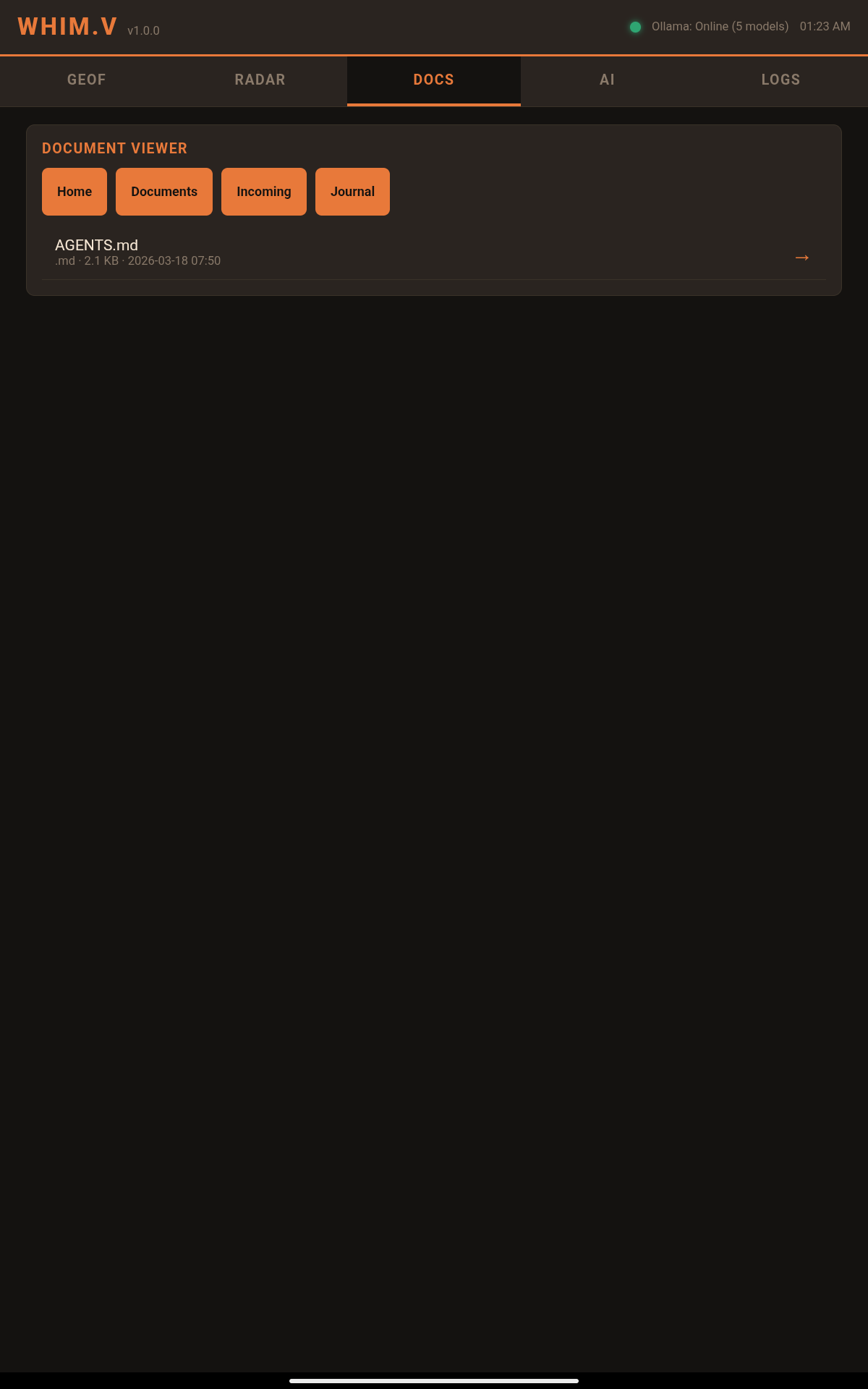
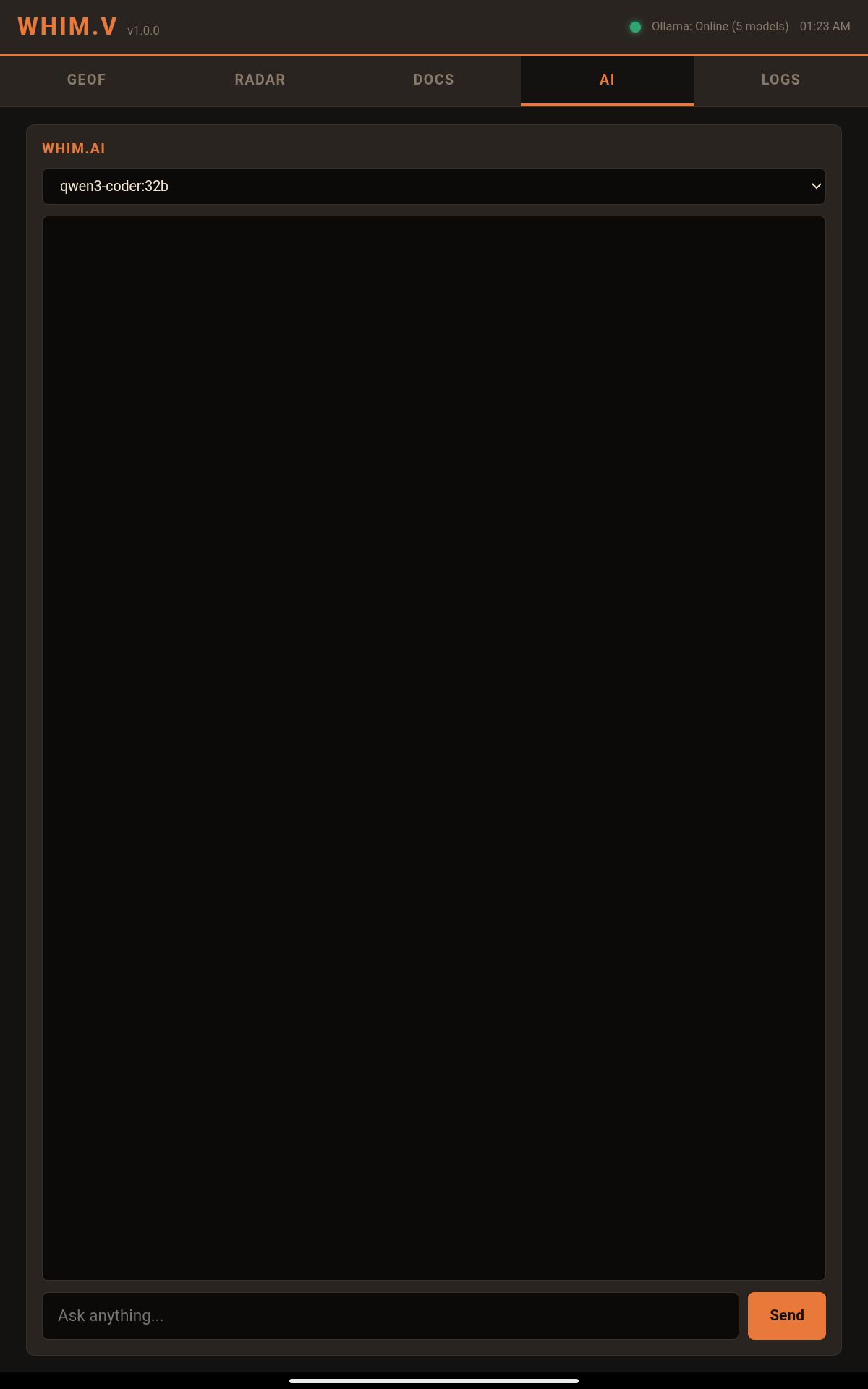
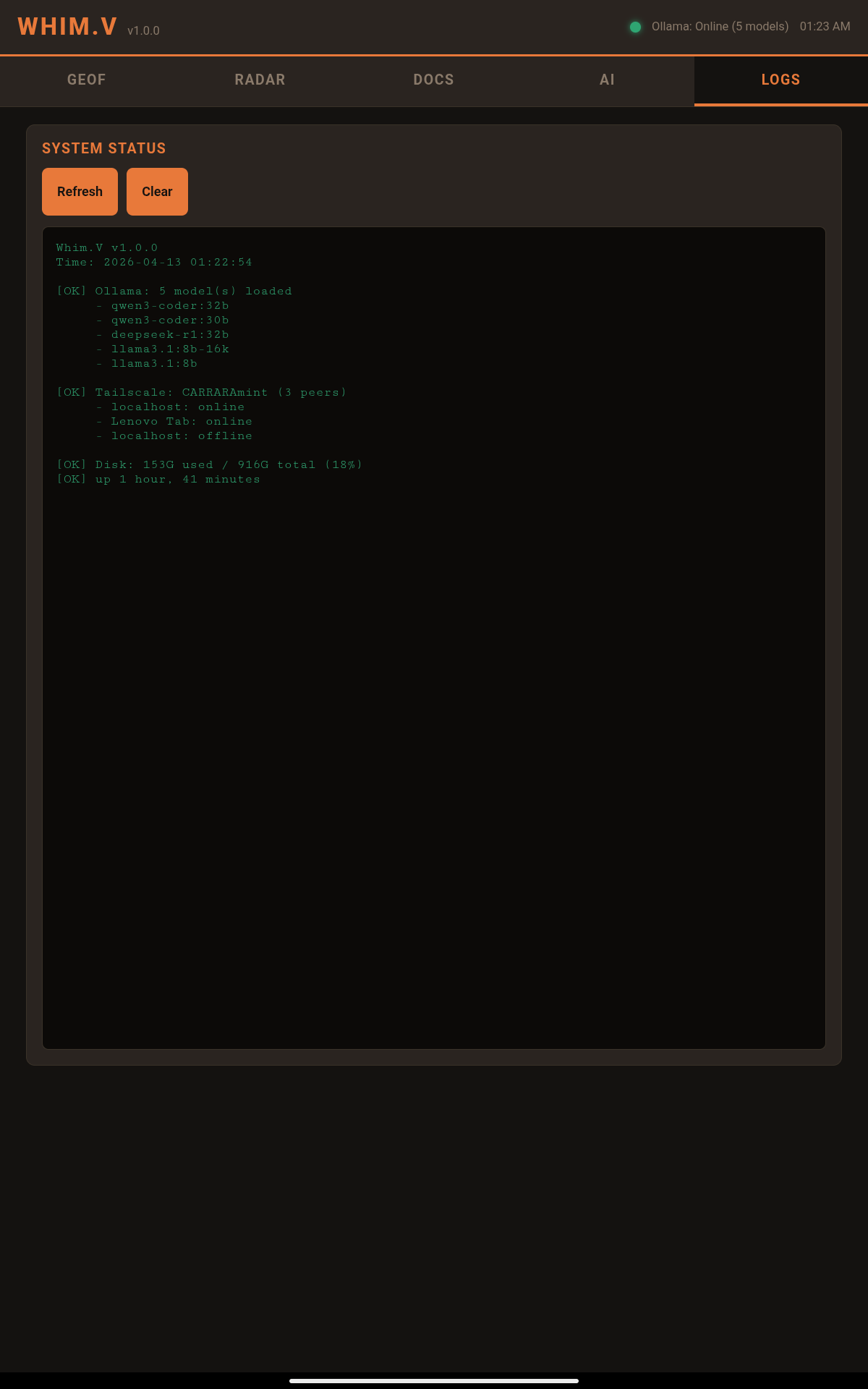
Quick Start
# Start the Whim.V server on your desktop or vehicle Ubuntu machine
python3 vehicle/whim_v.py --port 8099

# Open in any browser on the same network
# http://<your-ip>:8099

# Or install the Android APK for a native launcher icon
adb install vehicle/apk_build/out/whim_v.apk
Download
Download Whim-Vehicle.zip — contains whim_v.py server, Android APK source, and build script.
Platform Compatibility
| Feature | Ubuntu Vehicle Dash | Android Tablet | Desktop Browser |
|---|---|---|---|
| GeoF Map (Leaflet Satellite) | ✓ | ✓ | ✓ |
| Doppler Radar (7 stations) | ✓ | ✓ | ✓ |
| Named Locations + Geocoding | ✓ | ✓ | ✓ |
| Document Viewer | ✓ | ✓ | ✓ |
| AI Chat (Ollama) | ✓ | ✓ | ✓ |
| System Logs | ✓ | ✓ | ✓ |
| Offline (Service Worker) | ✓ | ✓ | ✓ |
| Touch Gestures | ✓ | ✓ | Mouse |
| Home Screen Icon | Desktop shortcut | APK launcher | Bookmark |
28
Multi-Terminal Sync
The SYNC tab enables state synchronization across multiple Whim Terminal instances running on different machines (Linux + Windows). Seven sync approaches are available, managed through a unified engine.
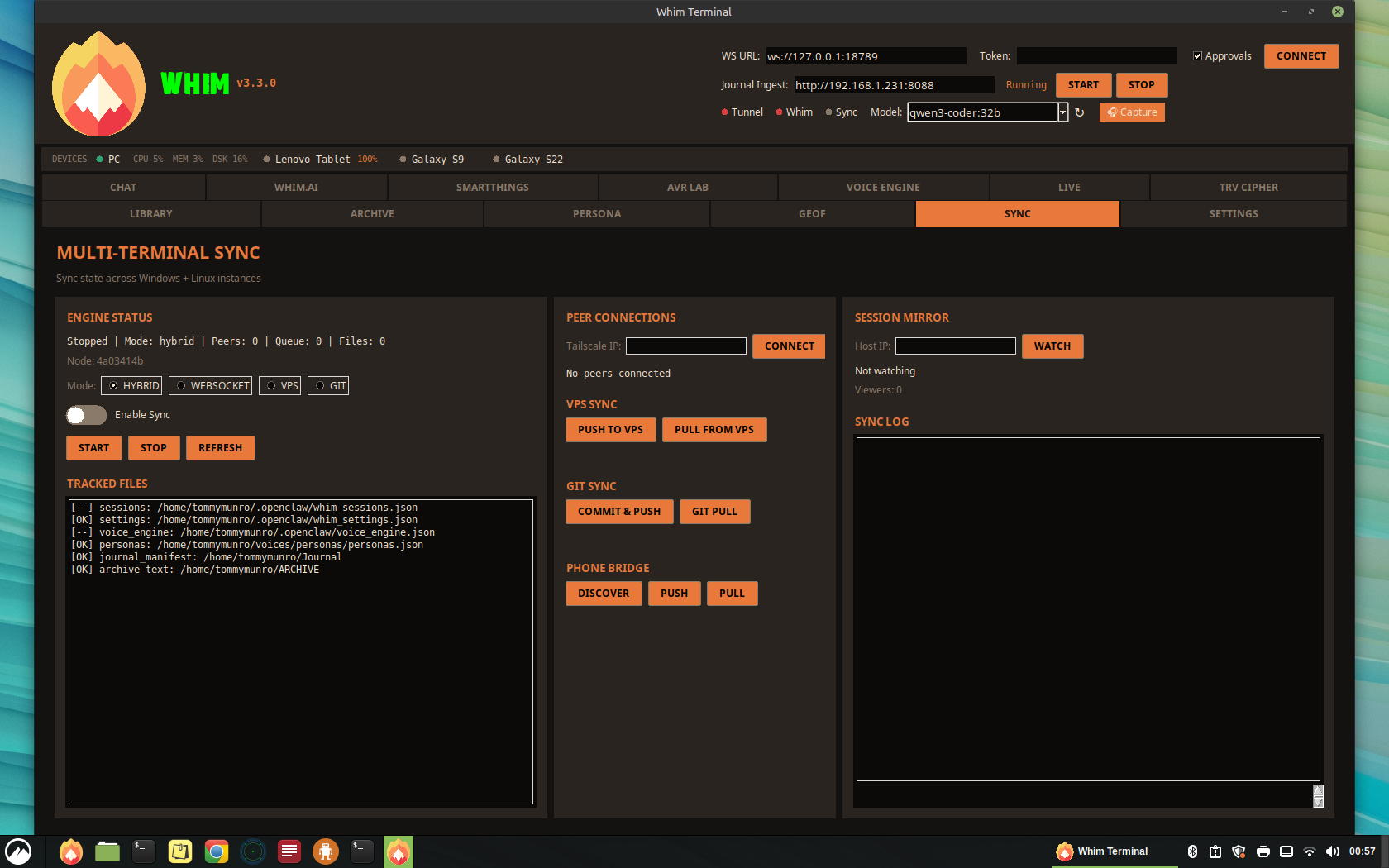
Sync Approaches
| # | Approach | Transport | Real-time | Offline |
|---|---|---|---|---|
| 1 | WebSocket Daemon | Tailscale mesh | Yes | No |
| 2 | VPS rsync | SSH to VPS | No | Yes |
| 3 | CRDT Collaboration | WebSocket | Yes | No |
| 4 | Git Sync | Git remote | No | Yes |
| 5 | Hybrid (1+2) | Tailscale + VPS | Yes | Yes |
| 6 | Session Mirror | WebSocket | Yes | No |
| 7 | Phone Bridge | HTTP (Whim.m) | Buffered | Yes |
What Gets Synced
| Data | File | Sync Default |
|---|---|---|
| Session History | whim_sessions.json | On |
| Settings | whim_settings.json | On |
| Voice Engine Config | voice_engine.json | On |
| Device Locations | device_locations.json | On |
| Personas | personas.json | On |
| Journal Manifest | ~/Journal/*.json | On |
| Archive Text | ~/ARCHIVE/*.txt | On |
| API Keys / Tokens | — | Never |
Sync Modes
Combines WebSocket + VPS for maximum reliability:
- When both machines are on Tailscale: live WebSocket sync (sub-second)
- When one is offline: changes queue locally
- On close: auto-push to VPS. On open: auto-pull from VPS.
- VPS acts as tie-breaker for conflicts
Real-time peer-to-peer sync via Tailscale. Both machines must be online. Heartbeat every 10s, full reconciliation every 5 min.
Async push/pull via rsync over SSH. Works even when the other machine is off. Manual or auto-triggered.
Auto-commit every 60s, push/pull from a private Git repo. Full version history and easy rollback.
Conflict Resolution
The sync engine uses vector clocks for last-writer-wins conflict resolution. Each node maintains a logical clock that increments on every local change. When merging, the node with the higher clock value wins. For simultaneous edits at equal clocks, the node with the lexicographically higher ID wins (deterministic tie-breaking).
The CRDT layer (Approach 3) provides conflict-free merging for structured data like session lists and chat histories, ensuring eventual consistency without data loss.
Session Mirror
Cast a live Whim Terminal session to another machine for read-only viewing. Enter the host's Tailscale IP in the SYNC tab and click WATCH. The mirror updates in real-time. Optional control handoff allows the viewer to operate the remote session.
Phone Bridge
Uses connected Whim.m phones as store-and-forward relays. When desktop A pushes changes, the phone stores them. When desktop B comes online, it pulls buffered changes from the phone. Leverages the existing Whim.m HTTP server on port 8089.
Security
- API keys, tokens, secrets, and passwords are never synced between nodes
- All WebSocket traffic runs over Tailscale (WireGuard encrypted)
- VPS sync uses SSH key authentication only
- Sensitive fields are automatically stripped before transmission
Configuration
Sync config is stored at:
| Platform | Path |
|---|---|
| Linux | ~/.openclaw/whim_sync.json |
| Windows | %APPDATA%\OpenClaw\whim_sync.json |
Quick Start
- Open the SYNC tab in Whim Terminal
- Select your preferred mode (Hybrid recommended)
- Toggle Enable Sync on
- Click START
- Enter the Tailscale IP of your other Whim instance and click CONNECT
29
Zipline — File Transfer CLI
Zipline is a local-first command-line file transfer tool for the Whim ecosystem. It sends and pulls files between devices over the Tailscale mesh using Whim.m HTTP endpoints — no cloud, no external dependencies, pure Python stdlib. Think of it as a sovereign AirDrop for the Whim mesh.
Architecture
Zipline talks directly to the Whim.m HTTP server (port 8089) running on each device. It uses the existing
/library/upload, /library/download/, /upload, /audio/,
/files, and /library endpoints — no additional server or daemon required.
| Component | Description |
|---|---|
| Script | ~/vaults/WHIM/scripts/zipline.py |
| Symlink | ~/.local/bin/zipline |
| Transport | HTTP over Tailscale mesh (WireGuard encrypted) |
| Server | Whim.m on port 8089 (existing — no extra setup) |
| Downloads | ~/Incoming/zipline/ |
| Dependencies | None (Python 3 stdlib only) |
Commands
| Command | Description |
|---|---|
zipline send <file> <target> | Send a file to a device's shared library |
zipline send <file> <target> --journal | Send to the device's journal (audio upload path) |
zipline pull <filename> <target> | Pull a file from a device's shared library |
zipline pull <filename> <target> --journal | Pull from the device's journal |
zipline ls <target> | List files on a device's shared library |
zipline ls <target> --journal | List a device's journal files |
zipline devices | List all known devices with online/offline status |
zipline ping <target> | Check if a device's Whim.m server is reachable |
Device Aliases
Targets can be friendly aliases or raw Tailscale IPs:
| Alias(es) | Tailscale IP | Device |
|---|---|---|
pc, carraramint, mint | 100.69.17.20 | PC (CARRARA Mint) |
s22, galaxy-s22 | 100.77.59.2 | Samsung Galaxy S22 |
s9, galaxy-s9 | 100.97.96.1 | Samsung Galaxy S9 |
tablet, lenovo | 100.64.255.124 | Lenovo TB311FU |
Usage Examples
# Send a config file to the S22's library
zipline send ./new_model_config s22

# Send audio to the PC's journal
zipline send recording.webm pc --journal

# Pull a screenshot from the tablet
zipline pull Screenshot_20260414.png tablet

# List what's on the S22's library
zipline ls s22

# Check all device connectivity
zipline devices

# Quick reachability check
zipline ping tablet
Data Flow
SEND:  Local File → HTTP POST → Tailscale Mesh → Whim.m :8089 → ~/Shared (library) or ~/Journal (journal)
PULL:  Whim.m :8089 → Tailscale Mesh → HTTP GET → ~/Incoming/zipline/
How It Works
- Send (library) — Multipart POST to
/library/uploadwith field namefile. Saved to~/Shared/on the target. - Send (journal) — Multipart POST to
/uploadwith field nameaudio. Saved to~/Journal/with a timestamp prefix. - Pull (library) — GET from
/library/download/<name>. Saved to~/Incoming/zipline/locally. - Pull (journal) — GET from
/audio/<name>. Saved to~/Incoming/zipline/locally. - Connectivity — TCP socket probe to port 8089 before every operation. Fails fast with clear error if target is offline.
- Duplicate handling — If a file already exists in
~/Incoming/zipline/, a Unix timestamp suffix is appended to prevent overwrites.
Security
- All traffic runs over Tailscale (WireGuard encrypted end-to-end)
- No cloud intermediary — packets never leave the mesh
- No credentials stored in the script — relies on Tailscale device authentication
- Filenames are sanitized via
os.path.basename()on both send and receive
30
Whimgo.io — Web Portal & WISP Terminal
Whimgo.io is the public-facing web portal for the Whim ecosystem, hosted on GitHub Pages. It serves as both a project homepage for the community and a secure operator dashboard for authenticated users. Operators can access the WISP Terminal — a browser-based shell into the CARRAMint workstation — directly from the portal, enabling remote APK sideloading, system administration, and ADB commands without leaving the browser.
Site Architecture
| Page | URL | Description |
|---|---|---|
| Home | whimgo.io | Product overview, feature grid, architecture diagram, Edge Match GPU selector, downloads, community, and operator login |
| Journal | whimgo.io/journal.html | Development journal and build log (operator-gated) |
| WISP | whimgo.io/wisp.html | Remote terminal console via ttyd over Tailscale mesh (operator-gated) |
Operator Handshake
Certain pages (Journal, WISP) are gated behind an Operator Handshake — a SHA-256 passphrase challenge verified entirely client-side. No credentials are transmitted to any server. The passphrase hash is embedded in the page source; authentication is stored in sessionStorage and resets on browser close. The home page also features an Operator login that reveals a live dashboard with Tailscale mesh status, VPS tunnel health, OpenClaw gateway status, and a burndown task queue.
WISP Terminal
The WISP page embeds a ttyd instance running on CARRAMint (100.69.17.20:7681) inside an iframe, providing a full interactive bash shell in the browser. This is the same terminal environment where the WISP droid (Whim’s Integrated Systems Processor) operates. Key capabilities:
- Remote ADB — Connect to vehicle head unit over Tailscale (
adb connect 100.64.255.124:5555) and push APKs directly from the browser - System Administration — Manage Ollama models, check service health, restart daemons, review logs
- File Operations — Browse vaults, edit configs, transfer files via Zipline CLI
- AI Access — Launch the WISP droid session (
droid --name WISP --droid wisp) for AI-assisted system diagnostics
WISP Terminal Toolbar
| Control | Function |
|---|---|
| Status Dot | Green (connected), Yellow (checking), Red (unreachable) — reflects ttyd reachability |
| Target Address | Displays the Tailscale IP and port (100.69.17.20:7681) |
| Connect / Disconnect | Creates or destroys the ttyd iframe, with connection timeout detection |
| Sidebar Toggle | Show/hide the ADB Quick Actions, mesh device list, and ttyd config panels |
ADB Quick Actions Sidebar
The sidebar provides one-click clipboard commands for common ADB operations, eliminating the need to remember paths and IPs:
| Action | Command |
|---|---|
| Connect Vehicle HU | adb connect 100.64.255.124:5555 |
| Push Whim.m APK | adb install ~/Apps/whim_m.apk |
| Push Whim.V APK | adb install ~/Apps/whim_v.apk |
| List Devices | adb devices -l |
| Screenshot Vehicle | adb shell screencap && adb pull |
| List Whim Packages | adb shell pm list packages | grep whim |
ttyd Service Setup
The ttyd web terminal runs as a systemd service on CARRAMint, bound to the Tailscale interface with TLS enabled so it can be embedded in the HTTPS-hosted Whimgo.io site:
TLS Requirement
Because Whimgo.io is served over HTTPS (GitHub Pages), the ttyd iframe must also use HTTPS to avoid mixed-content blocking by browsers. ttyd is configured with a self-signed certificate (or Tailscale cert) bound to the Tailscale IP. On first connection, the operator must accept the certificate by visiting https://100.69.17.20:7681 directly in the browser.
Mesh Device Panel
The sidebar also displays all Tailscale mesh devices with live status indicators:
| Device | Tailscale IP | Status |
|---|---|---|
| CARRAMint | 100.69.17.20 | Online |
| Galaxy S22 | 100.77.59.2 | Online |
| Galaxy S9 | 100.97.96.1 | Online |
| Lenovo Tablet | 100.64.255.124 | Online |
| Vehicle HU | pending | Dev |
Repository
| Item | Value |
|---|---|
| Source | github.com/scarter84/whimgo.io-site |
| Hosting | GitHub Pages (HTTPS enforced) |
| Domain | whimgo.io (custom CNAME) |
| Service Worker | Offline caching for PWA support |
| Auth | Client-side SHA-256 passphrase (no server component) |
Operator Workflow: Remote APK Sideload
The primary use case for the WISP terminal on Whimgo.io is pushing APK updates to the vehicle head unit while sitting in the vehicle, using the phone or tablet’s browser:
- Open
whimgo.io/wisp.htmlon any mesh-connected device - Authenticate with the operator passphrase
- Click Connect to open the CARRAMint terminal
- Use the ADB Quick Actions to connect to the vehicle HU and push the latest APK
- The APK transfers from the home PC → Tailscale mesh → vehicle head unit — no USB cables, no cloud
Whimgo.io closes the loop on sovereign infrastructure. You are not relying on a third-party app store or cloud service to manage your fleet — you are using your own hardware, your own mesh, and your own web portal. The entire deployment pipeline from code change to APK running on the vehicle display runs through infrastructure you control.
31
Glossary
Quick reference for all Whim ecosystem terminology.
| Term | Definition |
|---|---|
| Whim Terminal | The primary desktop application. 20-tab Tkinter UI running on Linux, Windows, and macOS. The central hub of the ecosystem. |
| Whim.m | Mobile companion app for Android (APK + PWA). Five tabs: REC, LIBRARY, CHAT, WAKE, DEVICES. Connects via VPS tunnel or Tailscale. |
| Whim.V | Vehicle dashboard. Touch-optimized Flask web app for 13.6″ Tesla-style displays and Android tablets. Five panels: GeoF, Radar, Docs, AI, Logs. |
| OpenClaw | The command protocol and AI gateway. Routes instructions between platforms via WebSocket (port 18789), manages sessions, agents, and approvals. |
| CARRARA / carraramint | The primary Linux Mint workstation that runs Whim Terminal, Ollama, and all server-side services. Tailscale IP: 100.69.17.20. |
| Ollama | Local LLM inference server at port 11434. Hosts DeepSeek R1:32B, Llama 3.1:8B-16K, and Qwen3-Coder:32B. No cloud dependency. |
| Doppler | Weather radar module. NWS NEXRAD base reflectivity overlay, Open-Meteo 7-day forecast, NWR audio, anemometer, and severe weather alerts. |
| GeoF | Geofence tracker. Canvas map with draggable fence vertices, LoRa collar bridge (ESP32), 20-minute heartbeat monitor, in/out detection, and named location management. |
| HAM / APRS | Amateur radio station monitor. Embedded OSM tile map with station markers, Direwolf integration (KISS/AGWPE/simulate), distance-filtered station list. |
| LoRa Bridge | ESP32-based gateway that receives LoRa packets from GPS collars and forwards them to GeoF for geofence tracking. |
| NodeFlow | Visual node-based editor showing active droids, LLM reasoning, OpenClaw telemetry, and data flow connections on a drag-and-drop canvas. |
| Sovereign Mode | Toggle that disables all cloud API fallbacks, ensuring 100% local-only AI inference. No data leaves the machine. |
| Unified Model Router | AI routing layer in Whim.AI. Local-first via Ollama; optionally falls back to OpenAI, Anthropic, or DeepSeek cloud APIs when Sovereign Mode is off. |
| Tailscale | WireGuard-based mesh VPN connecting all Whim devices. Opt-in fallback for mobile connectivity; handles WiFi-to-cellular handoffs natively. |
| VPS Tunnel | Primary mobile connectivity. Reverse SSH tunnel via autossh through a Vultr VPS (104.207.140.242). No ports opened on the home router. |
| Zipline | Local-first CLI file transfer tool. Sends and pulls files between mesh devices over Tailscale using Whim.m HTTP endpoints. Python stdlib only. |
| AVR Lab | XTTS v2 voice synthesis lab. Speaker references, spectrogram visualization, and Table Reads output for voice cloning. |
| TRV Cipher | Audio transcription workstation. Spectrogram, playback transport, Whisper transcription, ODT export, and scrub tools. |
| Persona | Voice personality manager. Coined response playlists per voice clone, confidence-gated, context-aware, with XTTS pre-render pipeline. |
| WISP | Whim’s Integrated Systems Processor. The resident AI assistant for diagnostics, file browsing, and system maintenance tasks. Accessible remotely via the Whimgo.io WISP terminal page. |
| Whimgo.io | The public web portal for the Whim ecosystem. Hosted on GitHub Pages. Features project overview, Edge Match GPU selector, operator dashboard (passphrase-gated), development journal, and WISP remote terminal. |
| ttyd | Web-based terminal emulator running on CARRAMint (port 7681, Tailscale-bound, TLS-enabled). Provides browser-based shell access embedded in the Whimgo.io WISP page for remote administration and ADB operations. |
| MillyAl | The cloned voice identity used for spoken AI responses via XTTS v2. Generates audio for wake word replies and voice chat. |
| GBrain | Open-source AI memory system (github.com/garrytan/gbrain). Persistent knowledge graph with PGLite + pgvector, hybrid search, 34 skills, Dream Cycle maintenance, and entity enrichment. Installed at ~/gbrain, data at ~/.gbrain/. |
| Brain Health | Live indicator in the header bar showing GBrain status (green dot = online, grey = offline) with page count. Polls every 30 seconds. Click to jump to BRAIN tab. |
| Whim Dictionary | 43-term ecosystem glossary (whim_dictionary.py) injected into every Whim.ai system prompt. Contains subsystem definitions, GitHub repo locations, and GBrain context. |
| Himalaya | CLI email client for IMAP/SMTP integrated into Whim Terminal. Configured in Settings > Email. Chat commands: /email list, /email read, /email search. |
| Dream Cycle | GBrain’s 8-phase overnight maintenance: lint, backlinks, sync, synthesize, extract, patterns, embed, orphans. Runnable from the BRAIN > Operations tab. |
| Send to Brain | One-click button in the Whim.AI toolbar that saves the last AI response as a brain page with frontmatter, prompt context, and timestamp. |
| FreshTail | Context window management system that builds optimized message history for Ollama, handling token overflow and message prioritization. |
| OpenTailor | The Tool Store in Settings. Manages AI capability bundles with per-preset tool selection, risk badges, and approval requirements. |
| OpenFang | Visual watchdog kernel. Monitors system state via screenshots, OCR, and neural analysis. Produces kickbacks when issues detected. Commands: /openfang, /chk, /solve. |